The SaaS cost tracker built for small and medium businesses
Last updated:
CostLoop is a SaaS cost tracker that shows you exactly what your business pays for software each month. Add each tool once - its cost, billing cycle, and renewal date - and CostLoop handles the rest: total spend calculation, renewal alerts before charges hit, and a health score that flags unused seats and duplicate tools.
SaaS costs grow faster than anyone notices
Every subscription feels small when you sign up. The accumulation is what gets expensive. Without a single place to track them, the total creeps up subscription by subscription until it becomes a number nobody expected.
Subscriptions that outlive their usefulness
A tool gets bought for a specific project. The project ends. The subscription continues. Because nobody tracks which tools are actively in use, charges keep firing on tools the team stopped using months ago. The fix is having a status field for every tool and reviewing it quarterly.
Annual renewals that arrive as surprises
You commit to an annual plan for the discount. Twelve months later the renewal fires and catches you off guard. Not because you forgot the tool existed - because you forgot exactly when it renewed. A SaaS cost tracker keeps the renewal date visible and sends reminders before the charge appears.
Seats left active after people leave
Team members leave. Their software seats stay active. Per-seat pricing means you keep paying for access nobody is using. Tracking seat counts and assigned users makes it easy to catch this before the next billing cycle.
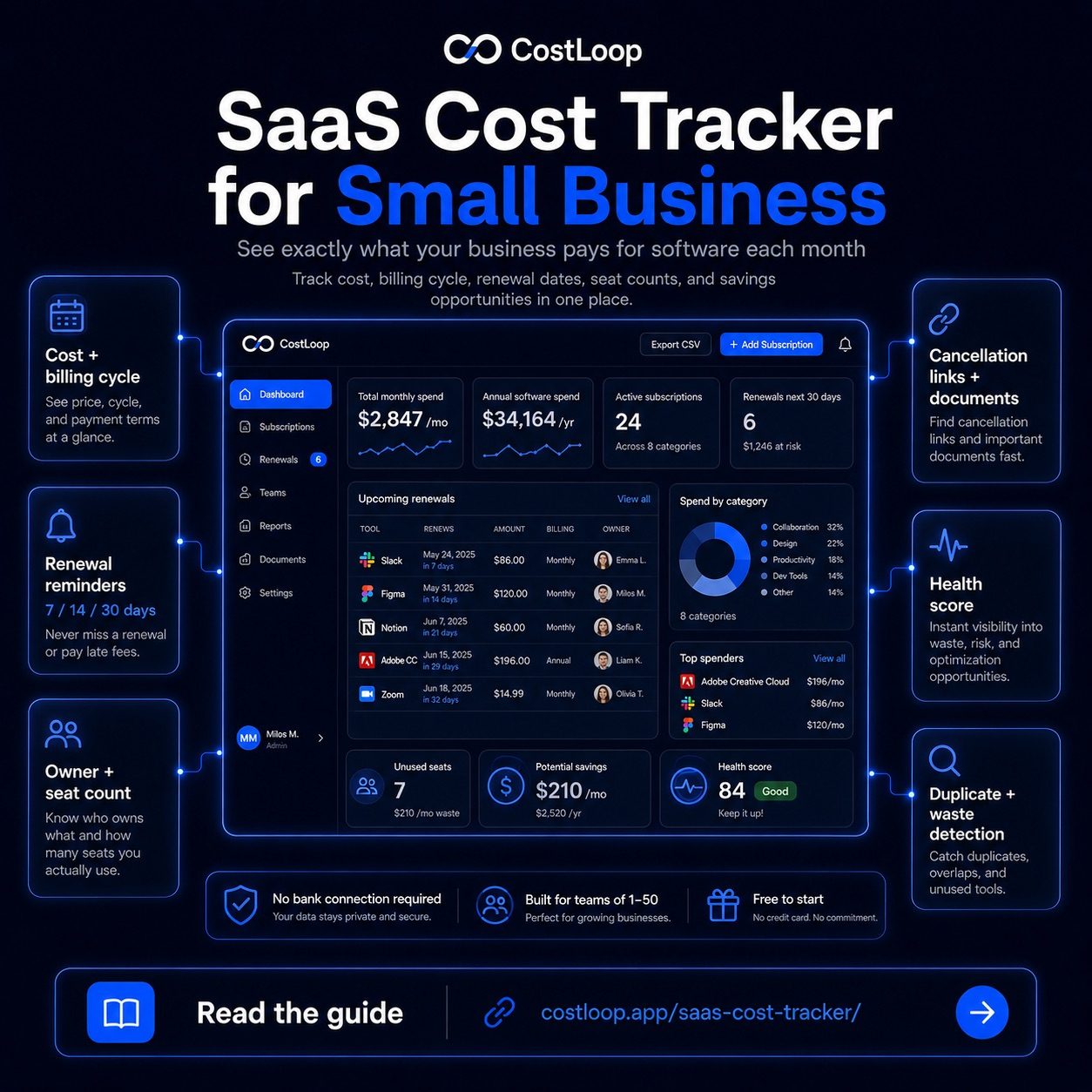
What CostLoop tracks for every subscription
Each subscription record holds the information you need to make real decisions at renewal time - not just the name and cost, but who owns it, how many seats are assigned, and where to cancel it.
Cost and billing cycle
Record monthly or annual cost for each tool. CostLoop converts everything to a monthly equivalent so you can see your total SaaS spend as a single, accurate number rather than a rough estimate.
Renewal date and automatic reminders
Set the renewal date once. CostLoop sends email reminders 7, 14, or 30 days before each renewal. That lead time is enough to evaluate whether the tool is still earning its cost and cancel if it is not.
Owner and seat count
Assign an owner to each subscription and record the number of seats. When someone leaves the team, filtering by their name shows every tool that still has them assigned - clean up is fast when the data is already there.
Cancellation link and documents
Store the cancellation URL with each record. When you decide to cancel, the link is already in CostLoop - you are not spending 20 minutes hunting through account settings. Attach invoices and contracts to the same record for year-end accounting.
Health score
Mark each tool as active, unused, or under review. The health score uses these statuses alongside seat data and renewal timing to generate a 0-100 rating for your software portfolio. Low scores flag where attention and potential savings are hiding.
Savings and duplicate detection
The savings panel shows unused seats and tools in the same category - the two most common sources of waste in a small or medium business software stack. See all features for the full list.
What a spreadsheet cannot do for your SaaS costs
A spreadsheet is a reasonable starting point. Most businesses outgrow it once they have more than 10 subscriptions or their first missed renewal. Here is where the gap shows up.
| What you need | Spreadsheet | CostLoop |
|---|---|---|
| Renewal reminders before charges hit | Manual calendar entries | Automatic email alerts |
| Total monthly spend calculated automatically | Formula, breaks with edits | Always current |
| Unused seat and duplicate tool detection | Manual review only | Health score + savings panel |
| Cancellation links stored with each tool | Possible but unstructured | Built into each record |
| Ownership tracking across the team | Shared file, no ownership | Per-tool owner assignment |
Built for small and medium teams who manage their own software costs
Founders and operators
You approved every tool in the stack and are responsible for the total cost. CostLoop gives you one place to see what you are paying, what is coming up, and what is no longer being used - so you can make informed decisions rather than reactive ones.
Finance and operations leads
Software costs show up across multiple cards and accounts. Pulling the total for a budget review means cross-referencing statements and asking team members what they signed up for. CostLoop replaces that with a single accurate number that is always current. Read the SaaS cost management guide for more.
Freelancers and solo operators
Every tool you pay for comes out of your margin. CostLoop helps you stay deliberate - knowing exactly what each tool costs, when it renews, and whether it is still earning its place. Free plan available with no credit card required.
Common questions about SaaS cost tracking
Start tracking your SaaS costs today
Free to start with up to 5 subscriptions. No credit card required. Add your tools, see your total, and catch renewals before they charge.