CostLoop vs Pleo
Pleo is a business spend management platform centered around smart company cards, expense reporting, and reimbursements. CostLoop is a subscription tracking tool that helps small teams keep a clear inventory of their SaaS tools, renewal dates, invoices, cancellation links, and recurring software costs.
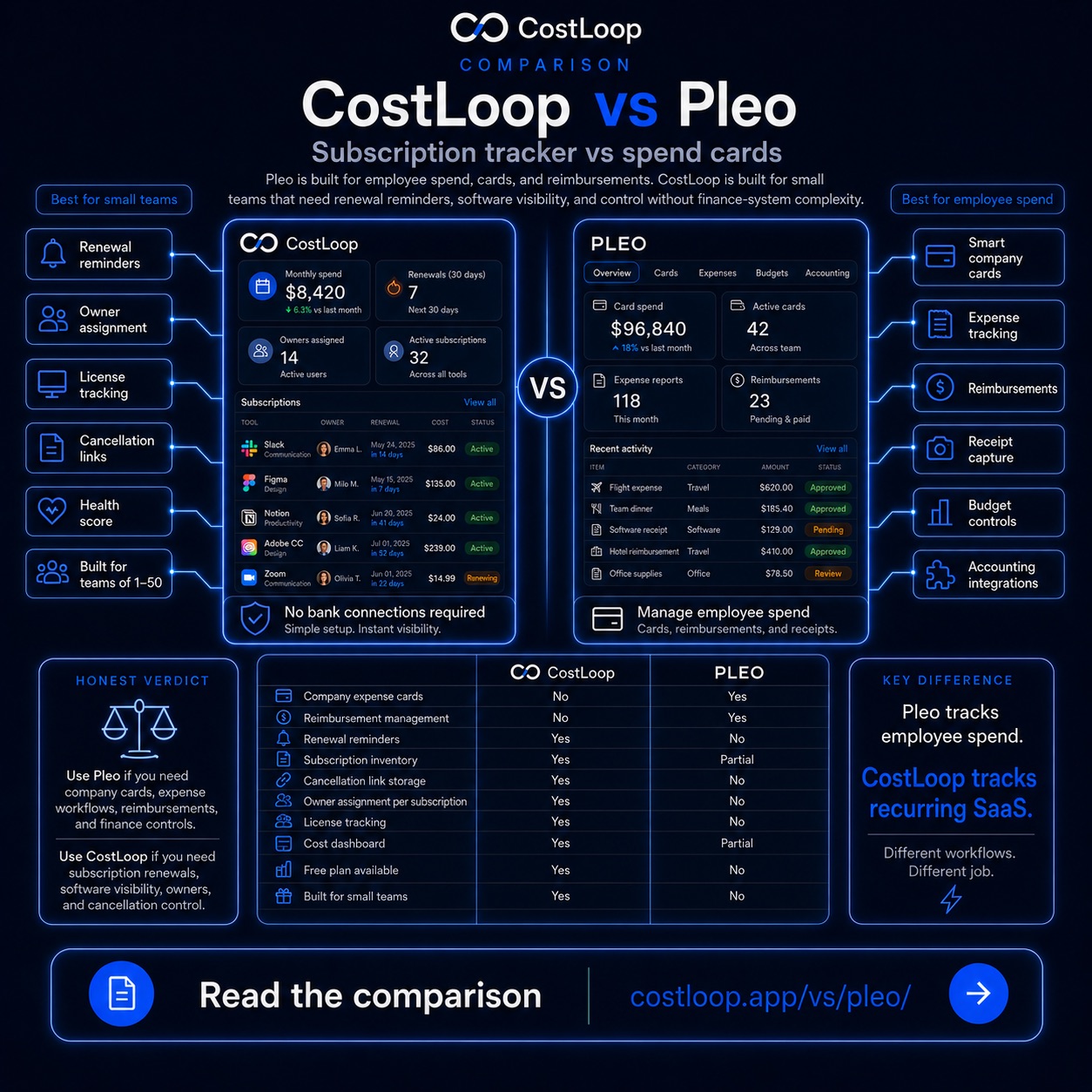
Two tools, two completely different jobs
What Pleo is great at
- Smart company cards for employees
- Real-time expense tracking across the team
- Reimbursement management for out-of-pocket purchases
- Receipt capture and automated expense categorisation
- Budget controls per team or department
- Accounting integrations with tools like Xero and NetSuite
- Built for teams that need to manage employee spending
Pleo is built around how employees spend - giving them cards, capturing receipts, and routing everything into accounting workflows.
What CostLoop is built for
- Manual subscription tracking for SaaS and software tools
- Renewal reminders - 30-day advance warning by email
- License tracking per subscription
- Cancellation link storage so you can cancel fast
- Owner assignment per subscription
- Cost dashboard showing monthly and annual spend
- Health score to surface unused or duplicate tools
CostLoop is built around what software a team pays for - giving every subscription a home, a renewal date, and an owner.
The key insight: they solve different problems
Pleo manages how employees spend money across a company. CostLoop manages what software a company pays for and when it renews. A small team might use both without any overlap - Pleo for employee card expenses, CostLoop for the recurring SaaS stack. They address separate categories of business spending.
Side-by-side comparison
Where each tool excels - and where it doesn't apply.
| Capability | Pleo | CostLoop |
|---|---|---|
| Company expense cards | ✅ Core feature | ❌ Not built for this |
| Reimbursement management | ✅ Core feature | ❌ Not built for this |
| Renewal reminders | ❌ | ✅ Core feature |
| Subscription inventory | ⚠️ Partial - via card spend | ✅ Purpose-built |
| Cancellation link storage | ❌ | ✅ |
| Owner assignment per subscription | ❌ | ✅ |
| Free plan available | ❌ | ✅ Genuinely free tier |
| Built for small and medium teams | ⚠️ Targets larger teams | ✅ Designed for 1-200 people |
When to use each tool
Use Pleo when you need
- Company cards issued to employees
- Expense reports and approval workflows
- Employee reimbursements for one-off purchases
- Accounting integrations for finance teams
- Budget controls across teams or departments
Use CostLoop when you need
- A clear inventory of your SaaS subscriptions
- Renewal reminders before auto-charges hit
- One place to store cancellation links
- Cost visibility without connecting bank accounts
- Owner assignment so nothing falls through the cracks
Honest verdict
Pleo and CostLoop are not alternatives to each other - they solve different problems. Pleo manages how employees spend across a company. CostLoop manages what software a company pays for and when it renews.
A small team might use both, but for subscription tracking specifically, CostLoop is purpose-built. It takes about 5 minutes to add your first subscriptions, and you get your total monthly software cost in one place with no bank connection required.
Adding CostLoop to a Pleo setup
Pleo and CostLoop address different categories of business spending. Pleo manages how employees spend money through company cards. CostLoop tracks the recurring software subscriptions your business pays for - regardless of which payment method is used.
Setup takes about 5 minutes: create a CostLoop account, add your recurring SaaS tools (including any paid through Pleo cards), and set renewal dates. Email reminders go out 30 days before each renewal. No Pleo integration is required - CostLoop operates independently of your card or payment setup.
If you've been trying to identify your software subscriptions through Pleo's recurring charge history, moving them into CostLoop gives you the specific fields Pleo doesn't provide: proactive renewal alerts, cancellation link storage, owner assignment per subscription, and a health score to surface unused tools.
Frequently asked questions
Does Pleo track SaaS subscription renewals?
Pleo can surface recurring card charges through its transaction history, but it does not send proactive renewal reminders before subscriptions auto-renew. CostLoop is built specifically for that: set renewal dates once and receive email alerts 30 days in advance, regardless of payment method.
Can I use CostLoop if I don't have a Pleo company card?
Yes. CostLoop requires no bank connection, card, or financial account integration. You manually add subscriptions and set renewal dates - CostLoop works independently of how you actually pay for the tools.
Is Pleo available without a company card program?
Pleo's core product is built around company cards. Without them, the platform has limited utility. CostLoop works completely independently of any payment method and does not require company cards to function.
What does CostLoop cost?
CostLoop has a free plan with no time limit. Pleo does not have a free plan. See the pricing page for current CostLoop plan details. Pricing information last reviewed July 2026.
Related resources
- All CostLoop alternatives - a full list of tools people compare when evaluating subscription trackers
- Browse subscriptions by category - see what software small businesses typically track
- SaaS Waste Guide - common sources of unmanaged software spend
- CostLoop vs Spendesk - another spend management comparison for context
Track your software subscriptions with CostLoop - free to start.
No bank connections. No credit card required. Know what you pay for and when it renews.