What QuickBooks does
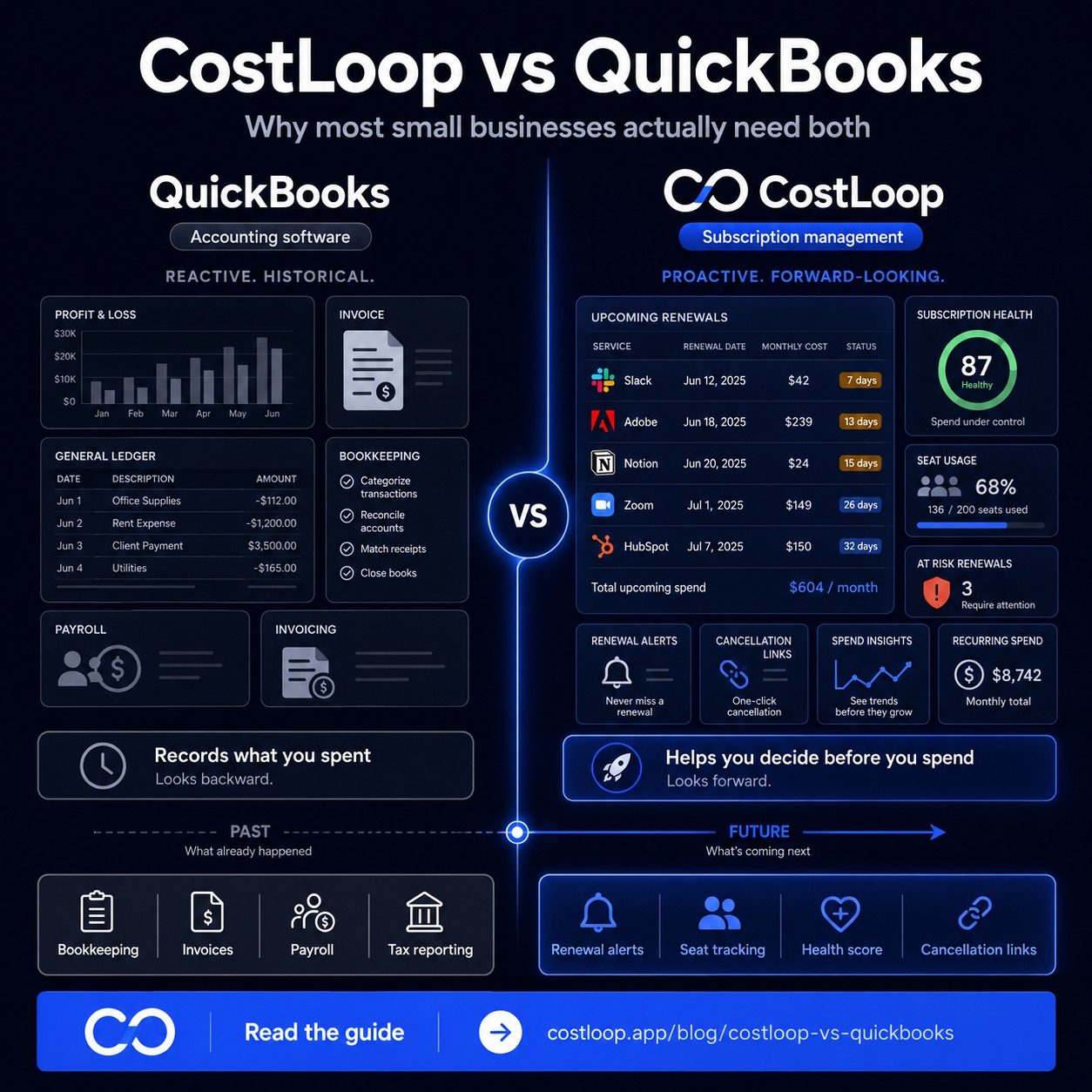
QuickBooks is accounting software - not a subscription management tool. Its core job is keeping an accurate financial record of everything your business earns and spends - invoices issued, payments received, expenses categorized, payroll run, bank accounts reconciled. At the end of the month, it produces a profit and loss statement. At the end of the year, it gives your accountant the data they need for tax filing.
QuickBooks is fundamentally reactive and historical. It records what has already happened. A payment goes out, QuickBooks logs it. Revenue comes in, QuickBooks records it. It's the authoritative ledger of your business's financial activity - which is exactly what accounting software is supposed to be.
It's excellent at this job. If you need double-entry bookkeeping, VAT tracking, invoicing, payroll integration, or a clean audit trail, QuickBooks (and tools like it) is the right choice. The question is what it can't do - and what that means for your software budget specifically.
What CostLoop does
CostLoop is a SaaS cost tracker giving you a clear, proactive picture of your recurring software costs - the SaaS tools your business pays for automatically every month or year. It tracks renewal dates, sends email alerts before charges hit, monitors seat usage, stores cancellation links, and calculates a health score for your subscription stack.
The critical word is proactive. CostLoop is forward-looking: it tells you what's coming before it happens. You can see which renewals are approaching in the next 30 days. You can see which tools have unused seats. You can see where your software spend health score is dropping and why. For guidance on how to track software subscriptions systematically, the process starts with exactly this kind of visibility.
The key difference: reactive vs. proactive
Here's the simplest way to explain the gap:
- QuickBooks tells you what you spent. After your Figma subscription renews, QuickBooks records the $540 annual charge as an expense in the software category.
- CostLoop prevents unnecessary spending before it happens. Ten days before that Figma renewal, CostLoop sends an alert. You log in, see that 2 of your 3 paid seats haven't been used in 4 months, and downgrade before you're charged for seats nobody needs.
QuickBooks is accurate and authoritative - about the past. CostLoop is actionable - about the future. Most small and medium businesses need both: one to keep the books right, one to keep the software budget under control before charges accumulate.
When you're working on your SaaS budget for small and medium business, the first step is knowing what you're already committed to paying. QuickBooks shows historical spend by category. CostLoop shows you the exact renewal calendar, so you can make decisions before they're made for you.
Why QuickBooks alone fails at subscription management
QuickBooks users often assume their accounting software covers subscription management. Here's why it doesn't:
- No renewal reminders. QuickBooks doesn't know that your $99/month project management tool renews on the 15th. It records the charge after it happens - not before.
- No subscription health score. There's no view in QuickBooks telling you which tools are unused, which have excess seats, or which are renewing in the next two weeks that deserve a decision.
- No cancellation links. When you decide to cancel something, you're on your own. QuickBooks doesn't store where to go to cancel each tool.
- No seat tracking. QuickBooks records the invoice total - it doesn't track whether you're using 3 seats or 12, or whether the seats you're paying for are assigned to active employees.
- Categorization is retrospective. You can tag software charges as "SaaS expenses" in QuickBooks, but you're categorizing after the fact. There's no mechanism to evaluate the subscription before the next charge goes through.
None of this is a QuickBooks failure - it's simply not what accounting software is designed to do. Accounting software is a ledger built for expense categorization and recording recurring charges after the fact - not a subscription manager that alerts you before they happen.
A real scenario
Say your business pays for six software tools. At the end of last month, QuickBooks shows $680 in software expenses. That's accurate and useful for the books. But it doesn't tell you:
- Two of those tools are renewing next week - do you want to keep them?
- One tool has 5 paid seats but only 2 people have logged in this quarter
- One tool is a duplicate - you have two overlapping project management tools from when you switched six months ago
- One annual subscription you forgot about is coming up for $480 in 18 days
QuickBooks recorded the past accurately. CostLoop would have surfaced all four of those items before another charge went through. Understanding annual vs monthly SaaS billing - which subscriptions are monthly vs annual - is only half the battle; you also need alerts timed to when decisions actually matter.
Feature comparison: CostLoop vs QuickBooks
| Capability | QuickBooks | CostLoop |
|---|---|---|
| Bookkeeping & double-entry accounting | ✓ Core feature | ✗ Not applicable |
| Invoicing & accounts receivable | ✓ Full invoicing suite | ✗ Not applicable |
| Payroll | ✓ Integrated payroll | ✗ Not applicable |
| P&L statements & tax reports | ✓ Built in | ✗ Not applicable |
| SaaS subscription tracking | ✗ Records charges, no management | ✓ Purpose-built |
| Renewal alerts before charges hit | ✗ No | ✓ 7, 14, 30-day email alerts |
| Subscription health score | ✗ No | ✓ 0–100 score with risk breakdown |
| Seat usage tracking | ✗ No | ✓ Active vs paid seats |
| Cancellation link storage | ✗ No | ✓ Per subscription |
| Forward-looking renewal calendar | ✗ No | ✓ Visual dashboard |
| Historical spend reporting | ✓ Detailed category reporting | ⚠ Monthly totals per subscription |
The typical workflow: using both together
Most small and medium businesses with more than a handful of tools and employees will get the most value from using both for subscription management and accounting. Here's how they fit together:
- CostLoop is your subscription command center. Every SaaS tool goes in here when you sign up. It sends you renewal alerts at 30, 14, and 7 days. You review, decide whether to keep or cancel, and log any changes.
- QuickBooks records the result. When the charge goes through (for tools you decided to keep), QuickBooks logs it as a categorized expense. When you cancel something, there's no charge for QuickBooks to log - money saved.
The two tools complement each other without overlapping. CostLoop is why your accounting software sees fewer surprise charges and cleaner software expense categories. See the full CostLoop vs QuickBooks comparison for a side-by-side breakdown.
The honest verdict on accounting software vs. subscription tracking
QuickBooks is great accounting software and it should stay in your stack if you need accounting software. CostLoop is great subscription management software and it belongs next to QuickBooks - not instead of it. They're not competing for the same job. The business that uses both has complete visibility: accurate books for the past, proactive oversight for the future.
Who might only need CostLoop
There's a real case for starting with CostLoop alone if you're a micro-business, freelancer, or solo operator who:
- Doesn't have payroll to run
- Has simple income and expense patterns that a bank statement covers
- Uses an accountant quarterly who handles the bookkeeping separately
- Needs to get software costs under control before adding more overhead
CostLoop gives you a clear view of what your software stack costs, which tools are pulling their weight, and what's renewing before it renews. That alone is a meaningful improvement for most small and medium businesses, without the full complexity of accounting software setup.
When your business grows to the point where you need proper P&L statements, payroll, or multi-entity accounting - that's when accounting software earns its place. CostLoop scales with you regardless.
CostLoop gives you the renewal calendar and subscription health view that QuickBooks doesn't. See the comparison summary or start tracking your subscriptions free today.
Start free - no credit card neededThe gap QuickBooks doesn't fill
QuickBooks is built on a fundamental principle: record what happened accurately. A charge hits your bank account, QuickBooks captures it, categorizes it, and adds it to the ledger. This is exactly what accounting software is supposed to do - and QuickBooks does it well. But that same principle is what makes it the wrong tool for subscription management. By the time QuickBooks sees a charge, the decision has already been made. The money is gone. The renewal has fired.
Subscription management is about the window before the charge. That 30-day window before Figma renews annually is when you can evaluate whether all your seats are in use, whether the plan tier still fits your team, or whether you should cancel entirely and switch to a different tool. Once the charge fires, QuickBooks logs it accurately - but the opportunity to prevent it is gone. CostLoop operates in that pre-charge window. It tracks your renewal calendar, sends alerts at 30, 14, and 7 days before each renewal, and gives you a clear view of which subscriptions deserve attention before the next billing cycle. QuickBooks operates after the window closes. Both are useful - they just work at different points in time.
The practical result is that businesses relying on QuickBooks alone for software cost management consistently discover surprise charges. A $480 annual subscription they forgot about. An upgraded plan tier from 8 months ago that nobody downgraded back. Three seats on a tool only one person uses. QuickBooks records each of those charges with perfect accuracy - but it never had the chance to prevent them. That's not a QuickBooks failure; it's a scope mismatch. Accounting software records history. Subscription management prevents unnecessary history from being made in the first place. The post on hidden SaaS costs covers exactly what accumulates when there's no proactive layer watching renewals.
Do you need both QuickBooks and CostLoop?
For most small and medium businesses with real accounting complexity and a meaningful software stack - yes, using both makes sense, and they don't compete. QuickBooks handles your books: the P&L, the invoices you send clients, the payroll, the bank reconciliation, the tax-ready reports your accountant needs every quarter. These are accounting workflows that have nothing to do with whether your Figma renewal is justified.
CostLoop handles your software stack: the 15-30 SaaS tools auto-charging your company card, the renewal dates you need to act on before they arrive, the seat counts that drift out of alignment with headcount as people join and leave. These are subscription management workflows that QuickBooks never touches. When you cancel a subscription in CostLoop before it renews, QuickBooks never sees the charge - which is exactly the point. Money that doesn't leave your account doesn't become a QuickBooks entry. The two tools work in sequence: CostLoop eliminates unnecessary charges before they happen, and QuickBooks records the charges that were justified to go through.
The scenario where you might not need both is if you're a solo operator or very early-stage business where your financial complexity doesn't yet justify accounting software. In that case, starting with CostLoop - which gives you immediate visibility into your software costs and renewal calendar - is a practical first step. You can add QuickBooks or another accounting tool when payroll, invoicing complexity, or tax preparation demands it. CostLoop doesn't try to do accounting; it does one thing well and leaves room for accounting software to do its job when the time comes. See CostLoop's pricing page to understand what's included at each tier.
Verdict: when to use QuickBooks, when to use CostLoop, when to use both
- Use QuickBooks if you need accurate bookkeeping, P&L statements, invoicing, payroll, or tax-ready financial reports. QuickBooks is the right tool for understanding your business's overall financial health and maintaining compliant financial records.
- Use CostLoop if you pay for recurring SaaS tools and want to manage those costs proactively - renewal alerts before charges hit, seat tracking, health scores, and a clear view of which subscriptions are justified. See all features for what CostLoop tracks.
- Use both if you have real accounting needs AND a software stack of 5 or more tools. This is the most common situation for small and medium businesses with employees. QuickBooks covers your past financial record. CostLoop covers your upcoming subscription decisions. Neither does the other's job.
- The right time to add CostLoop is the moment you lose track of what you're paying for - typically around 5-10 SaaS tools. The right time to add QuickBooks is when your income, expenses, or payroll complexity outgrows a simple bank statement.
CostLoop vs QuickBooks: expense management software for small and medium business - which covers what
QuickBooks is accounting software. CostLoop is subscription management software. They cover different workflows, and the distinction matters for how you manage your expense management software for small and medium business stack.
QuickBooks tracks transactions after they happen - it sees the subscription charge on your bank statement. CostLoop tracks the subscription before it charges - it knows the renewal is coming 30 days in advance and alerts you so you can decide whether to continue, downgrade, or cancel before the money leaves your account.
For expense management software for small and medium business: you likely need both. QuickBooks for bookkeeping and tax - the authoritative record of what you spent. CostLoop for proactive subscription control and renewal decisions - the tool that prevents unnecessary charges before they become QuickBooks entries. The businesses that use both get complete coverage: accurate books and proactive oversight.
Does QuickBooks replace a subscription tracker?
No. QuickBooks categorizes charges after they occur. A subscription tracker like CostLoop alerts you before charges fire, so you make decisions rather than discover them. QuickBooks shows last month's Figma charge. CostLoop tells you Figma renews in 9 days and you have 2 unused seats. Different workflows, both useful.
Frequently asked questions
Can QuickBooks track software renewals?
QuickBooks records payments after they happen, but it doesn't send renewal reminders or track subscription health. It will show you that a payment went out, but it won't warn you that a $600 annual renewal is coming up in 10 days, or flag that you have 5 unused seats on a plan.
Does CostLoop replace QuickBooks?
No. CostLoop handles proactive subscription management - renewal alerts, health scores, seat tracking, and cancellation links. QuickBooks handles accounting - bookkeeping, invoicing, payroll, P&L statements, and tax preparation. Most businesses use both for different purposes.
What does CostLoop do that QuickBooks doesn't?
CostLoop sends renewal alerts before charges hit, tracks unused seats, stores cancellation links, calculates a subscription health score, and shows upcoming renewals in a forward-looking dashboard. QuickBooks is built for accounting - it records what happened, not what's about to happen.
Do I need accounting software as a small and medium business?
It depends on your complexity. If you have payroll, multiple revenue streams, and need to produce P&L statements or prepare for tax filing, accounting software is worth it. If you're just starting out and mainly need to track and manage your SaaS costs, CostLoop alone is a practical starting point - you can add accounting software when the complexity warrants it.
Will QuickBooks catch duplicate or unused subscriptions?
QuickBooks will record every charge accurately - but it won't flag that two charges are for overlapping tools, or that a subscription is being paid for a tool nobody is using. It categorizes what happened; it doesn't evaluate whether the spending is justified. CostLoop is built to surface exactly those patterns: duplicate tools, unused seats, and low-activity subscriptions approaching renewal. Those flags appear in CostLoop's health score and dashboard before charges go through.
How does CostLoop handle multi-currency subscriptions?
CostLoop supports tracking subscriptions billed in 40+ currencies with daily exchange rates, so your total software spend is always shown in your home currency even if some tools bill in USD, EUR, or GBP. QuickBooks also handles multi-currency, but at the accounting record level - after the charge clears. CostLoop gives you the multi-currency view proactively, before renewals hit, so you can see your true upcoming software commitment in the currency that matters to your business.