Zoho's breadth is genuinely impressive
Zoho has built one of the most complete business software ecosystems available to small and medium businesses - yet it has no dedicated subscription management tool for the SaaS tools you pay for. Zoho CRM, Zoho Books, Zoho People (HR), Zoho Projects, Zoho Mail, Zoho Desk - and many more, all on one platform with a unified login and native integrations between apps.
Zoho One, their all-in-one bundle, packages 40+ of these apps under a single per-user fee. For businesses that want to consolidate their software stack onto one vendor, Zoho One is a compelling offer. The breadth is real. The integrations work. The pricing is competitive.
So what's missing?
The gap: Zoho doesn't track the subscriptions you pay for
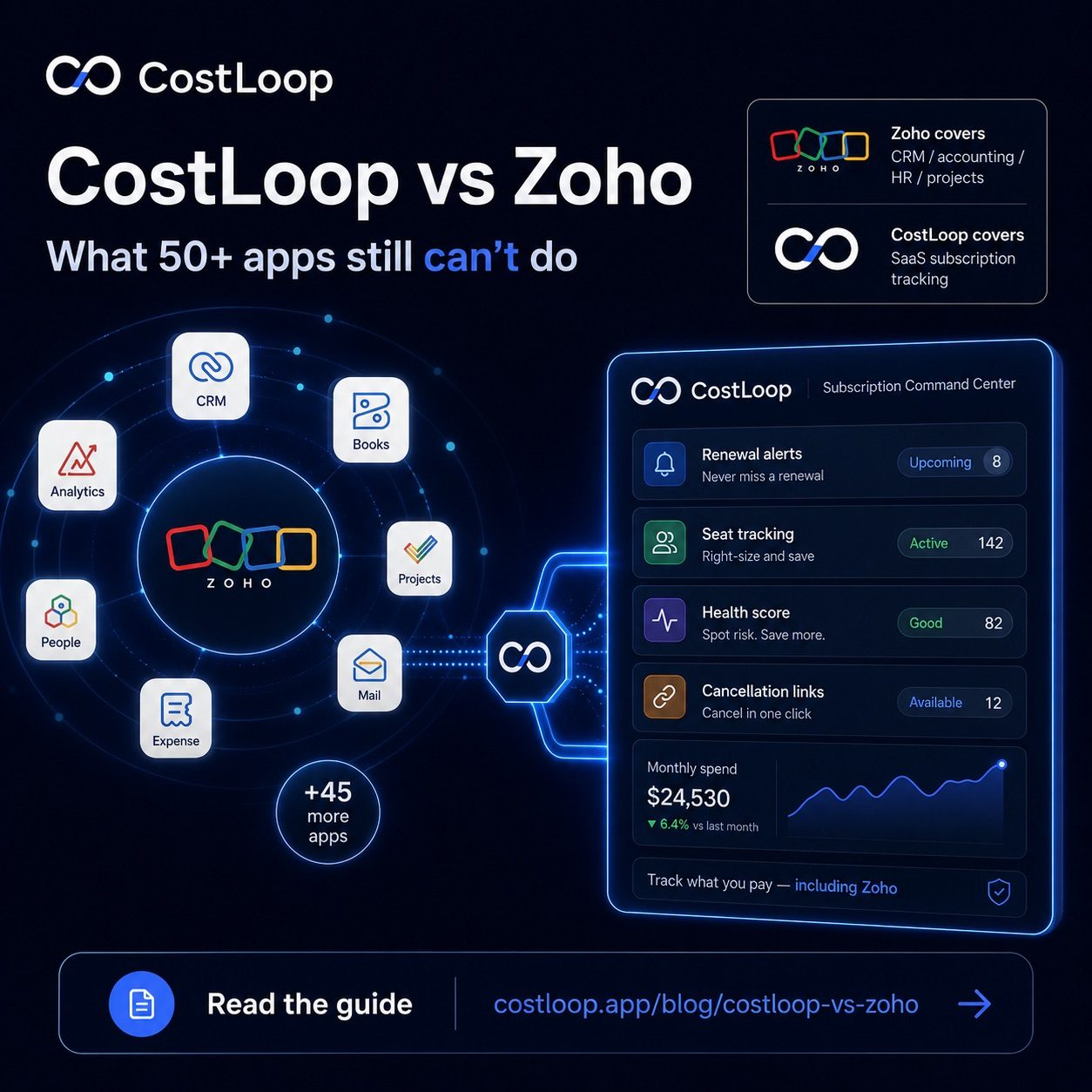
With 50+ apps, Zoho covers nearly every business function - except one. None of Zoho's apps are specifically designed to track your own SaaS subscriptions: the recurring tools your business pays for automatically every month or year, the renewal dates you need to act on, the seats you may be overpaying for.
This is the exact problem that drives SaaS sprawl in small and medium businesses. You adopt tools, they start charging you, and nobody is watching the full picture. The irony is that Zoho itself - with its per-user pricing and multiple app tiers - is exactly the kind of subscription cost that benefits from active oversight.
Let's be specific about what Zoho doesn't tell you:
- Your Figma annual subscription renews next week - do you want to downgrade before being charged?
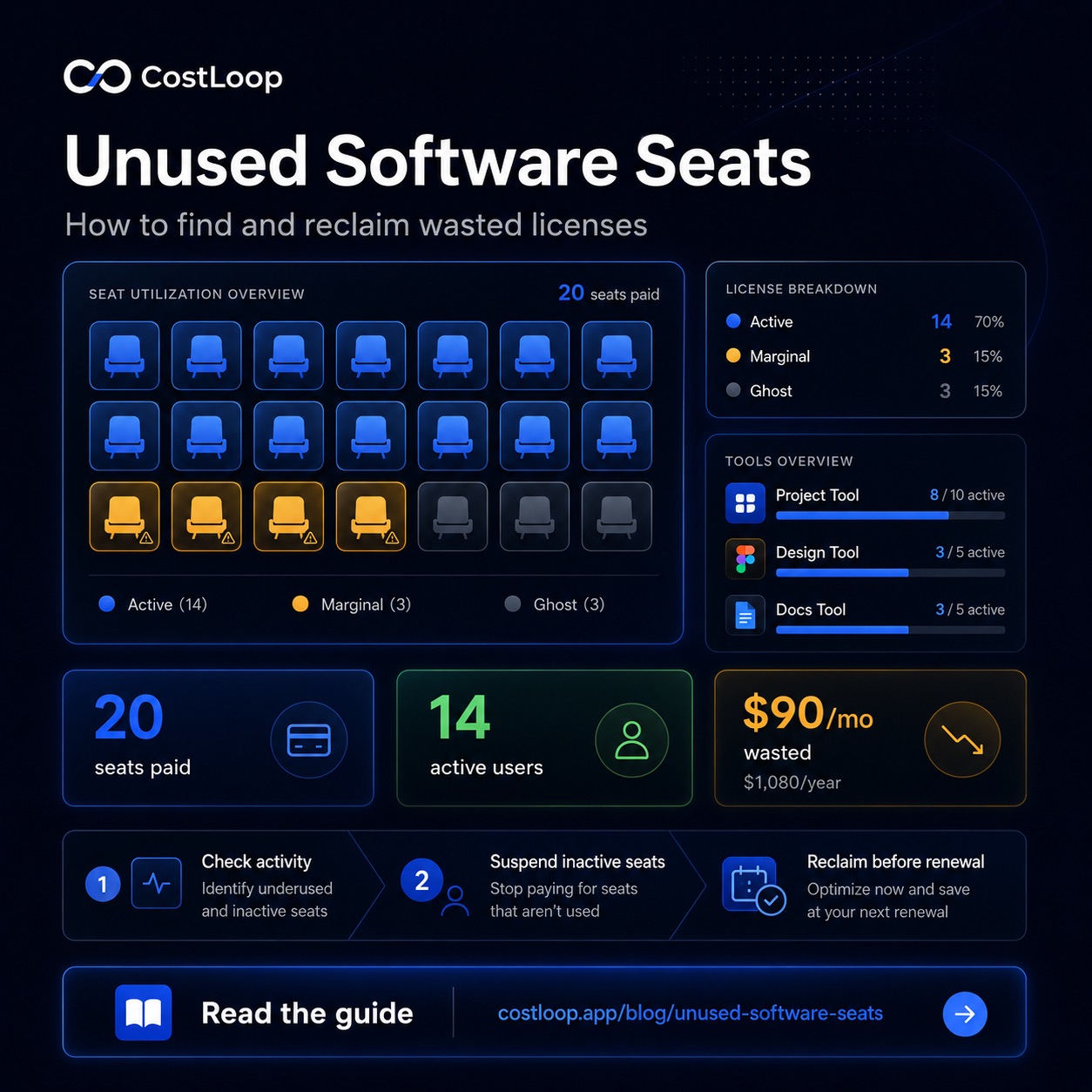
- You have 4 unused software seats in Slack that nobody has logged into this quarter
- You're paying for three overlapping project management tools since switching from Asana to Notion six months ago
- Your software spend health score has dropped because two subscriptions have no assigned owner and one has a past-due renewal date
Zoho simply doesn't have an app that surfaces this information for the tools your business pays for. That's not a criticism - it's a scope decision. Zoho is built to run your business operations. CostLoop is a subscription tracking tool built to manage the costs of the tools that run your business - giving you full subscription visibility over every vendor's recurring payments in one place.
What Zoho One actually includes
Zoho One is marketed as an operating system for your business - one subscription that unlocks 40+ Zoho applications. It's a compelling pitch, and the breadth is genuine. Here is what you actually get, and what each major app does:
- Zoho CRM - manages your customer relationships, sales pipeline, lead tracking, and deal management. This is where your contacts, accounts, and sales activity live.
- Zoho Books - handles accounting, invoicing, bank reconciliation, and tax compliance. It's a solid accounting tool for small and medium businesses that need proper bookkeeping.
- Zoho People - HR management: employee records, leave tracking, attendance, onboarding, and performance reviews.
- Zoho Projects - project and task management, Gantt charts, time tracking, and collaboration tools for project-based work.
- Zoho Mail - business email hosting with a custom domain, calendar, and contacts. A full email suite for businesses that want to keep everything in Zoho.
- Zoho Desk - customer support ticketing, help desk, and customer service workflows.
- Zoho Expense - employee expense reports, receipt capture, reimbursements, and corporate card reconciliation.
- Zoho Analytics - business intelligence and data visualization across Zoho apps and external data sources.
- Zoho Campaigns - email marketing, automation, and customer communication campaigns.
- Zoho Creator - a low-code platform for building custom business apps on top of Zoho infrastructure.
Each of those apps handles a real business function. The integrations between them are genuine - a deal closing in Zoho CRM can trigger an invoice in Zoho Books, for example. This is what makes Zoho One compelling: you get a connected ecosystem, not just a loose collection of tools.
But here is the critical gap: none of those apps track the subscriptions your business pays for externally. Zoho Books records charges after they hit your account - it doesn't alert you that your Slack annual plan renews in 12 days. Zoho CRM tracks your customers; it doesn't track the tools your team uses. Zoho Expense handles what employees submit for reimbursement - not the vendor charges auto-renewing on the company card. Zoho's 50+ apps are organized around running your business. None of them are organized around managing the costs of the tools that run it - including the cost of Zoho itself. That's exactly the job CostLoop was built to do, and it's the one gap that 50+ apps still leaves open. For more on why this happens at scale, the post on SaaS sprawl explains how software costs pile up even inside well-organized businesses.
What about Zoho Expense?
Zoho Expense is the first tool people reach for when they think about managing costs in Zoho. But Zoho Expense is an employee expense management tool - it handles what employees spend and need to be reimbursed for. Receipts, corporate card reconciliation, travel claims, per diem tracking. It's the same category as Expensify.
Zoho Expense doesn't track the subscriptions your business is being charged for directly. It manages outbound employee costs, not your incoming recurring vendor charges. These are different problems, and Zoho Expense solves the first one - not the second.
There's also Zoho Subscriptions, but that's a billing tool for selling recurring subscriptions to your own customers. It's completely unrelated to managing what you pay as a subscriber yourself.
A subscription-tracking task comparison
| Subscription-tracking task | Zoho suite | CostLoop |
|---|---|---|
| List all tools your business pays for | ✗ No dedicated tool | ✓ Core feature |
| Renewal date tracking with alerts | ✗ Not available | ✓ 7, 14, 30-day email alerts |
| Subscription health score | ✗ Not available | ✓ 0–100 score with risk breakdown |
| Seat usage tracking (paid vs active) | ✗ Not available | ✓ Per subscription |
| Cancellation link storage | ✗ Not available | ✓ One-click access per tool |
| Employee expense reports | ✓ Zoho Expense | ✗ Not applicable |
| CRM & sales pipeline | ✓ Zoho CRM | ✗ Not applicable |
| Accounting & bookkeeping | ✓ Zoho Books | ✗ Not applicable |
| HR & people management | ✓ Zoho People | ✗ Not applicable |
| Multi-currency subscription costs | ✗ Not for subscription tracking | ✓ 40+ currencies, daily rates |
When Zoho is the better choice
If your business needs CRM, accounting, HR, and project management on one integrated platform - and you're willing to invest the setup time - Zoho One is genuinely excellent. The per-user pricing model means you're not paying for each app individually, and the native integrations between Zoho apps can eliminate a lot of manual data work. A sales team that wants deals from Zoho CRM to flow automatically into Zoho Books invoices, with support tickets created in Zoho Desk and time tracked in Zoho Projects, gets that out of the box. That integration story is real and it works.
Zoho is also a strong choice for businesses that are tired of managing multiple vendor relationships and want to consolidate onto fewer platforms. Instead of separate contracts with a CRM vendor, an accounting vendor, an HR vendor, and an email vendor, Zoho One replaces all of them with one subscription and one support relationship. For businesses where operational simplicity is a priority, that consolidation has real value - both in cost and in the administrative overhead of managing vendor renewals. It's worth noting, though, that Zoho One itself becomes one of the larger annual subscriptions in your stack - which is exactly the kind of cost that deserves active oversight.
CostLoop doesn't offer CRM features. It doesn't do accounting, HR, email, or project management. If those are the jobs you're hiring software for, Zoho is the better answer and CostLoop is not in competition. Good SaaS vendor management means matching tools to jobs - and Zoho is genuinely strong across the jobs it's designed for. The right comparison is: does Zoho do the specific job of tracking your SaaS subscriptions and sending renewal alerts? The answer is no, which is why the two tools can coexist without competing.
When CostLoop is the better choice
If the specific job is tracking the SaaS subscriptions your business pays for - knowing what everything costs, when it renews, whether you're overpaying for seats nobody uses, and whether your software stack is healthy - then a focused subscription tracker consistently outperforms a 50-app suite that doesn't have this feature at all. Zoho One covers 40+ business functions. But if you ask it to send you a renewal alert 14 days before your Figma annual plan fires, or to flag that 3 of your 8 Notion seats haven't been touched in two months, it has no answer. That's not a Zoho criticism - it's a scope decision. Zoho chose not to build a subscription tracker for your external vendors. CostLoop built nothing else.
CostLoop is the right choice when your business has more than 5-10 SaaS tools auto-charging your company card and you've started losing track of what's active, what's been forgotten, and what's about to renew. At that point, the cost of not having visibility is real: surprise annual charges, unused seats being paid for month after month, duplicate tools from a vendor switch that never got cleaned up. CostLoop catches all of those before they become accounting entries. The health score gives you a single number summarizing the risk across your entire stack, so you're not manually auditing 20 subscriptions every month. See all CostLoop features for the full picture of what it tracks, or check CostLoop pricing to understand what's available free.
CostLoop is also the faster starting point if subscription tracking is your immediate problem. No lengthy setup, no integrations to configure across 40 apps, no per-user fee that scales with headcount. You add your subscriptions, set your alert preferences, and have a renewal calendar within a day. If Zoho is your long-term business suite and you use it for CRM, accounting, and HR, CostLoop runs alongside it and handles the one job Zoho doesn't: proactively managing the costs of every tool in your stack - including Zoho itself.
Verdict: Zoho vs CostLoop
This is not a close competition because the tools don't compete. The verdict depends entirely on which job you're trying to fill.
- Choose Zoho One if you need an integrated business suite covering CRM, accounting, HR, projects, and email under one roof with one vendor. Zoho is genuinely strong here and the per-user pricing can make it cost-competitive for teams already paying for multiple separate tools.
- Choose CostLoop if you need to track, manage, and receive alerts for the recurring SaaS subscriptions your business pays for. No setup complexity, no per-user pricing, and a focused feature set built around the one job: subscription visibility. Start at CostLoop pricing or try it free.
- Use both if you're in the Zoho ecosystem and also have external tools to manage - which is every Zoho customer, because Zoho doesn't cover every vendor. CostLoop tracks your Zoho subscription cost alongside every other SaaS tool. They genuinely complement each other.
- The key question: does your current stack have a tool that sends you renewal alerts before charges fire, tracks seat usage, and gives you a health score on your software subscriptions? If not, and you use Zoho, adding CostLoop fills that exact gap without touching anything Zoho already handles.
Can they work together?
Yes - and this is genuinely the most common setup for businesses using Zoho. Zoho handles your CRM, books, HR, and projects. CostLoop tracks your recurring software costs, including your Zoho subscription costs.
That last point is worth pausing on. If you're on Zoho One, you're paying a per-user fee for 40+ apps. That's a meaningful recurring cost that deserves the same oversight as any other SaaS subscription - renewal tracking, seat review, vendor tracking per tool, and decision-making before the next annual charge. CostLoop is how you manage that, even for Zoho itself.
The honest verdict on Zoho CRM software vs. SaaS tool management
Zoho has built an impressive suite that covers a huge range of business needs. But even with 50+ apps, there is no Zoho tool for tracking your own SaaS subscriptions, monitoring renewal dates, or maintaining a health score on your software stack. CostLoop fills that specific gap - not by replacing Zoho, but by doing the one thing Zoho doesn't. The businesses that get the most value from CostLoop are often the ones with the most tools to manage. If you're deep in the Zoho ecosystem, you probably have more subscriptions to track, not fewer.
CostLoop gives you renewal alerts, seat tracking, and a health score for your entire software stack - including every Zoho app you're paying for. See the full comparison summary or start tracking free today.
Start free - no credit card neededCostLoop vs Zoho for subscription and SaaS management
Zoho is a full business suite: CRM, accounting, HR, project management, email, and much more. CostLoop is a focused subscription and SaaS management tool. These are not competing products - they cover different problems entirely.
If your business already uses Zoho: Zoho does not include dedicated subscription tracking or SaaS management. Zoho Books handles accounting and expense categorization. Zoho CRM handles customer relationships. Neither sends renewal reminders for the tools your business pays for, tracks subscription health scores, or stores cancellation links per vendor.
For best subscription tracker for small and medium business: if you use Zoho Books for accounting, you still need a separate subscription tracker for the proactive side - renewal alerts before charges hit, seat tracking, and per-tool ownership that accounting software doesn't provide. CostLoop works alongside Zoho rather than replacing any part of it.
Does Zoho include subscription management?
Zoho Books tracks transactions. It does not send renewal reminders, track subscription health, or manage SaaS vendor relationships. CostLoop fills that gap alongside Zoho.
Frequently asked questions
Does Zoho have a subscription tracker?
Zoho Expense tracks employee expenses and receipts, but there is no Zoho tool specifically built to track your own SaaS subscriptions, renewal dates, and software health. Zoho Subscriptions is a billing tool for selling subscriptions to your customers - it doesn't track the subscriptions your business pays for.
Can I use CostLoop with Zoho?
Yes. They serve different functions. CostLoop tracks your recurring software costs - including your Zoho subscription - while Zoho handles CRM, accounting, HR, project management, and more. They don't overlap; they complement each other.
What's the difference between Zoho Expense and CostLoop?
Zoho Expense is for employee expense claims and reimbursements - receipts, corporate card reconciliation, per diem tracking. CostLoop is for monitoring recurring business software costs, tracking renewal dates, spotting unused seats, and managing your SaaS stack proactively. They solve different problems.
Is Zoho One enough for subscription tracking?
Zoho One bundles 40+ business apps into one plan, but none of those apps are specifically built to track your own SaaS subscriptions, send renewal alerts, monitor unused seats, or give you a health score on your software stack. That's the gap CostLoop fills - even for Zoho One customers.
How much does Zoho One cost and how does CostLoop pricing compare?
Zoho One pricing is per-user per-month and varies by region and billing cycle - check Zoho's current pricing on their site for exact figures. CostLoop is not priced per user; it's structured around the number of subscriptions you manage, with a free tier that covers small stacks. See CostLoop's pricing page for current plan details. Because Zoho One is itself a meaningful recurring expense, it's worth tracking that cost in CostLoop alongside the rest of your SaaS stack.
Does CostLoop track software costs including tools billed in foreign currencies?
Yes. CostLoop supports 40+ currencies with daily exchange rates, so if some of your tools bill in USD and others in EUR or GBP, your total software spend is always shown in your home currency. This is useful for businesses that buy software from international vendors - a common situation when using tools like Figma, Notion, or Adobe that may bill in USD regardless of where you operate. Zoho Books also handles multi-currency accounting, but at the bookkeeping level - after charges clear. CostLoop gives you the multi-currency subscription view proactively, before renewals hit.