SaaS vendor management sounds like something that happens in a Fortune 500 procurement department, with dedicated staff and enterprise software to match. But the moment your small and medium business is paying 10 or 15 different SaaS vendors, you have a vendor management situation - whether you call it that or not. Without any structure, you're likely auto-renewing tools you don't evaluate, paying for capabilities you don't use, and missing price increases until they hit your bill. The right SaaS management software gives you the structure to stay ahead of these issues without the enterprise overhead.
The good news: vendor management at the small and medium business level doesn't require much. A simple framework - consistent vendor inventory, basic performance evaluation, a renewal calendar, and a clear escalation process - covers 90% of what you need. This guide walks through each piece.
Note: this guide is a process framework for tracking the software vendors your own company pays. If you are instead pricing out procurement/supplier vendor management platforms - onboarding, compliance, risk, contracts and sourcing for your suppliers - see Vendor Management Software Pricing 2026.
Step 1: Build Your Vendor Inventory
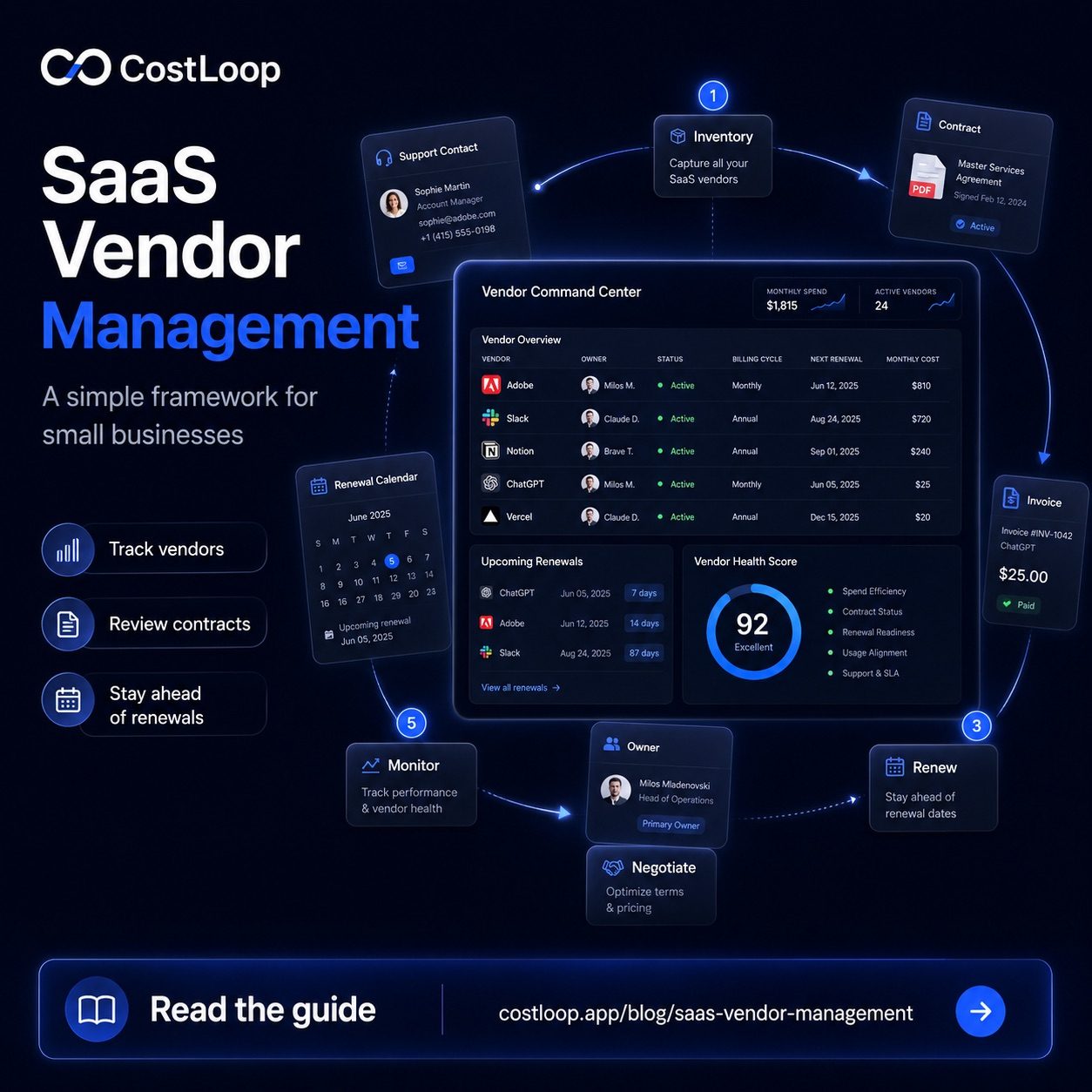
You can't manage what you can't see. Before anything else, you need a complete record of every SaaS vendor your business pays. For each vendor, record:
- Tool name and vendor
- What it's used for (one sentence - forces clarity)
- Internal owner - the person responsible for this tool
- Number of active users
- Monthly or annual cost
- Billing cycle and next renewal date
- Contract type - month-to-month or annual
- Payment method and billing email
Many small and medium businesses do this exercise and discover tools they'd forgotten about. The immediate savings depend on the vendor prices and which tools nobody owns or uses anymore. Documenting vendor contracts and SaaS contracts per tool at this stage - including auto-renewal clauses and notice periods - makes every future renewal decision faster. This is the same starting point recommended in subscription management best practices - clarity first, optimization second.
Step 2: Evaluate Vendors Against a Consistent Scorecard
Once you have your inventory, the next question is: for each tool, is it earning its place? Intuition alone doesn't work well here - you'll over-rate tools you use personally and under-rate tools that quietly support the business in ways that aren't visible.
A vendor scorecard standardizes the evaluation. Here's a simple template that works for most small and medium businesses:
| Criteria | Weight | Score (1–5) | Notes |
|---|---|---|---|
| Active usage | 30% | How many people use it, how often? | Pull from admin panel last-login data |
| Business impact | 30% | What breaks if we remove it? | Core process = high; nice-to-have = low |
| Cost vs alternatives | 20% | Is this price competitive? | Quick market check at each renewal |
| Vendor reliability | 10% | Uptime, support quality, roadmap? | Check status page history, reviews |
| Integration quality | 10% | Does it connect well with your other tools? | Fragmented stacks have higher switching costs |
| Weighted total | 100% | Score out of 5 | <2.5 = serious cancel candidate; >4 = lock in renewal |
You don't need to run this full scorecard for every tool every quarter. Run it for your top 5–8 by annual cost, and give lighter treatment to smaller tools. A $20/month tool with clear daily usage doesn't need a quarterly scorecard review - use your time where the dollars are.
Step 3: Build a Renewal Calendar
Most SaaS vendor management failures aren't about bad tool choices - they're about timing. When you realize your annual contract for a $400/month tool auto-renewed last week, you've lost the leverage to negotiate or cancel. Good vendor management is largely about staying ahead of renewals.
The mechanics are simple. For every tool in your inventory, record the renewal date. Set a calendar reminder for 90 days before for tools costing $500+/month, 45 days for $100–500/month tools, and 30 days for anything smaller. When the reminder fires, run a quick scorecard review and decide: renew as-is, negotiate, downgrade, or cancel.
What to do at each SaaS renewal negotiation window
- 90 days out: Review usage data. Pull last-login reports. Ask the internal owner if the tool is still meeting their needs.
- 60 days out: Run the scorecard. If the score is borderline, start evaluating alternatives - even just to understand your options.
- 30 days out: Contact the vendor if you want to negotiate, change seats, or cancel. Vendors need notice; waiting until day 5 reduces your leverage to zero.
- Renewal day: Confirm the action was taken. If renewing, verify the billing matches what you expected.
A SaaS vendor management tool like CostLoop shows every upcoming renewal with countdown timers and sends alerts before the date hits. No spreadsheet to maintain, no renewal surprises. See how the renewal reminder feature works.
Start free - no credit card neededStep 4: Standardize Your Renewal Decision Process
Ad hoc renewal decisions lead to inconsistent outcomes. One month you cancel something on a whim; the next you renew something expensive without reviewing it at all. A simple decision framework helps.
When a renewal window opens, ask these four questions in order:
- Is it being used? If the scorecard shows low usage and the internal owner confirms the tool isn't critical, cancel. Don't keep tools out of inertia.
- Is it the best option available? A quick market check at renewal time might reveal that a competitor has launched something better or cheaper since you signed up. This is worth doing annually for any tool above $100/month.
- Is the price right? If you'd pay for it but the price has crept up, negotiate before renewing. Vendors are far more flexible pre-renewal than post. See the tactics covered in the guide on negotiating SaaS pricing.
- Is the seat count still correct? Headcount changes. If you have 18 seats licensed for a team that's now 12, adjust before the renewal locks in the higher count.
Handling Vendor Risk and Dependencies
Some vendors create more risk than others. Signs a vendor relationship warrants closer management:
- Your data is locked into a proprietary format with no export option
- Multiple internal processes depend on this single tool
- The vendor has been acquired and is transitioning product strategy
- You've experienced 2+ reliability incidents in the past year
- The vendor has raised prices by more than 15% year-over-year
For high-dependency tools, it's worth maintaining a migration plan - not because you'll necessarily use it, but because having one makes renewal negotiations more grounded. When you actually know what switching to an alternative would cost and take, you can make renewal decisions based on real trade-offs rather than vague switching cost anxiety.
Good software license management connects directly to vendor risk management: when you know exactly what you've licensed, who owns it, and what your exposure is, you're in a far better position to make strategic decisions about your stack.
Keeping It Lightweight
The goal isn't an elaborate procurement process - it's enough structure to stay intentional. For most small and medium businesses with 10–20 SaaS tools, this entire framework requires roughly 2–3 hours per quarter: one review session at the start of each quarter to look at upcoming renewals and check usage data, and individual renewal conversations as they come up. The quarterly review is also the right moment to consider vendor consolidation - identifying supplier relationships where two tools overlap and picking one to cancel.
The businesses that get most from this are the ones that start before they feel the pain. If you're already losing track of renewals or unsure of your total software spend, you're behind. If you build the habit now - starting with the inventory, adding renewal reminders, running a quick scorecard at each review - you won't be the business that discovers it's been paying for a tool nobody uses for 14 months. That happens more than you'd think.
Start with a simple list. Track what you pay for and when it renews. Everything else in this framework can come later. But that basic visibility - understanding your SaaS budget for small and medium business and knowing when each bill is coming - changes how you make decisions about it.
SaaS management platform vendors: what to look for when evaluating tools
For small and medium businesses evaluating SaaS vendor management tools, the key criteria are practical: Does it cover the full vendor relationship - not just costs, but contacts, contracts, and cancellation links? Does it send renewal alerts automatically? Can multiple team members access it? Is pricing proportional to business size?
Enterprise SaaS management platform vendors - Zylo, Torii, Zluri - are priced for IT departments managing hundreds of tools. Some businesses also consider all-in-one platforms that bundle CRM, project tools, and finance in one product; for those evaluations, the CostLoop vs Zoho comparison explains where each tool fits. They offer deep integrations, browser extensions that auto-detect SaaS usage, and SAML-based access control. For a business with a smaller stack and no dedicated IT team, that complexity and cost can be disproportionate to the problem.
Small and medium businesses need vendors offering simpler, affordable tools that handle the core vendor management functions: inventory, renewal alerts, owner assignment, and vendor contact storage. CostLoop stores vendor notes, cancellation URLs, and support contacts per tool - the vendor management layer without enterprise pricing. See how it compares in the best subscription tracker for small and medium business.
How to manage SaaS subscriptions vendor by vendor
The vendor-level view is where subscription management becomes genuinely useful. For each vendor, you need to know: the cost and billing cycle, the renewal date and notice period, the support contact and escalation path, the cancellation URL (not just the homepage), the contract terms including any auto-renewal clause, and who on your team owns the relationship.
Managing this per-vendor - rather than just tracking the charge on a statement - is what turns a subscription list into real vendor management. The difference matters when a renewal approaches: with vendor-level records, you can make an informed decision in minutes. Without them, you are starting from scratch every time, hunting for the right contact or the cancellation page under time pressure.
Building this vendor-level view starts with finding every subscription your business currently pays for. The guide on how to find all company subscriptions covers the full discovery process.