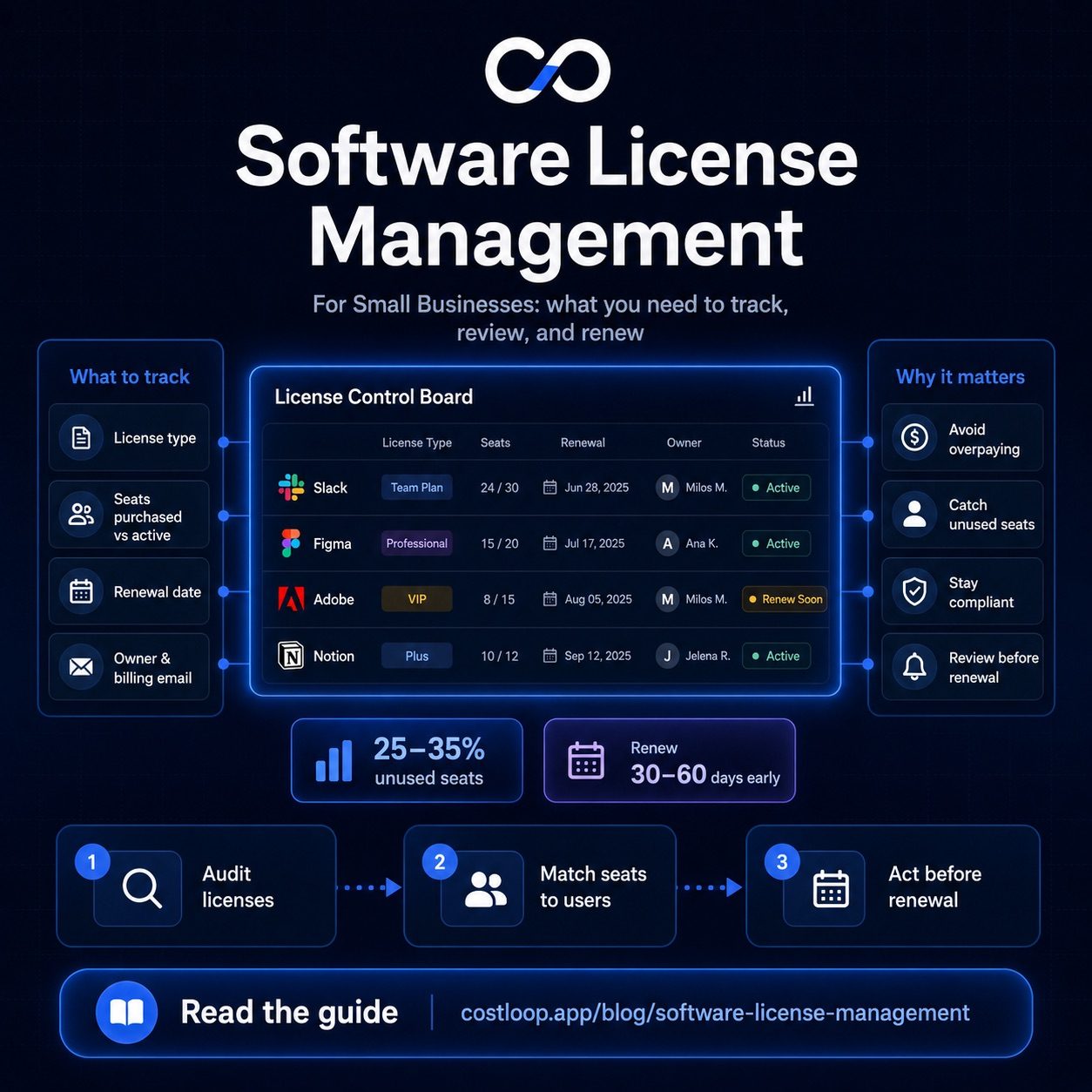
License tracking software gives a business one reliable record of what software it pays for, how many licenses or seats it owns, who those licenses are assigned to, whether they are actually being used, what they cost, and when they renew. The useful part is not the inventory itself. It is being able to make a confident action before money is wasted, access is lost, or a license agreement becomes a compliance problem.
A reliable tracking process separates three things that are often confused: what you purchased, who you assigned it to, and who actually used it. Renewal dates and ownership then turn that data into a repeatable decision process.
Scope note: This guide covers buyer-side license tracking: software used by organizations to manage licenses and subscriptions they purchase. It does not cover vendor-side licensing platforms that software publishers use to issue product keys, enforce entitlements, or monetize their own applications.
Key takeaways
- A useful software license tracking system records entitlements, assignments, usage, cost, ownership and renewal timing. A list of app names is not enough.
- Assigned does not mean used. A person can hold a seat without actively using the software, so usage decisions need a separate activity signal where one is available.
- The right usage source depends on the license model: SaaS admin reports for named-user cloud tools, endpoint inventory for installed software, and license-server telemetry for floating or concurrent licenses.
- Renewal management should work backward from the contract. A practical review date is renewal date minus cancellation notice period minus internal approval buffer.
- Spreadsheets can work for small, stable inventories. Dedicated license tracking software becomes useful when reminders, ownership, usage checks, multiple editors or auditability begin to break the spreadsheet process.
- CostLoop fits the lightweight end of this market: SaaS-heavy teams that need license and seat records, owners, costs and renewals without enterprise SAM or ITAM complexity.
How this guide was researched
CostLoop publishes this guide. The author, Milosh Mladenovski, is CostLoop's founder and therefore has direct product knowledge of CostLoop. Guidance about other license-management approaches is research-based and does not imply hands-on testing of every platform mentioned.
Current product and technical claims were checked primarily against official documentation from Microsoft, Flexera, ServiceNow, ManageEngine, Altair, OpenLM and CostLoop on August 16, 2026. The same decision framework is used throughout: identify the license model, identify the correct source of truth, separate assignment from usage, and connect the data to an owner and renewal decision.
What is license tracking software?
License tracking software is a system for recording and monitoring the software licenses an organization owns or pays for, including license type, quantity, assigned users or devices, usage, cost, owner, expiry and renewal information. More advanced systems can also discover software automatically, reconcile contractual entitlements, monitor installed applications, or collect real-time license-server usage.
The phrase covers several different product categories:
- a lightweight software license tracker for SaaS seats, costs and renewals;
- a SaaS management platform that adds automated application discovery and usage data;
- IT asset management software that connects installed software with devices;
- enterprise Software Asset Management (SAM) that reconciles purchases, entitlements and consumption;
- an engineering license monitoring tool that measures concurrent or floating-license use.
These categories overlap, but they are not interchangeable. A 20-person agency tracking Figma, Microsoft 365 and Adobe seats does not need the same software license monitoring system as a manufacturer optimizing shared CAD licenses across several license servers.
For the wider discipline, see CostLoop's software license management guide. If you need the underlying database model, use the software license inventory guide. If you are comparing vendors rather than building the tracking process, use the license management software comparison.
The five layers of reliable software license tracking
A tracker becomes useful when it answers five separate questions. Keeping these layers distinct prevents the most common reporting errors.
1. Commercial record: what are we paying for?
Record the vendor, product or plan, price, currency, billing cycle, contract term, order or invoice reference, payment method, and renewal or expiry date.
This is the finance view. It answers what the organization committed to buy and what the next financial event will be.
2. Entitlement or capacity: what are we allowed to use?
For a simple SaaS product this may be 25 paid seats. For a perpetual application it may be a defined number of installations. For enterprise software it may involve more complicated contractual rights. For floating software it may be a pool of concurrent licenses.
Do not reduce all of these models to one field called “licenses.” Record the license type and what the count actually represents.
3. Assignment: who currently holds access?
Named-user products should map seats to people. Device-based products should map them to machines. Departmental licenses should have a responsible owner even if individual users are not named.
This is where user license management begins. When an employee joins, changes role or leaves, their license assignments should change with them.
4. Usage: is the assigned capacity actually needed?
Usage is a separate layer from assignment. A user can be licensed and assigned but inactive.
For example, Microsoft's current Microsoft 365 admin reporting distinguishes licensing information from usage reports: administrators can view assigned licenses and separately review service activity or active-user reporting. Microsoft 365 usage reports
That distinction matters. If your tracker only knows that 40 seats are assigned, it cannot tell you whether all 40 are providing value.
5. Decision and renewal status: what happens next?
Every significant license should have a named owner and a next decision date. Typical statuses include:
- active / keep;
- review before renewal;
- reclaim or reassign;
- downgrade;
- renegotiate;
- cancel / do not renew;
- expired or retired.
Without this layer, a software license tracking system becomes a passive database instead of an operating process.
What should a software license tracker record?
The minimum useful record depends on the licensing model, but the following fields cover most SaaS and business-software scenarios.
| Field | Why it matters | Typical source of truth | Update trigger |
|---|---|---|---|
| Product and vendor | Identifies the commercial item | Contract, invoice, admin portal | New purchase or vendor change |
| License type | Defines what the count means | Contract / vendor terms | Plan or agreement change |
| Paid quantity / seats | Shows purchased capacity | Invoice, contract, admin portal | Purchase, renewal, true-up |
| Assigned users or devices | Shows allocation | Admin portal, directory, tracker | Joiner, mover, leaver event |
| Usage / last activity | Shows whether access is needed | Vendor usage report, API, endpoint or license server | Continuous or scheduled review |
| Unit and total cost | Supports savings and budgeting | Invoice / finance system | Price or quantity change |
| Billing cycle | Normalizes cost and renewal logic | Contract / invoice | Plan change |
| Renewal / expiry date | Drives review timing | Contract, order, billing email | Renewal completed or term changed |
| Cancellation / notice period | Prevents missed termination windows | Contract / vendor terms | Contract change |
| Owner / department | Creates accountability | Internal policy | Team or role change |
| Contract / invoice links | Preserves evidence | Procurement / document store | New document |
| Status / next action | Turns data into a workflow | Tracker | Review decision |
A good software license tracking system should make these fields easy to update and should make stale or missing information obvious. The system does not have to collect every field automatically, but the organization should know where each value comes from.
How to track software licenses step by step
Step 1: define the scope and one accountable owner
Start by deciding what belongs in the tracking system.
For a small business, the scope may simply be every paid SaaS subscription and commercial software license. For a larger IT organization it may include installed desktop software, server products, SaaS applications, maintenance agreements and engineering licenses.
Assign one role that is responsible for the quality of the register. Individual products can have different owners, but somebody must own the tracking process itself.
A simple rule works well:
If the organization can be charged for it, lose access to it, or become non-compliant by using it incorrectly, it belongs in the license-management process.
Step 2: build the initial inventory from evidence, not memory
Do not ask one person to list every tool they remember. Build the inventory from the systems where software leaves evidence.
Useful sources include:
- procurement records and purchase orders;
- accounts-payable and card statements;
- vendor invoices and renewal emails;
- SaaS admin consoles;
- SSO or identity-provider application lists;
- endpoint software inventory;
- contract repositories;
- browser or email discovery tools;
- license-server records for concurrent software;
- team interviews for tools purchased outside the normal process.
For SaaS-heavy small teams, CostLoop's guide to tracking software subscriptions covers the discovery process in more detail.
For traditional installed software, automated discovery can matter more. Flexera, for example, documents machine and software inventory plus software usage tracking as part of its discovery approach. Flexera IT asset discovery
The important principle is that discovery and license management are different jobs. Discovery tells you that software exists. Your contract or purchase data tells you what rights you bought.
Step 3: classify the license model before you measure anything
You cannot interpret usage correctly if you do not know what the license count represents.
Common models include:
- Named-user / seat-based SaaS: a specific person receives a paid seat.
- Device-based: the right is tied to a machine or installation.
- Perpetual: the organization buys a continuing right to use a version, sometimes with separate maintenance or support.
- Concurrent / floating: multiple users share a limited pool and a license server controls simultaneous access.
- Usage or consumption-based: cost depends on transactions, credits, compute, API usage or another consumption metric.
- Enterprise or publisher-specific entitlement: rights are determined by contract terms that may involve users, devices, processors, cores, virtualization or other metrics.
If the license type is unclear, do not invent a utilization percentage. Resolve the commercial terms first.
Step 4: reconcile purchased capacity with current assignments
The first operational comparison is simple:
Purchased capacity - assigned capacity = unassigned capacity
If you purchased 50 named-user seats and only 44 are assigned, six seats are immediately worth reviewing.
But the opposite situation matters too. If 52 people are assigned against 50 purchased rights, that may indicate an over-allocation or compliance issue depending on the vendor agreement.
Enterprise SAM systems go deeper than this simple seat comparison. ServiceNow's current Software Asset Management documentation, for example, describes license-usage views that compare rights consumed with active rights purchased and support reconciliation. ServiceNow license usage
For a small SaaS environment, the purchased-versus-assigned comparison may be sufficient. For complex publisher licensing it is only the starting point.
Step 5: track actual software usage using the right signal
Software license usage tracking should measure a meaningful activity signal for the specific license model. There is no universal “last used” data source that works for every product.
| License model | Useful usage signal | Typical data source | What it can tell you |
|---|---|---|---|
| Named-user SaaS | Active user, login or product activity | Vendor admin report, API, SSO or approved browser telemetry | Whether assigned users are actually active |
| Installed desktop software | Install presence plus metering / execution | Endpoint agent, inventory or ITAM tool | Which devices have software and whether it runs |
| Concurrent / floating | Checkouts, peak concurrency, denials, idle time | License server / specialist monitor | Whether the shared pool is too large or too small |
| Perpetual software | Installation and business need | Endpoint inventory plus owner review | Whether the purchased right is still deployed or required |
| Consumption-based | Credits, API calls, compute or other consumption | Vendor usage and billing data | Whether usage matches the purchased tier |
| Enterprise entitlements | Consumption compared with contractual rights | SAM reconciliation | Whether usage is within the license position |
Microsoft's current reporting is a good example of why assigned and active users should be separated. Its Microsoft 365 admin center provides licensing information and separate service usage reports, while the Microsoft 365 Apps Active Users report can show activity across defined reporting periods. Microsoft 365 Apps Active Users report
For engineering software, the data is completely different. Altair Monitor documents current and historical license utilization from supported license managers, while OpenLM documents monitoring for named-user, node-locked and floating licenses. Altair Monitor | OpenLM Software License Management
This is why a generic “license monitoring tool” is not automatically the right answer. The monitoring method must fit the license model.
Step 6: calculate utilization, but do not confuse a metric with a decision
Three simple metrics are useful for seat-based licenses.
Assignment utilization
Assigned seats / paid seats x 100
This tells you how much purchased capacity has been allocated.
Active utilization
Active users in the chosen period / paid seats x 100
This tells you how much paid capacity appears active according to your usage definition.
Potential annual avoidable seat cost
Seats confirmed unnecessary x monthly cost per seat x 12
These metrics are decision aids, not automatic cancellation rules.
A user who only opens tax software quarterly may be inactive in a 30-day report but still need the license. A designer may use a specialist tool only during a particular project phase. The owner should validate business need before a seat is removed.
Worked example: tracking assignment, usage and renewal together
Assume a hypothetical company has:
- 50 paid seats;
- $24 monthly cost per seat;
- 46 seats assigned;
- 34 users active during the chosen review period;
- renewal in 75 days;
- 30-day cancellation notice requirement;
- 14 days needed internally for approval and procurement.
Assignment utilization:
46 / 50 = 92%
Active utilization:
34 / 50 = 68%
The 12-seat gap between paid capacity and active users is not automatically 12 removable licenses. First, ask the four assigned-but-inactive users whether they still require access and confirm whether any currently unassigned seats are intentionally reserved.
If the business validates that 10 seats are genuinely unnecessary, the potential annual avoidable cost is:
10 x $24 x 12 = $2,880 per year
The renewal decision should also start before the contractual notice date.
A useful formula is:
Internal review date = renewal date - cancellation notice period - internal approval buffer
In this example:
75 days - 30 days - 14 days = 31 days
So the team has only 31 days from today to finish the usage review and decide what quantity it wants at renewal. The contract renews in 75 days, but the operational deadline is much earlier.
This is why license tracking, software usage monitoring and renewal management should live in the same process.
Step 7: build renewal tracking around the contract, not a generic reminder
A renewal date by itself is not enough. Record:
- renewal or expiry date;
- automatic-renewal status if known;
- cancellation or non-renewal notice period;
- internal decision owner;
- approval/procurement lead time;
- target quantity or plan at renewal;
- negotiation status;
- final decision.
For simple month-to-month SaaS, a 7-, 14- or 30-day reminder may be enough depending on the product and cancellation terms. For a negotiated annual agreement, the internal review may need to start 60 or 90 days earlier.
The right rule is not “always remind me 30 days before.” It is:
Start the review early enough to finish usage validation, approvals, negotiation and cancellation before the contractual notice window closes.
CostLoop's renewal tracker guide goes deeper on building the reminder process itself.
Step 8: connect user license management to employee lifecycle events
License data becomes stale quickly when it is disconnected from people changes.
At minimum, build license checks into three events:
Joiner: Which licenses does the new employee genuinely need? Who approves them?
Mover: Has the employee changed role or department? Which existing licenses are no longer required, and which new ones are justified?
Leaver: Which licenses must be revoked, reclaimed, reassigned or cancelled? Does any software contain data that must be transferred before access is removed?
This is the operational core of user license management. It prevents the tracker from drifting away from the actual workforce.
For a small team, this can be a checklist owned by operations. Larger organizations may automate it through identity, HR and SaaS-management systems.
Step 9: maintain the tracker on a recurring cadence
A one-time software audit gives you a clean starting point. It does not keep the data clean.
| Cadence | Review | Typical actions | Owner |
|---|---|---|---|
| Weekly | Exceptions and urgent renewals | Resolve expiring licenses, missing owners and failed offboarding | Operations / IT |
| Monthly | Inventory hygiene | Update new purchases, assignments, price/plan changes and cancellations | License or tool owners |
| Quarterly | Usage and right-sizing | Review inactive seats, duplicates, unused capacity and upcoming annual renewals | IT / Finance / Ops |
| Pre-renewal | Commercial decision | Validate usage, quantity, terms, price and cancellation/negotiation decision | Product owner + Finance/Procurement |
The cadence should become lighter as the system improves. The goal is not to spend more time managing licenses. It is to surface the small set of records that need a decision.
Software license tracking vs software license monitoring
Software license tracking records what you own, who it is assigned to, what it costs and when it renews. Software license monitoring focuses on actual consumption or activity: logins, application use, installations, license checkouts, peak concurrency or another measurable usage signal.
The two work best together.
Tracking without monitoring can tell you that 50 seats are assigned but not whether they are used. Monitoring without commercial tracking can show activity but not whether you bought the correct quantity, what the seats cost, or when the agreement can be changed.
A mature software license monitoring system therefore connects usage to a commercial record and a decision owner.
ManageEngine's current software-license documentation is a practical example of this combination: it describes software inventory, compliance/renewal reporting and usage metering as related parts of license management. ManageEngine software license management
Which type of license tracking system should you use?
The best system is the least complex one that can produce reliable decisions for your license estate.
| Tracking approach | Best for | Discovery / usage depth | Renewal workflow | Compliance depth | Implementation effort |
|---|---|---|---|---|---|
| Spreadsheet | Very small, stable inventories with one disciplined owner | Manual | Manual calendar / formulas | Basic record only | Low |
| Dedicated license / subscription tracker | Small and growing SaaS-heavy teams | Manual/import-assisted plus product-specific signals | Built-in reminders and ownership | Basic operational control | Low |
| SaaS management platform | Larger SaaS estates | SSO, direct integrations, APIs, finance or other discovery sources | Strong | SaaS governance rather than deep publisher SAM | Medium |
| ITAM / enterprise SAM | Installed software, hardware context, complex entitlements and audit exposure | Endpoint discovery, inventory, reconciliation | Strong | High for supported licensing models | High |
| Engineering license monitor | CAD/CAE/scientific floating-license estates | License-server telemetry and historical utilization | Contract process varies | Specialist license-server control | Medium to high |
When a spreadsheet is enough
A spreadsheet can be perfectly reasonable when:
- there are relatively few licenses;
- the list changes infrequently;
- one person owns it;
- usage can be checked manually in vendor admin portals;
- renewals are simple;
- supporting documents are easy to find;
- nobody needs automated reminders or audit trails.
The problem is not that spreadsheets are “bad.” The problem is that they do not enforce the process.
When to move to dedicated license tracking software
Move beyond a spreadsheet when you notice one or more of these symptoms:
- renewal dates are missed;
- the same tool has conflicting seat counts in different files;
- nobody knows who owns a license;
- former employees still appear in assignments;
- multiple people edit the register and nobody trusts it;
- usage reviews happen only when finance asks for cuts;
- contracts and invoices are scattered across email;
- you need reminders, shared ownership, role-based access or reporting;
- the cost of stale data is higher than the cost of maintaining a proper system.
There is no magic number of applications at which software license tracking software becomes necessary. The trigger is loss of reliability.
How to choose license tracking software
Do not start with a feature checklist. Start with the data and decisions you need.
1. Ask what the tool can discover automatically
“Automated discovery” is too vague.
Ask exactly which sources are supported:
- endpoint agents or network scanning;
- SSO / identity provider;
- direct SaaS integrations;
- finance or expense data;
- browser activity;
- email or invoice scanning;
- license-server telemetry;
- API imports;
- CSV/manual records.
Then ask what happens for an application that has no supported integration.
2. Ask how it defines “usage”
A tool should be able to explain its usage signal.
Is an active user someone who logged in once? Used a specific feature? Opened the desktop application? Checked out a floating license? Generated billable consumption?
The word “unused” is meaningless unless the measurement window and activity definition are clear.
3. Confirm that purchased, assigned and active are separate fields
This is one of the most important tests.
A useful dashboard should not collapse these concepts into one number:
- Purchased: what you pay for or are entitled to use.
- Assigned: who or what currently holds access.
- Active: who actually used the software according to the defined signal.
The gap between these fields is where most right-sizing decisions begin.
4. Check renewal and notice-period handling
A license tracker should do more than store an expiry date.
Look for:
- configurable reminder lead times;
- contract notice-period fields;
- owner assignment;
- calendar or action-center views;
- approval / procurement workflow where needed;
- notes on planned quantity or negotiation status.
5. Check data portability
Ask how to export:
- application inventory;
- license quantities;
- user assignments;
- usage history;
- contracts and documents;
- renewal data;
- audit history.
A tracking system becomes business infrastructure. You should know how to leave it before you buy it.
6. Match implementation complexity to your organization
A product that requires endpoint agents, SSO configuration, finance integrations, CMDB normalization and dedicated SAM ownership can be exactly right for a large enterprise and completely wrong for a 12-person company.
The best software license tracking tools are not the ones with the most integrations. They are the ones whose required data sources and operating model your organization can actually maintain.
Questions to ask during a software license tracking demo
- 1. Exactly how do you discover licenses and software? Ask for every data source, not “AI-powered discovery.”
- 2. What happens when there is no direct integration? Can the record still be maintained accurately?
- 3. Can you show purchased, assigned and active counts separately?
- 4. What does your product count as usage? What period and activity signal are used?
- 5. How do you track renewal dates, cancellation notice periods and owners?
- 6. Can a leaver's licenses be identified and reclaimed quickly?
- 7. How do you handle perpetual, device-based, concurrent or consumption-based licenses?
- 8. Can all license, user, renewal and document data be exported if we leave?
- 9. Which integrations, discovery methods or reporting features cost extra?
- 10. Show one complete workflow from detecting an underused license to making the renewal or reclamation decision.
The final question is the most revealing. A dashboard can look impressive while still leaving the buyer to do all of the real reconciliation manually.
Common license tracking mistakes
Treating an inventory as a management process
Knowing that you own 37 applications is not the same as knowing what should happen to them. Every high-cost or renewing record needs an owner and next decision.
Using assigned seats as a proxy for actual usage
Assignment proves access, not value. Whenever the vendor exposes reliable activity data, use it as a second signal.
Cancelling based on “last login” alone
Low frequency can be legitimate. Review business purpose, seasonality, project requirements and data-retention needs before reclaiming access.
Ignoring license type
A seat-based SaaS subscription, a perpetual desktop license and a floating engineering license need different measurements. One utilization formula cannot be applied blindly to all three.
Tracking renewals but not notice periods
If a contract requires 30 days' notice and your reminder fires 14 days before renewal, the alert is already too late.
Forgetting joiner, mover and leaver events
Stale user assignments often begin with a role change or departure that never reached the license register.
Keeping proof of purchase somewhere else
A clean tracker should point to the agreement, invoice or order record that supports the license count. This is especially important when multiple teams can buy software independently.
How CostLoop fits into software license tracking
CostLoop is a lightweight option for small and growing teams whose software estate is mainly SaaS and whose biggest problems are visibility, seat ownership, recurring cost and renewal control.
The current CostLoop feature set lets teams record license details, seat counts, assigned users and expiry dates alongside subscription information. It also includes owner/department records, renewal reminders, document links and unused-seat detection based on purchased seats versus assigned users. CostLoop features
CostLoop's current pricing page also lists the Chrome extension with an email scanner and usage monitor among plan capabilities. CostLoop pricing
Where CostLoop is a good fit
Use CostLoop when:
- the estate is mostly SaaS subscriptions and named-user licenses;
- you need one place for costs, seats, assigned users, owners and renewal dates;
- renewal reminders and a clear action list matter more than enterprise entitlement logic;
- you are moving away from spreadsheets or scattered records;
- you want lightweight implementation rather than a SAM/ITAM project.
The dedicated CostLoop software license tracker page covers the product workflow in more detail.
Where CostLoop is not the right fit
Use a broader or specialist system if you need:
- endpoint discovery and installed-software inventory across a large device estate;
- publisher-specific entitlement reconciliation or effective license positions;
- deep enterprise audit/compliance workflows;
- hardware IT asset management;
- real-time floating-license-server telemetry for engineering software.
That distinction matters. A lightweight tracker should not pretend to replace enterprise SAM, and an enterprise SAM deployment is unnecessary if the real problem is simply knowing who owns 25 SaaS seats and what renews next month.
A simple operating model for small and growing teams
If your company does not have a dedicated Software Asset Management function, use this lightweight process:
- 1. One system of record: keep every paid software/license record in one place.
- 2. One owner per tool: someone is accountable for assignment and renewal decisions.
- 3. One usage signal: define how you will check whether each major license is actually used.
- 4. One renewal deadline: calculate the real internal review date from contract notice plus approval time.
- 5. One quarterly review: check inactive seats, duplicates, ownership gaps and upcoming annual renewals.
- 6. One offboarding step: reclaim or review software access whenever a team member leaves.
This model is intentionally boring. That is why it works. The value comes from consistent data and decisions, not from making the process complicated.
Frequently asked questions
What is license tracking software?
License tracking software is a system that records the software licenses an organization owns or pays for and connects them with quantities, assigned users or devices, usage, cost, owners and renewal dates. More advanced products can automate software discovery, usage monitoring, entitlement reconciliation or license-server reporting.
What should a software license tracker include?
At minimum, a software license tracker should include the product/vendor, license type, paid quantity, assigned users or devices, cost, billing cycle, owner, renewal or expiry date, notice period, status and links to the supporting contract or invoice. Where usage data exists, keep it separate from assignment data.
How do you track software license usage?
Track usage with the activity signal that matches the license model. Named-user SaaS can use vendor admin or API activity reports; installed desktop software may use endpoint inventory and metering; floating engineering licenses use license-server checkout and concurrency data; and complex enterprise licenses may require SAM reconciliation against contractual entitlements.
What is the difference between software license tracking and software license monitoring?
Software license tracking focuses on the commercial and administrative record: what you bought, quantity, assignments, cost, owner and renewal. Software license monitoring focuses on consumption: who used the software, when it was used, installations, checkouts, peak concurrency or another usage metric. Good license management connects both.
What is a software license monitoring system?
A software license monitoring system collects ongoing usage or consumption data for licensed software. Depending on the environment, it may read vendor APIs, admin reports, endpoint agents, SSO activity or license-server telemetry. Monitoring is especially useful when the organization needs to identify unused seats, capacity shortages or utilization trends before purchasing or renewal decisions.
How should I track software license renewals?
Record the renewal date, cancellation or non-renewal notice period, owner and internal approval lead time. Then calculate the operational review date by subtracting the notice period and internal buffer from the renewal date. The reminder should fire before that review date, not merely a few days before the vendor charge.
When is a spreadsheet enough for software license tracking?
A spreadsheet is enough when the inventory is small and stable, one person owns it, usage can be checked manually, and renewal dates are unlikely to be missed. Move to dedicated software license tracking software when multiple people maintain the data, assignments become stale, renewals are missed, reminders are needed, or nobody trusts the spreadsheet.
What is user license management?
User license management is the process of assigning, reviewing, reclaiming and reassigning software access as employees join, change roles or leave. It connects license records to workforce changes so paid seats do not remain assigned to people who no longer need them.
Do I need SAM or ITAM software to track licenses?
Not always. Small SaaS-heavy teams can often use a dedicated tracker. ITAM becomes more relevant when hardware and installed software must be managed together. Enterprise SAM is appropriate when publisher entitlements, complex license metrics, reconciliation and audit exposure create material risk. Engineering teams with concurrent licenses may need a specialist license monitoring tool.
What is the best way for a small business to track software licenses?
For a small business, the best approach is usually a central license register with seat counts, assigned users, owners, costs and renewal dates, plus a simple usage check before each major renewal. Use a spreadsheet if the process is genuinely reliable; use a dedicated tracker such as CostLoop when reminders, ownership and recurring review need to be built into the system.
Final recommendation
Software license tracking is not primarily a data-entry problem. It is a decision-quality problem.
A strong process can answer, at any time:
- What did we buy?
- What are we entitled to use?
- Who or what is assigned?
- What is actually being used?
- What does it cost?
- Who owns the decision?
- When is the last safe date to change the agreement?
Start with those questions and choose the smallest system that can answer them reliably.
For a small SaaS-heavy organization, that may be a dedicated software license tracker. As the estate grows, automated SaaS discovery, ITAM, enterprise SAM or engineering-license monitoring may become justified. The upgrade point is not a specific number of tools. It is the point at which your current system can no longer produce trustworthy answers before a purchase, renewal, offboarding event or audit.
Ready to centralize software licenses, seats, owners and renewal dates? Review CostLoop's software license tracker, see the current features, or start free.