Last verified: July 21, 2026
Quick answer
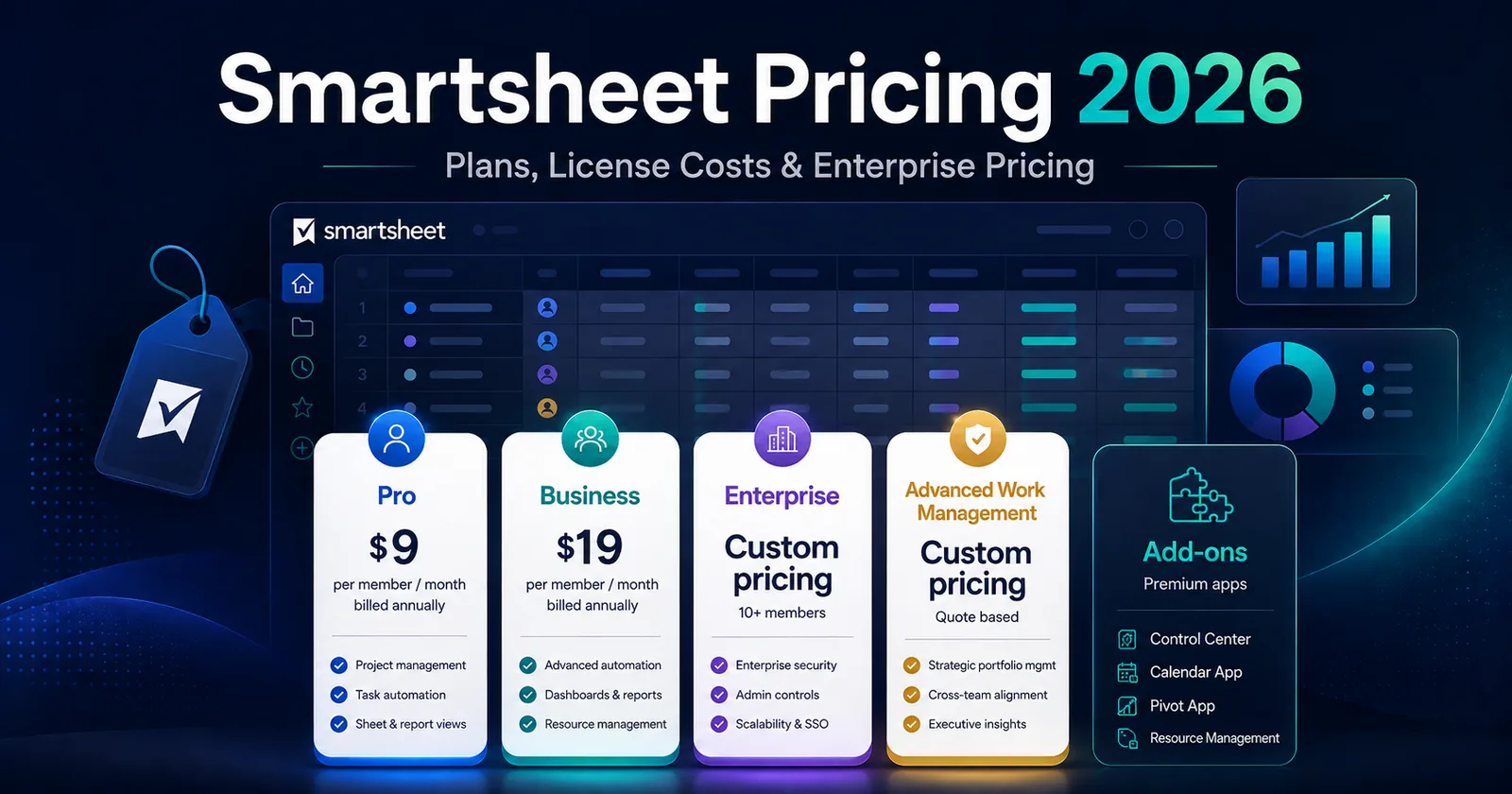
Smartsheet pricing in 2026 starts at $12 per member per month on Pro when billed monthly or $9 per member per month when billed annually. Business starts at $24 per member per month when billed monthly or $19 per member per month when billed annually. Enterprise and Advanced Work Management use custom, quote-based pricing.
If you are searching for smartsheet pricing, smartsheet cost, smartsheet pricing plans, or smartsheet plans and pricing, that is the core answer. The harder part is figuring out what your real total will be once you factor in minimum seat requirements, annual billing discounts, and premium apps like Resource Management, Control Center, Calendar App, and Pivot App.
In this guide
- Current Smartsheet pricing plans for 2026
- Real-world smartsheet cost per month and smartsheet cost per user examples
- What is known and unknown about smartsheet enterprise pricing
- What to expect for resource management smartsheet pricing
- Whether smartsheet control center cost, smartsheet calendar app cost, and smartsheet pivot app cost are public
- How to build a practical smartsheet cost estimate
- When Smartsheet is worth the price and when it is overkill
Methodology and disclosure
CostLoop publishes this guide and competes in the broader software-cost visibility space, but not as a direct replacement for Smartsheet. This article is based on publicly available Smartsheet pricing and help documentation reviewed in August 2026. Where Smartsheet does not publish a number, this guide says so plainly rather than inventing one.
If your goal is broader software-cost visibility beyond one work-management tool, CostLoop also has related guides on software license lifecycle management, software license inventory, SaaS license management, and best license management software.
Related CostLoop guides
- Project Management Subscription Tracker
- Best Subscription Tracker for Small and Medium Business
- Cloud-Based Software License Management
- CostLoop Features
- CostLoop Pricing
Smartsheet pricing plans in 2026
| Plan | Public price | Member guidance | Best fit |
|---|---|---|---|
| Pro | $12/member/month monthly $9/member/month annually | 1-10 Members | Individuals and small teams |
| Business | $24/member/month monthly $19/member/month annually | 3+ Members | Teams needing administration, workload tracking and scale |
| Enterprise | Custom quote | 10+ Members | Security, governance and advanced controls |
| Advanced Work Management | Custom quote | Custom | Enterprise deployments needing premium apps and portfolio tooling |
Here is the clearest public snapshot of smartsheet pricing plans right now.
What each plan includes
Pro
Pro is the entry-level paid plan. It is the answer for most “starter” searches like cost for smartsheet, smartsheet monthly cost, or cost of smartsheet license.
Key points:
- Gantt, table, board, and calendar views
- Unlimited sheets, forms, and reports
- Unlimited contributors
- 250 automations per month
- 1–10 Members
Business
Business is where Smartsheet becomes meaningfully more capable for growing teams. If you are pricing Smartsheet for a department rather than one person, this is usually the real comparison point.
Key points:
- Everything in Pro
- Timeline view
- Workload tracking
- Unlimited automations
- Admin capabilities
- 1 TB attachment storage
- Minimum 3 Members
Enterprise
Smartsheet pricing enterprise is not listed publicly as a dollar amount. Smartsheet requires a sales conversation for this tier. If you are searching smartsheet enterprise cost, smartsheet enterprise pricing, or smartsheet pricing enterprise, the honest answer is that there is no public list price on the official pricing page.
Enterprise includes:
- SAML-based SSO
- Directory integrations
- Unlimited attachment storage
- Enterprise Plan Manager
- Scenario Planning
- Portfolios
Advanced Work Management
Advanced Work Management is also custom-priced. It includes Enterprise plus a bundle of premium capabilities such as:
- Control Center
- Dynamic View
- Data Shuttle
- Connectors
- DataMesh
- Calendar App
- Pivot App
- Premium Support
This matters because many searches for smartsheet control center pricing, smartsheet control center cost, smartsheet calendar app cost, and smartsheet pivot app cost are really questions about whether those capabilities are bundled, sold separately, or only available at higher tiers.
Smartsheet cost per user and cost per month
People often search smartsheet cost per user, smartsheet license price, smartsheet cost per month, and smartsheet subscription cost because they want a practical monthly figure, not just a pricing page screenshot.
Smartsheet now uses the term Member, but most buyers still search using “user” or “license.” For practical buying purposes, the search intent is the same.
Quick cost examples
| Pro members | Monthly billing | Annual-equivalent monthly rate | Annual equivalent |
|---|---|---|---|
| 1 | $12/month | $9/month | $108/year |
| 5 | $60/month | $45/month | $540/year |
| 10 | $120/month | $90/month | $1,080/year |
| Business members | Monthly billing | Annual-equivalent monthly rate | Annual equivalent |
|---|---|---|---|
| 3 | $72/month | $57/month | $684/year |
| 5 | $120/month | $95/month | $1,140/year |
| 10 | $240/month | $190/month | $2,280/year |
Pro plan examples
Business plan examples
Those tables are the cleanest way to translate smartsheet cost estimate queries into actual budgeting numbers.
What changes your real Smartsheet monthly cost?
Your final smartsheet monthly cost depends on more than the plan line item:
- Billing cadence. Annual billing drops the effective monthly rate.
- Member count. Business starts at a 3-member minimum.
- Plan tier. The jump from Pro to Business is significant.
- Premium apps. Resource Management, Calendar App, Pivot App, Control Center, and similar add-ons can materially change total spend.
- Enterprise requirements. SSO, governance, premium support, data controls, and implementation help usually push buyers toward quote-based pricing.
If you only need a lightweight work tracker, Pro can be enough. If you need governance, portfolio visibility, or premium apps, the headline smartsheet cost goes up quickly.
Smartsheet licenses and license costs
Searches like smartsheet licenses, smartsheet license costs, and cost of smartsheet license are really asking two things:
- What do paid seats cost?
- Which account roles actually need paid access?
At a high level:
- Members are the paid licenses.
- Contributors are free on Pro.
- Guests and Contributors are free on Business.
- Enterprise and Advanced Work Management use custom seat structures and governance options.
That distinction matters. Many teams overestimate the number of paid Smartsheet licenses they need because they assume every collaborator requires a paid seat. Before buying, map who needs full editing/admin capability and who only needs lighter participation.
For broader visibility into how seat counts, ownership, and renewal dates should be tracked across your stack, see CostLoop’s guide to license tracking software and software license management.
Smartsheet enterprise pricing and enterprise cost
Is Smartsheet enterprise pricing public?
No. Smartsheet enterprise pricing is quote-based. The official pricing page lists Enterprise as custom pricing for 10+ Members.
What affects Smartsheet enterprise cost?
If you are estimating smartsheet enterprise cost, expect the quote to depend on factors such as:
- Number of Members
- Security and identity requirements
- Need for SAML SSO and directory integrations
- Premium features or Advanced Work Management bundles
- Data residency or governance requirements
- Support level and procurement terms
Practical buying advice
If you need a rough budget placeholder for procurement, do not pretend you know the exact Enterprise quote. That is trash budgeting. Instead:
- model your likely Member count
- assume Enterprise will exceed Business pricing materially
- flag premium apps separately
- request a direct quote early if procurement needs numbers this quarter
Resource Management Smartsheet pricing
One of the most common long-tail searches is resource management smartsheet pricing or smartsheet resource management pricing.
Here is the important distinction:
- Workload tracking is included in Business and above.
- Resource Management by Smartsheet is a separate premium product/add-on.
Smartsheet’s official marketplace pages state that pricing for Resource Management varies and depends on organizational needs and the number of users. In other words, there is no single public number for full Resource Management pricing.
What to tell a finance team
If someone asks for a number today, the accurate answer is:
Full Resource Management by Smartsheet is add-on pricing, available for Business and Enterprise customers, and Smartsheet does not publish a universal public list price.
That is the only responsible way to answer resource management smartsheet pricing without making things up.
Smartsheet calendar app cost
Searches for smartsheet calendar app cost are common because buyers often confuse Smartsheet’s built-in calendar view with the separate Calendar App premium add-on.
Here is the practical answer:
- Basic calendar view is included in core Smartsheet plans.
- Calendar App is a premium app.
- Smartsheet lists Calendar App as eligible for Business and Enterprise customers.
- Calendar App is included in Advanced Work Management.
- Smartsheet does not publish a simple standalone public price on the main pricing page.
So if you are calculating smartsheet calendar app cost, treat it as quote-based unless your sales rep confirms otherwise.
Smartsheet Control Center pricing and cost
If you are searching smartsheet control center pricing or smartsheet control center cost, this is the clean answer:
- Control Center is a premium add-on for Business and Enterprise plans.
- It is included in Advanced Work Management.
- Smartsheet does not show a public dollar amount for Control Center on the main pricing page.
Control Center is usually relevant for PMOs, repeatable project portfolios, and teams needing portfolio-scale project provisioning. If that is not your use case, do not let a sales process pull you into a higher bundle just because the feature sounds impressive.
Smartsheet Pivot App cost
The same logic applies to smartsheet pivot app cost.
- Pivot App is a premium add-on.
- It is eligible for Business and Enterprise customers.
- It is included in Advanced Work Management.
- Smartsheet’s documentation says to contact sales for purchase details.
So again, there is no reliable public flat number you can use as a universal price.
Google Smartsheet cost: is there a separate price?
Another odd but real query is google smartsheet cost.
There is no separate consumer-facing Google-only Smartsheet price tier. Smartsheet integrates with Google Workspace, but the underlying Smartsheet plan pricing is the same pricing structure described above. If someone in your company says “Google Smartsheet cost,” they usually mean one of two things:
- the cost of Smartsheet when used alongside Google Workspace, or
- confusion between Smartsheet and Google Sheets.
Those are not the same product category. Smartsheet is a paid work management platform. Google Sheets is a spreadsheet product included in Google Workspace tiers.
Smartsheet pricing plans vs real buying scenarios
Best fit for Pro
Choose Pro if:
- you are an individual or very small team
- you want classic Smartsheet functionality without admin-heavy requirements
- you need predictable smartsheet cost per month with no enterprise procurement cycle
Do not choose Pro if:
- you need admin controls, workload tracking, or advanced reporting at scale
- you already know you need premium apps
Best fit for Business
Choose Business if:
- your team actually collaborates across departments
- you need governance beyond basic usage
- you want workload tracking and unlimited automations
Do not choose Business if:
- you only need one or two paid Members
- you are buying because you hope it will magically fix broken process design
Best fit for Enterprise
Choose Enterprise if:
- procurement or security requires SAML SSO, directory integration, or enterprise controls
- multiple departments are standardizing on Smartsheet
- you need custom contracting and administration
Do not choose Enterprise if:
- your problem is just “we need a project tracker and some dashboards”
- you have not even validated whether Business is enough
Best fit for Advanced Work Management
Choose Advanced Work Management if:
- you know you need Control Center, Pivot App, Calendar App, Data Shuttle, or related premium components
- you are managing portfolios and repeatable large-scale work
Do not choose it if:
- you are still guessing what your PMO needs
- your team mainly needs cost visibility, reminders, and lightweight operational control
Hidden costs buyers often miss
This is where many Smartsheet buying decisions go wrong.
1. Minimum plan thresholds
Business has a 3-member minimum. That changes the real smartsheet cost per user for tiny teams because you may pay for seats you do not fully need yet.
2. Premium app creep
A buyer starts with core Smartsheet, then later wants:
- Resource Management
- Calendar App
- Pivot App
- Control Center
- connectors or portfolio tooling
At that point, the original smartsheet cost estimate is obsolete.
3. Renewal inertia
Teams sign annual contracts for savings, then never revisit seat counts. If you want to avoid that problem, treat every annual renewal as a decision point. CostLoop’s software license lifecycle management and best subscription tracker for small and medium business guides show a practical way to control renewals before they auto-renew.
4. Smartsheet is only one tool in a larger stack
A lot of organizations do not overspend on Smartsheet because of Smartsheet alone. They overspend because Smartsheet sits on top of Asana, Monday.com, Jira, Trello, Airtable, or other overlapping tools. If you want visibility into that overlap, see CostLoop’s subscription management app page.
Smartsheet cost estimate examples
If you need a fast smartsheet cost estimate for planning, these scenarios are more useful than a generic range.
Example 1: solo operator
- Plan: Pro
- Members: 1
- Billing: annual
- Estimated spend: $108/year
Example 2: 5-person operations team
- Plan: Business
- Members: 5
- Billing: annual
- Estimated spend: $1,140/year
Example 3: 10-person team on Business
- Plan: Business
- Members: 10
- Billing: annual
- Estimated spend: $2,280/year
Example 4: PMO exploring Control Center and Calendar App
- Core plan: likely Business or Enterprise
- Premium app needs: Control Center, Calendar App
- Published list price: not public
- Action: request a quote
Example 5: enterprise with security and portfolio requirements
- Core plan: Enterprise or Advanced Work Management
- Member count: 25+
- Add-ons: likely bundled or quoted
- Published list price: not public
- Action: request a quote early and insist on line-item transparency
How to keep Smartsheet spend from getting sloppy
Smartsheet can be worth the money. But paying for it without renewal discipline is lazy.
At minimum, track:
- tool owner
- plan tier
- number of paid Members
- annual vs monthly billing
- renewal date
- contract term
- premium add-ons
- cancellation or account-management path
That is exactly the kind of recurring-software visibility CostLoop is built for. If Smartsheet is one of many SaaS tools you pay for, CostLoop helps you store the cost, owner, documents, renewal date, and license context in one place. See CostLoop features or CostLoop pricing if you want the lightweight control layer rather than another enterprise platform.
Frequently asked questions
What is Smartsheet pricing in 2026?
Smartsheet pricing starts at $12 per Member per month on Pro when billed monthly or $9 per Member per month when billed annually. Business starts at $24 per Member per month when billed monthly or $19 per Member per month when billed annually. Enterprise and Advanced Work Management are custom-priced.
What is the Smartsheet cost per month?
The headline smartsheet cost per month starts at $12 for one Pro Member on monthly billing. Real monthly spend depends on plan, Member count, annual vs monthly billing, and whether you add premium products.
What is the Smartsheet cost per user?
The basic smartsheet cost per user is $12/month on Pro or $24/month on Business with monthly billing. On annual billing, the effective rates drop to $9 and $19 respectively.
What is the Smartsheet monthly cost for a team?
Your smartsheet monthly cost is simply the per-member price multiplied by paid Members, adjusted for minimum seat rules and any premium apps.
Is there a public Smartsheet enterprise price?
No. Smartsheet enterprise pricing is quote-based. If you need smartsheet enterprise cost, you have to contact sales.
What are Smartsheet license costs?
Smartsheet license costs depend on paid Member seats, billing cadence, and tier. Pro and Business have public per-member pricing. Enterprise and some premium capabilities do not.
What is the cost of Smartsheet license upgrades?
The cost of smartsheet license upgrades depends on which plan you move to and how many Members are involved. Smartsheet does not publish one flat “upgrade fee.”
What is the cost for Smartsheet with Resource Management?
There is no public flat number for resource management smartsheet pricing or smartsheet resource management pricing. Smartsheet says pricing varies and depends on organizational needs and user counts.
What is the Smartsheet calendar app cost?
Smartsheet calendar app cost is not listed as a simple public flat price on the main pricing page. Calendar App is a premium app, available for eligible Business and Enterprise customers and included in Advanced Work Management.
What is Smartsheet Control Center pricing?
Smartsheet control center pricing is quote-based. Control Center is a premium add-on for Business and Enterprise and is included in Advanced Work Management.
What is the Smartsheet pivot app cost?
Smartsheet pivot app cost is not shown as a public fixed price on the main pricing page. Pivot App is a premium add-on and is included in Advanced Work Management.
What does Google Smartsheet cost mean?
Google smartsheet cost usually reflects confusion between Smartsheet and Google Sheets or a search for Smartsheet used with Google Workspace. There is no separate Google-only Smartsheet price tier.
Which Smartsheet pricing plan is best?
The best plan depends on whether you need only core work management, stronger team/admin features, or enterprise controls and premium portfolio apps. For small teams, Pro or Business usually matter most. For larger organizations, the decision quickly becomes quote-based.
Final verdict
If you want the short version:
- Pro is the cheapest public plan.
- Business is the practical upgrade for teams.
- Enterprise is quote-based.
- Advanced Work Management is quote-based and bundles premium features.
- Resource Management, Control Center, Calendar App, and Pivot App are the areas where public pricing becomes much less transparent.
So if your only question is “what does Smartsheet cost?”, the answer is simple. If your real question is “what will we actually pay after seats, governance, and premium apps?”, then you need a proper cost model and probably a sales quote.
If you want to keep Smartsheet renewals, seat counts, and recurring software costs visible after purchase, CostLoop gives you a lightweight control layer without turning this into a spreadsheet mess. See CostLoop features, CostLoop pricing, and the guide to cloud-based software license management for the broader workflow.