What Expensify actually does
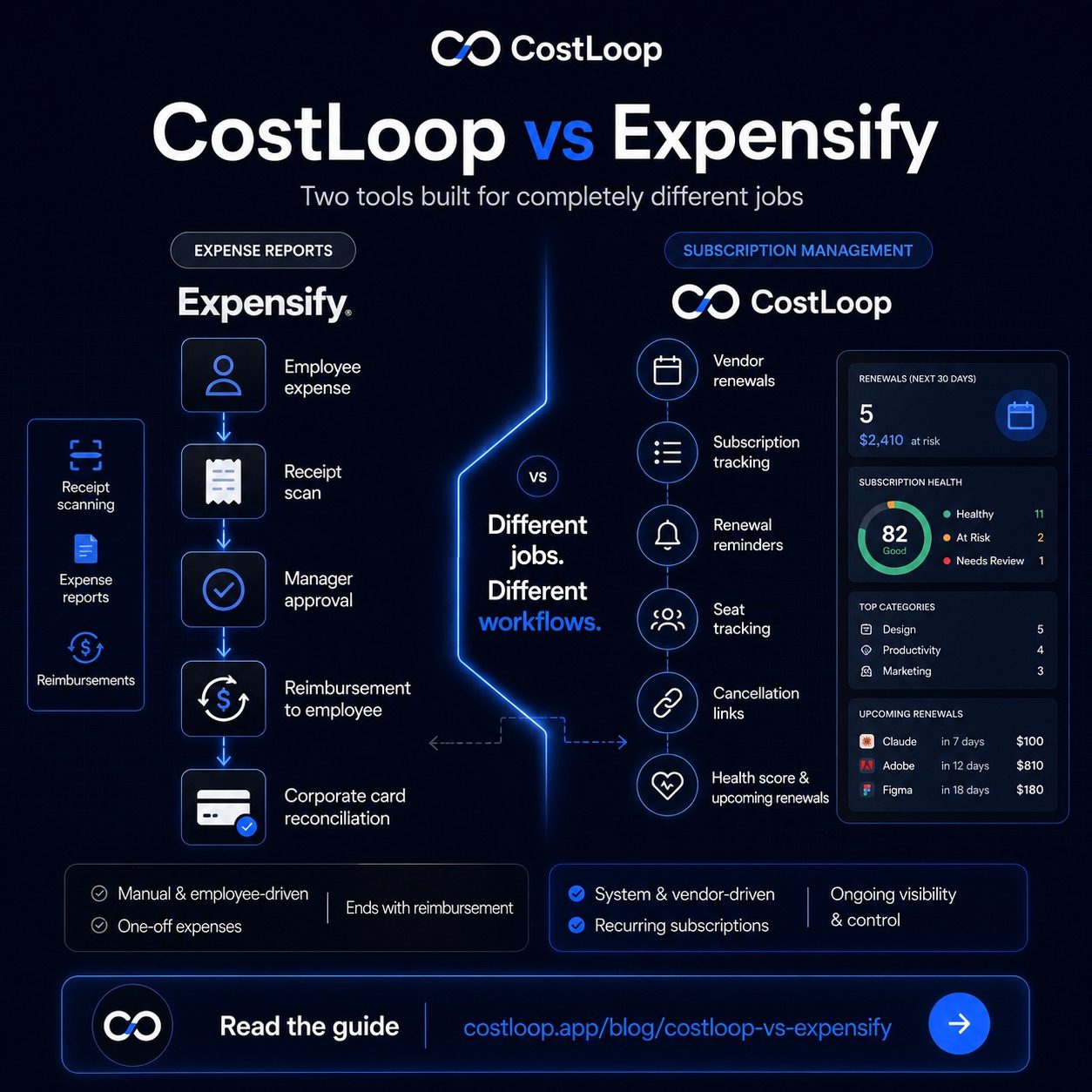
Expensify is an expense management tool - not a subscription tracking or subscription management tool. Its core job is handling the flow of money that employees spend on behalf of the business - meals, travel, supplies, equipment, and yes, sometimes software they purchase for their team. Employees photograph receipts, Expensify reads them with OCR, categorizes the spend, and routes it through an approval workflow so the company can reimburse the employee or reconcile the corporate card.
It's an outbound tool. The money has already moved - an employee paid for something - and Expensify helps process and document that transaction. Features like SmartScan, per diem tracking, and corporate card integration are all built around this core workflow: employee spends money, business reviews and approves.
Expensify is very good at this job. If you have employees submitting expense reports, it simplifies a genuinely painful process.
What CostLoop actually does
CostLoop is a subscription management app giving you complete subscription visibility over the recurring payments your business makes directly - the SaaS tools renewing automatically every month or year, the seats you've assigned, the renewals approaching that you need to decide on.
It's a forward-looking tool built for spend management of your software stack. Instead of recording what already happened, it keeps you ahead of what's about to happen. You know that Figma renews in 12 days. You know you have 3 unused seats in your project management tool. You know your software spend is trending up and your health score has dropped because two subscriptions have no owner assigned. See the full list of CostLoop's features to understand what it tracks.
CostLoop does not handle employee expense reports. It does not scan receipts. It does not manage reimbursements. That's not what it's for.
The core distinction: outbound vs. incoming recurring costs
Here's the clearest way to think about it:
- Expensify handles what your employees spent on behalf of the business. It's about employee-initiated transactions that need to be logged, approved, and reconciled.
- CostLoop handles what your business is being charged automatically by vendors. It's about recurring costs that renew whether you pay attention or not.
Subscription charges for email tools, CRM systems, cloud storage, and other recurring software often charge a company card directly. Expensify may not see them as expenses to manage unless an employee manually submitted them. CostLoop is purpose-built to track exactly this category of recurring software spending.
When you're working through a SaaS audit guide, this distinction becomes critical. Expense reports tell you what individuals spent. Subscription tracking tells you what your business is committed to paying every month, and whether those commitments are still justified.
Where Expensify falls short for subscription tracking
If you try to use Expensify as a subscription manager, you'll hit these walls quickly:
- No renewal alerts. Expensify records transactions after they happen. It doesn't warn you that a $1,200 annual renewal is hitting your card in 7 days.
- No subscription health score. There's no view showing you which tools have no active users, which plans have excess seats, or which renewals are coming up that you should evaluate.
- Not designed for SaaS oversight. Expensify's structure is built around the employee → receipt → approval → reimbursement flow. There's no place to store cancellation links, track seat counts, or flag a subscription as "review before renewal."
- No cost consolidation by tool. If Figma charges your card 12 times across the year, Expensify sees 12 separate transactions - it doesn't group them as one subscription with a running cost.
This is not a criticism of Expensify. It does what it was designed to do very well. But hidden SaaS costs accumulate precisely because businesses assume some other tool - their bank statements, their accounting software, or their expense tool - is handling subscription tracking. Usually, nothing is.
Where CostLoop doesn't replace Expensify
CostLoop doesn't replace Expensify either. Here's what CostLoop is not built for:
- Employee travel expense reports
- Receipt scanning and OCR
- Reimbursement workflows and approval chains
- Corporate card reconciliation
- Per diem tracking
If your business has employees who purchase things and need to be reimbursed, you need something like Expensify (or a similar tool) for that workflow. CostLoop won't help you there.
Feature comparison
| Capability | Expensify | CostLoop |
|---|---|---|
| Employee expense reports | ✓ Core feature | ✗ Not applicable |
| Receipt scanning (OCR) | ✓ SmartScan | ✗ Not applicable |
| Reimbursement workflows | ✓ Built in | ✗ Not applicable |
| Corporate card reconciliation | ✓ Supported | ✗ Not applicable |
| SaaS subscription tracking | ✗ Not designed for this | ✓ Core feature |
| Renewal date alerts | ✗ No | ✓ 7, 14, 30-day email alerts |
| Subscription health score | ✗ No | ✓ 0–100 score with risk breakdown |
| Seat usage tracking | ✗ No | ✓ Active vs paid seats |
| Cancellation link storage | ✗ No | ✓ Per subscription |
| Forward-looking cost view | ✗ Reactive only | ✓ Upcoming renewals dashboard |
Who needs which tool
Here's a clear decision guide:
| Situation | Use Expensify | Use CostLoop |
|---|---|---|
| Employees submit expense claims | Yes | No |
| You need receipt scanning | Yes | No |
| You pay for 10+ SaaS tools | No | Yes |
| You want renewal reminders | No | Yes |
| You want to spot unused seats | No | Yes |
| You want a software health score | No | Yes |
Many small and medium businesses actually need both
This is worth saying directly: most small and medium businesses with employees and a meaningful software stack will benefit from both tools. They don't overlap. They handle completely different financial workflows.
Expensify handles the employee side of the money - what people spent and need to be reimbursed for. CostLoop handles the vendor side - what tools are charging the business automatically and whether those charges are justified.
Neither tool sees the other's domain. If you're using Expensify but not tracking your subscriptions, you have no visibility into one of the fastest-growing cost categories in small and medium business. If you're tracking subscriptions with CostLoop but have no expense management for employees, you're processing reimbursements manually. Both gaps have a real cost.
For a deeper look at what's eating your software budget, the post on SaaS spend optimization covers the practical steps beyond just tracking.
Expense management software for small and medium business: which type do you actually need?
When small and medium business owners search for "expense management software for small and medium business," they are usually looking for one of three things - and the right answer depends on which problem they are actually trying to solve.
Employee expense reports and reimbursements. Employees buy something for work - a flight, a lunch with a client, a software tool for a project - and need to be reimbursed. Expensify is built for this: receipt capture, expense reports, approvals, and reimbursement processing. If your business has employees who submit expense claims, you need this category of tool.
Recurring software subscription tracking. Your business has 15-40 SaaS tools charging a company card automatically every month or year. You need visibility into what everything costs, alerts before renewals fire, and a way to see which tools are being used versus which are just billing. CostLoop is built for this: it is expense management software for small and medium business specifically focused on the recurring software spend that auto-renews without requiring any action from you.
General accounting and bookkeeping. Profit and loss, invoicing, tax preparation, accounts payable. QuickBooks, Xero, or FreshBooks. This category handles the financial record-keeping that both of the above connect to.
Most small and medium businesses with employees and a meaningful software stack need all three. The mistake is trying to make one tool do all three jobs - using accounting software to track subscriptions, or using Expensify to manage SaaS renewals. Each is worse at the other's job than a purpose-built tool. See the expense management software guide for a full breakdown of which tool fits which use case.
What "SaaS expense management" actually means
The term SaaS expense management is worth unpacking, because it sits at the intersection of both tools covered here. In its narrowest sense, it refers to managing the recurring software costs a business pays directly to vendors - the subscriptions and licenses that charge automatically, outside any employee expense workflow. This is CostLoop's domain: tracking what you pay, when it renews, and whether it's being used.
In a broader sense, "SaaS expense management" can refer to any process that controls software spending - including employee-submitted software purchases that flow through Expensify. The key difference is who initiated the transaction. If an employee bought a tool and submitted a receipt, that's an employee expense. If your company card is being charged automatically by a vendor each month, that's a subscription - and it needs dedicated SaaS tracking, not an expense report workflow.
This distinction matters for small and medium businesses because SaaS costs can hide in both places. A complete picture requires both: CostLoop to track recurring vendor charges, and a tool like Expensify to capture employee-initiated software purchases. Neither tool covers the full picture on its own. See the post on how to find all company subscriptions for a step-by-step process that covers both sources.
CostLoop gives you one place to track every recurring software cost, with renewal alerts so you always decide before you're charged. See the full comparison summary or start tracking for free today.
Start free - no credit card neededReal-world scenarios: when you need which tool
A 6-person design agency pays for Adobe Creative Cloud, Figma, Slack, Notion, Loom, Webflow, a project management tool, and half a dozen other tools - all charging the company card automatically. None of those charges go through an expense report. Nobody submits a receipt for Figma renewing. The agency needs CostLoop to track that stack, flag the Webflow annual renewal coming in 11 days, and surface the two Figma seats that haven't been touched in three months. Expensify would never see any of those charges because no employee submitted them.
That same agency sends employees to a client offsite. Flights, hotels, client dinners, printed materials - all submitted by employees as expense claims. The agency needs Expensify (or a similar tool) for that workflow. CostLoop won't help with the hotel receipt or the client dinner. These are genuinely separate jobs, and the mistake is assuming one tool covers both. A freelancer with no employees and 15 SaaS tools has no use for Expensify and a clear use for CostLoop. A 50-person company with lots of employee travel and only 3 software subscriptions has the opposite situation. Most businesses with employees and a real software stack need both - and at no point do the tools step on each other's toes.
Detailed feature comparison: CostLoop vs Expensify
| Feature / Dimension | Expensify | CostLoop |
|---|---|---|
| Primary purpose | Employee expense reports and reimbursements | SaaS subscription tracking and management |
| Subscription / renewal tracking | ✗ Not designed for this | ✓ Core feature - renewal calendar per tool |
| Renewal reminders | ✗ No | ✓ Email alerts at 7, 14, and 30 days |
| Receipt / expense capture | ✓ SmartScan OCR, mobile app | ✗ Not applicable |
| Employee reimbursements | ✓ Full reimbursement workflow | ✗ Not applicable |
| SaaS cost dashboard | ✗ No dedicated view | ✓ Full dashboard with health score and renewal calendar |
| Pricing - free tier | ⚠ Limited free plan available | ✓ Free plan with core features |
| Pricing - paid tier | Starts around $5-20/user/month depending on plan | See CostLoop pricing for current plans |
| Bank / card connection required | ⚠ Required for corporate card reconciliation | ✗ No - manual entry works fine |
| Seat usage tracking | ✗ No | ✓ Active vs. paid seats per subscription |
| Cancellation link storage | ✗ No | ✓ One stored link per tool |
Verdict: which tool do you actually need?
The answer is almost never "just one." Here is a clear breakdown based on your situation:
- Use Expensify if you have employees who spend money on behalf of the business and need reimbursements, approval workflows, receipt capture, or corporate card reconciliation. Expensify is excellent at this job and has years of polish in the employee expense workflow.
- Use CostLoop if your business pays for recurring SaaS tools and you need to know what everything costs, when it renews, whether you're overpaying for unused seats, and what your overall software spend health looks like. CostLoop is purpose-built for exactly this job - see all CostLoop features or check pricing to get started.
- Use both if you have employees submitting expenses AND a meaningful software stack with auto-renewing subscriptions. Most small and medium businesses with more than 5 employees and more than 10 SaaS tools are in this situation. The tools don't overlap - they handle separate financial workflows.
- Neither replaces the other. Expensify cannot manage your SaaS renewals. CostLoop cannot handle reimbursements. Trying to stretch either tool into the other's domain will leave real gaps in your financial oversight.
If you are only looking for subscription tracking and don't have an employee expense problem yet, CostLoop is the simpler, faster starting point. You can add expense management later if your team grows to a size that needs it. Start with the guide to finding all your company subscriptions to get a baseline before choosing tools.
Frequently asked questions
Can Expensify track SaaS subscriptions?
No. Expensify is built for employee expense reports - receipts, reimbursements, and corporate card reconciliation. It won't send renewal alerts, track seat usage, or give you a health score on your software stack. Those are the jobs CostLoop was built for.
Is CostLoop a replacement for Expensify?
No. They solve different problems. Expensify handles employee expense reports and reimbursements. CostLoop tracks your recurring software costs, renewal dates, and subscription health. Most small and medium businesses that need both will use both.
What's the difference between expense tracking and subscription tracking?
Expense tracking captures what employees spent on behalf of the business so they can be reimbursed or reconciled. Subscription tracking monitors recurring costs charged directly to the business - the SaaS tools renewing automatically every month or year, the seats you're paying for, and the renewals approaching that you need to decide on.
Do I need both CostLoop and Expensify?
Many small and medium businesses use both: Expensify for employee expense claims and reimbursements, and CostLoop for monitoring software subscriptions, tracking renewal dates, and managing their SaaS stack. They don't overlap - each handles a distinct financial workflow.
What is SaaS expense management?
SaaS expense management refers to controlling and optimizing the recurring software costs a business pays directly to vendors - subscriptions, license fees, and automatic renewals. It's distinct from employee expense management (handled by tools like Expensify) because the money flows differently: vendors charge the company card automatically, outside any reimbursement workflow. CostLoop is purpose-built for SaaS expense management: tracking what you pay, when it renews, and whether each tool is still earning its cost.