Most SaaS subscriptions renew automatically. The charge appears again, and because it looks familiar, it may not feel like a decision. That is how software budgets quietly bloat over time. Measuring SaaS ROI before each renewal - not after - is the fix: a simple framework for asking whether the tool is still worth the cost.
This guide gives you that framework - a simple ROI check you can apply to any SaaS tool in about 15 minutes. No complicated spreadsheets. No consultants. Just honest questions with honest answers. For a broader starting point, the SaaS audit guide walks through evaluating your entire stack at once.
The basic ROI formula for SaaS
ROI for a software tool comes down to one comparison: the value the tool delivers versus what it costs. If value exceeds cost, keep it. If cost exceeds value - or if you can't even estimate the value - that's your answer.
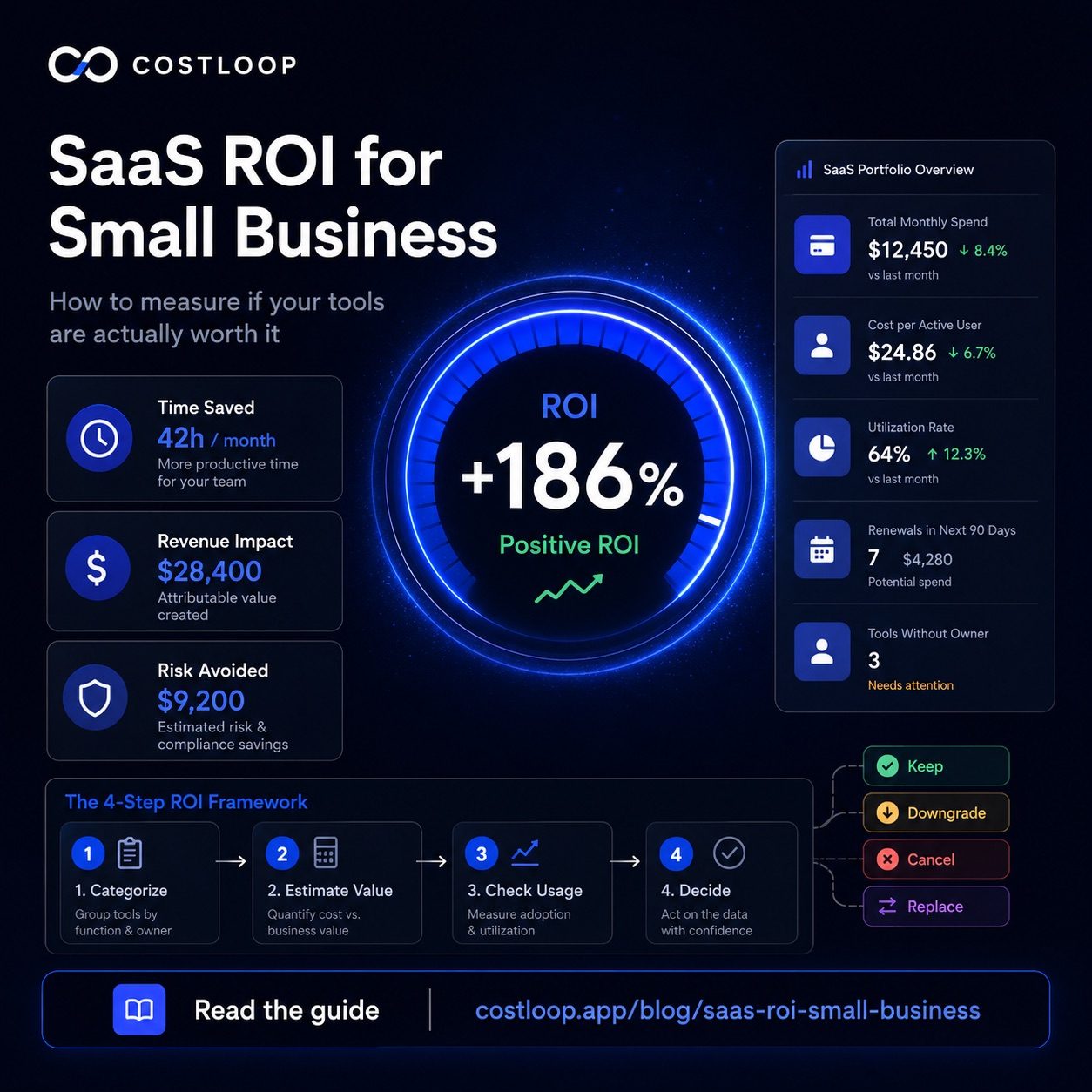
Value takes three forms for most small and medium business tools. Time saved is the most common: the tool does something that would otherwise take hours of manual work. Calculate this as hours saved per month × the average hourly cost of the person doing that work. Revenue generated is direct: some tools - CRMs, email marketing platforms, proposal tools - can be tied to specific deals or conversions. Risk avoided is harder to quantify but real: compliance tools, security software, backup systems protect against costs that haven't happened yet but would be significant if they did.
A simple example: your email marketing tool costs $49/month. It saves your marketing person 4 hours of manual email work per month. At $35/hour, that's $140 of time saved. ROI = ($140 - $49) / $49 × 100% = 186%. Easy keep. A SaaS ROI calculator can help you work through more complex scenarios with multiple users and variable usage.
Step 1: Categorize the tool
Before you calculate anything, decide what kind of tool you're actually looking at. Different categories have different standards for what "worth keeping" looks like.
Time-saver: Replaces manual effort. Evaluate by hours saved × hourly cost. Should have clear daily or weekly usage. Revenue generator: CRM, sales tool, marketing platform. Evaluate by attributable revenue - what closed deals or conversions ran through this tool? Risk reducer: Security, backup, compliance. Evaluate by the cost of the risk it prevents. A $20/month backup tool that would prevent a $10,000 data loss is worth it even if nobody opens it. Vanity tool: Looks good to have, was exciting to buy, but doesn't clearly save time or make money. These are the most common candidates for cancellation.
Step 2: Estimate the monthly value
Be specific. "It helps us be more organized" is not a value estimate. "It saves our project manager 3 hours per week on status updates" is. If you can't get specific, the tool probably isn't delivering measurable value - which is itself a signal worth paying attention to.
For time-saver tools: pick the primary user, estimate how many hours per month the tool saves them, multiply by their hourly cost. If multiple people use it, add them up. For revenue tools: look at the last 90 days and estimate how much revenue touched this tool in some direct way. For risk tools: estimate the likelihood and cost of the risk occurring annually, divide by 12 for a monthly figure. Compare that to the monthly subscription cost.
The total cost of ownership approach to SaaS ROI also factors in time spent administering and learning the tool - worth considering for complex platforms that require ongoing setup and maintenance.
Step 3: Check actual usage
Even if you can construct a theoretical value estimate, actual usage tells the real story. Log into the admin panel of every tool you're evaluating and look at three things: last login dates per user, active vs. inactive users, and which features are being used.
Last login dates cut through any amount of theorizing. If your project manager says the tool saves them 3 hours a week but hasn't logged in for 6 weeks, one of those claims is wrong. Inactive users on paid seats are straightforward waste - every seat you're paying for that someone hasn't used in 60 days is a candidate for removal. For a deeper look at this specific problem, the guide on unused software seats covers how to find and reclaim them systematically.
Step 4: Compare cost to value and decide
You now have a cost number and a value estimate. The comparison produces one of four outcomes:
| Situation | Decision | Action |
|---|---|---|
| Value clearly exceeds cost, team uses it regularly | Keep | Note renewal date, move on |
| Valuable but paying for more than you use | Downgrade | Find a cheaper plan, switch at renewal |
| Low usage, can't name clear benefit, duplicates another tool | Cancel | Cancel now, don't wait for renewal |
| Need the function, but this tool isn't the right fit | Replace | Find better option, then cancel this one |
Red flags that mean a tool probably isn't worth it
Some signals cut through any ROI analysis. If any of these apply, the tool is a strong cancel candidate:
Nobody logs in regularly. The team uses workarounds instead of the tool. You're on a paid tier but could accomplish everything on the free plan. Half the team doesn't know the tool exists. The last time you can point to a concrete win from this tool was more than two months ago. You originally signed up for a specific project and that project ended. The vendor raised prices at renewal and you didn't notice or push back.
These aren't theoretical risk factors - they're direct evidence that the tool isn't generating value at the level being charged.
Green flags that mean a tool is clearly worth keeping
Equally, some signals indicate a tool is pulling its weight without needing a deep analysis. The team uses it daily without prompting. It's embedded in a core workflow - removing it would require meaningful process changes. You've already tried cancelling it and felt the absence. You could name three specific outcomes from the past month that happened because of this tool.
Tools with all of those green flags don't need a lot of scrutiny. Just make sure you're on the right plan size - overpaying for unused seats is still waste even on a genuinely useful tool.
How often to do this
For most tools, a proper ROI check once a year - following the SaaS audit guide - is enough. For tools costing over $100/month, review quarterly. For the most expensive tools in your stack, check monthly - the savings from catching one underperforming $200/month tool a month earlier pays for the 15 minutes it takes.
The bigger picture is setting a SaaS budget for small and medium business that accounts for what each tool should deliver, so ROI checks become a comparison against a target rather than a from-scratch calculation each time.
For tools you're on the fence about, the guide on how to cut SaaS costs covers the negotiation approach - many vendors will offer a discount or plan adjustment when you bring usage data to the conversation at renewal time.
CostLoop's SaaS cost management health score flags tools that show signs of low usage before the renewal sneaks up on you. Instead of making a snap decision at billing time, you get the signal weeks ahead. See how it works on the features page, or check pricing to see what fits your stack size.
Start free - no credit card neededKey metrics for a SaaS business: the ones that actually matter for small teams
When people search for "key metrics SaaS business," they usually find content aimed at companies selling SaaS - MRR, churn rate, NPS. That is useful if you are building a SaaS product. If you are a small and medium business using SaaS tools, the relevant metrics are different. Here are the six that drive real decisions.
1. Total monthly SaaS spend. The baseline. If you do not know this number off the top of your head, that is the first problem to fix.
2. SaaS spend as a percentage of revenue or operating costs. Track the ratio over time and investigate sudden increases, duplicate categories, and tools without owners.
3. Cost per active user per tool. Divide each tool's monthly cost by the number of people who logged in that month. This number tells you what you are actually paying per person getting value - not per seat purchased.
4. Tool utilization rate. Compare paid seats with active users. Low usage means you may be paying for seats that are not earning their cost.
5. Renewal spend in the next 90 days. What decisions are coming up? Knowing this in advance lets you evaluate rather than auto-renew.
6. Tools without a named owner. Every tool without a named owner is an accountability gap. These are the subscriptions most likely to become zombies. For a broader view of how these metrics fit into operational discipline, see the guide on SaaS operations for small and medium businesses.
SaaS metrics dashboard: what you need vs. what's overkill
For most small and medium businesses, a SaaS metrics dashboard does not need to be a real dashboard. The six metrics above can be tracked in a focused subscription tracker - no Tableau integration, no data warehouse, no custom SQL required.
What a basic SaaS metrics dashboard should show: total spend by month and by year, spend broken down by category, upcoming renewals in the next 30 and 90 days, and tools flagged as underutilized. That is the complete decision-making surface for a 5-50 person team.
CostLoop shows all of these without requiring any setup beyond adding your subscriptions. Complex analytics platforms are built for enterprises with hundreds of tools and dedicated operations teams - the decisions a small and medium business needs to make do not require that level of analysis. For more on managing software spend holistically, see the guide on SaaS spend management.
Frequently asked questions
How do you calculate software ROI on a SaaS tool?
ROI compares the value delivered with the cost. Value can be time saved, revenue generated, or risk reduced. For a hypothetical time-saving tool, estimate the hours saved, multiply by the relevant labor cost, and compare that value with the subscription cost. This value assessment works for any subscription category.
What makes a SaaS tool worth keeping? Signs of genuine tool effectiveness
Regular usage by the team, clear time savings or revenue contribution, no cheaper alternative that does the same job, and active use of the features you're paying for. Tool effectiveness is easiest to judge through productivity metrics like hours saved or output per user per month.
What are signs a SaaS subscription is not worth it?
Nobody logs in regularly, you can't name a concrete benefit from the past month, it duplicates another tool, you're on a paid tier but only use free features, or you forgot you were paying for it.
How often should you review SaaS ROI?
Do a full review annually during your SaaS audit, and a lighter check quarterly. For expensive tools (over $100/month), review monthly.
What are the key metrics for a SaaS business?
For a business using SaaS tools (not selling them), the six metrics that drive decisions are: total monthly SaaS spend, SaaS spend as a percentage of revenue or operating costs, cost per active user per tool, paid-seat usage, renewal spend in the next 90 days, and number of tools without a named owner. These metrics tell you where waste is building before it becomes painful.
Do I need a SaaS metrics dashboard?
For most small and medium businesses, no - a simple subscription tracker that shows total spend, upcoming renewals, and utilization covers everything you need to make good decisions. A full dashboard becomes useful when the volume of tools, users, and renewal decisions justifies the added complexity. For smaller teams, the overhead of maintaining a dashboard may exceed the value it provides.