When a spreadsheet is actually the right choice
A subscription management app is a purpose-built tool, and it is not the right choice for everyone. A spreadsheet is not the wrong default - there are real situations where it is genuinely sufficient:
- You are a freelancer or solo operator with three to five tools. At that scale, a simple list in Google Sheets or Excel gives you everything you need. You know your tools well, you see the charges, and the overhead of a dedicated app is not worth it.
- Your subscriptions are all monthly. Monthly billing means you see each charge every 30 days. There are no long gaps between charges where something can slip past you. A list with no reminders still works because you are effectively reminded by the charge itself.
- You are doing a one-time audit. If your goal is to document everything you currently pay for, a spreadsheet is a perfectly reasonable place to dump that information. You do not need a purpose-built tool to create an initial inventory.
- It is just you and you already check it regularly. A system that depends on one person checking it manually works fine when that person actually does it. The problem arrives when life gets busy, someone else is involved, or the list grows.
If you recognize yourself in any of the above, there is no reason to add more complexity. Start with a spreadsheet and move on when it stops being enough. For more on how to track software subscriptions - whether you use a spreadsheet or a subscription management app - that guide covers the full process.
Where spreadsheets start to struggle
The cracks appear gradually. You do not notice the spreadsheet failing - you just notice that a renewal happened before you reviewed it, or that the information in the sheet is out of date, or that nobody knows whose job it is to check it.
Here are the specific situations where a spreadsheet becomes the weak point:
More than ten subscriptions
Below ten tools, a manually maintained list is manageable. Above ten, the cognitive load of remembering to check it increases, the chance of something being missing increases, and the renewal dates start to blur together. The amount of work required to keep the sheet accurate grows faster than the list itself.
Annual renewals mixed with monthly ones
Monthly subscriptions are hard to forget because they show up every 30 days. Annual renewals are the problem. You pay once, and then the charge comes back 12 months later. A spreadsheet has the date recorded, but it does not watch that date. Nobody gets notified. The renewal lands and either you catch it in time or you do not.
A realistic example: a design team signs up for an annual plan at $400 per year. The tool is useful for three months, then the team switches to a different workflow and stops using it. The subscription stays active. Nobody checks the spreadsheet in the window before renewal. The next year's charge hits without anyone making a decision. By the time it is noticed, the refund window has closed.
This is not unusual. Annual renewals on tools that have drifted out of use account for a significant portion of the waste most businesses find when they do a thorough audit.
Team use: subscription management app vs spreadsheet for shared access
A shared spreadsheet can work for a team, but it creates problems that do not exist for solo users. Multiple people editing the same sheet without version control leads to entries being overwritten or deleted. There is no notification when someone changes something. There is no concept of ownership - a row in a spreadsheet does not know who is responsible for the tool it represents. When the person who added a subscription leaves, the knowledge of what it is for and whether to renew it often leaves with them. A subscription management app solves this with role-based access, a clear software inventory per tool, and automated tracking of who owns each record - none of which a spreadsheet can replicate.
When documents need to live with subscriptions
Contracts, invoices, cancellation confirmation emails, order receipts - these documents belong with the subscription they relate to, but there is nowhere to put them in a spreadsheet. They end up scattered across email threads, shared drives, and someone's local downloads folder. When you need to find the contract for a tool you are about to cancel, you have to search for it separately.
CostLoop stores your renewal dates, cancellation links, and documents in one place - and sends you reminders before anything renews. No formulas, no manual checking.
Start free - no credit card neededWhat a dedicated subscription tracker does differently
A purpose-built software subscription tracker is designed around the specific problems that spreadsheets cannot solve passively. The key differences:
- Automatic renewal reminders. You record the renewal date once. The tool watches it and sends you an email before the charge arrives. No manual checking, no depending on someone remembering to look.
- Cancellation links stored with each record. When you need to cancel, the link is already there. You are not hunting through the vendor's help center under time pressure.
- Document storage per subscription. Invoices, contracts, and confirmation emails attach directly to the subscription record they relate to. Everything is in one place when you need it.
- Ownership assigned per subscription. Every tool has a named owner. When someone changes roles or leaves, the subscription does not become an orphan - it is visible, flagged, and attributable.
- Status tracking through a subscription's lifecycle. Active, trial, under review, cancelled - a dedicated tracker maintains a status that updates and is visible to the team. A spreadsheet can have a status column, but it does not enforce it or surface changes.
- Spend visibility across all subscriptions. See your total monthly and annual software cost in one view, broken down by category, status, or billing cycle. Useful for planning, budgeting, and finding patterns.
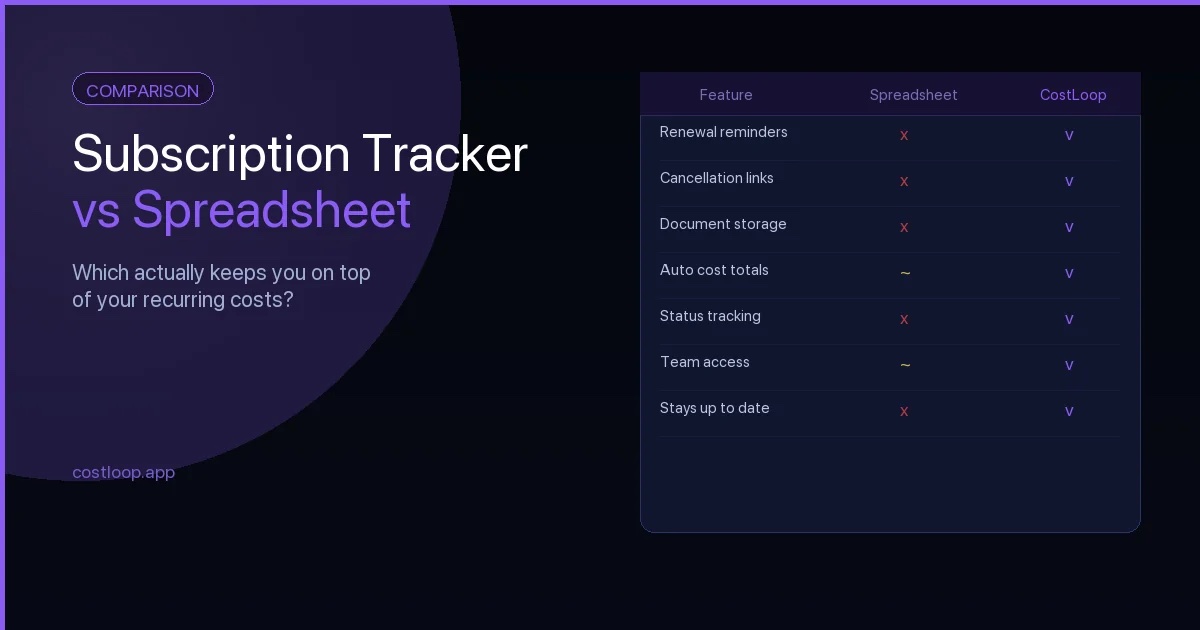
Side-by-side comparison
Here is how the two approaches compare on the things that matter most for subscription tracking:
| Feature | Spreadsheet | Dedicated tracker |
|---|---|---|
| Renewal reminders | No - requires manual checking | Yes - automatic email alerts before renewal |
| Cancellation link storage | Text column only - easy to miss | Stored per subscription, accessible when needed |
| Document storage | Not possible - files live elsewhere | Invoices and contracts attach to each record |
| Team access | Shared file - no version control or change log | Role-based access with full change history |
| Automatic alerts | None built in | Email notifications triggered by dates |
| Cost history | Only what you manually record | Tracked over time per subscription |
| Mobile access | Basic - depends on the spreadsheet app | Optimized for mobile use |
| Setup time | Fast for basic list; complex if you add formulas | Minutes to add your first subscription |
| Ownership tracking | A column - no enforcement or visibility | Assigned owner per subscription, surfaced in views |
| Ongoing maintenance | High - requires regular manual updates to stay accurate | Low - reminders and status updates reduce manual work |
A real scenario where the spreadsheet falls short
Consider a small agency with 15 active software subscriptions. They have been tracking everything in a shared Google Sheet since they started - tool name, cost, renewal date, and a notes column. If you want to go deeper on how to structure a subscription management spreadsheet before deciding whether to switch, that guide covers the columns and formulas worth using. It worked fine for the first year.
In the second year, the person who owned the sheet changed roles. The sheet did not get updated as consistently. A project management tool that the team had moved away from was still in the list as "active" with an annual renewal coming up. Nobody was watching the renewal date. Nobody received a reminder. The charge - let us say $480 for an annual plan - hit the company card without anyone making a decision to renew.
By the time anyone noticed, they were two weeks past the charge. The vendor's refund window was 7 days. They were stuck with a year's cost for a tool they had not used in months.
This is not a story about negligence. It is a story about a system that worked well at a small scale and then stopped working when the situation changed. The spreadsheet did not fail dramatically - it just did not do the thing that would have prevented the problem, which was watching the date and telling someone.
How to decide which one you need right now
The honest answer is that neither tool is universally better. The right choice depends on your situation today:
- Fewer than 5 subscriptions, solo use, mostly monthly billing: a spreadsheet is probably enough. Start there.
- 10 or more subscriptions, or any annual renewals over a few hundred dollars a year: the cost of a missed renewal almost certainly exceeds the cost of a dedicated tracker. It is worth switching.
- A team with distributed ownership of tools: a spreadsheet has no way to surface ownership gaps or notify anyone automatically. A tracker is more reliable.
- You have already been surprised by a renewal you did not expect: that is the clearest signal. The current system did not catch it, and it will happen again unless something changes.
If you are not sure, the test is simple: when did you last check your subscription spreadsheet? If the honest answer is "I do not remember" or "not recently", the system is not working.
Why the alternative to a spreadsheet is not complicated
Some people assume switching from a spreadsheet to a dedicated subscription management app is a significant project. It is not. A spreadsheet alternative like CostLoop lets you add your subscriptions one by one in a few minutes each. You set the renewal date, assign an owner, paste in the cancellation link, and you are done for that subscription.
From that point, the tool handles reminders. You do not need to check a sheet. You get an email before each renewal with enough time to decide what to do. The record stays where it is until something changes.
The comparison table above makes the differences look large, but the day-to-day reality is simple: one approach requires you to check something manually, and the other sends you a message when you need to act. For most businesses past a certain size, the second approach is just less work. If you are weighing specific tools, the CostLoop vs Google Sheets comparison goes deeper on what a dedicated tracker does that a spreadsheet cannot, and the CostLoop vs Notion comparison covers the same ground for teams already using Notion. If you prefer a feature-level side-by-side, the page to compare CostLoop with Google Sheets has the structured breakdown, and the page to compare CostLoop with Notion covers the same ground for teams using a Notion database instead.
The best SaaS management software for small and medium business: what the comparison really comes down to
When comparing a subscription tracker vs. spreadsheet, you are really answering: which gives you better SaaS management? Not just tracking, but management - ownership, accountability, renewal decisions, and spend control.
The best SaaS management software for small and medium business is the one that gives you all five core capabilities without requiring IT resources or enterprise budget: a complete inventory, automatic renewal alerts, owner assignment per tool, real-time cost visibility, and support for quarterly review decisions. Spreadsheets give you inventory and manual cost tracking. They fail at alerts, accountability, and proactive review support - the three capabilities that actually prevent wasted spend. These spreadsheet limitations become most visible at scale, which is exactly when a subscription dashboard with automated tracking pays for itself.
Enterprise SaaS management tools (Zylo, Torii, Zluri) are built for IT teams managing large software portfolios. For a small business with a focused subscription stack, a lighter subscription tracker like CostLoop covers the core tracking, owner, renewal, and cost workflows without enterprise pricing or complexity. See the pricing page for plan details, or the full feature comparison at the best subscription tracker for small and medium business guide.