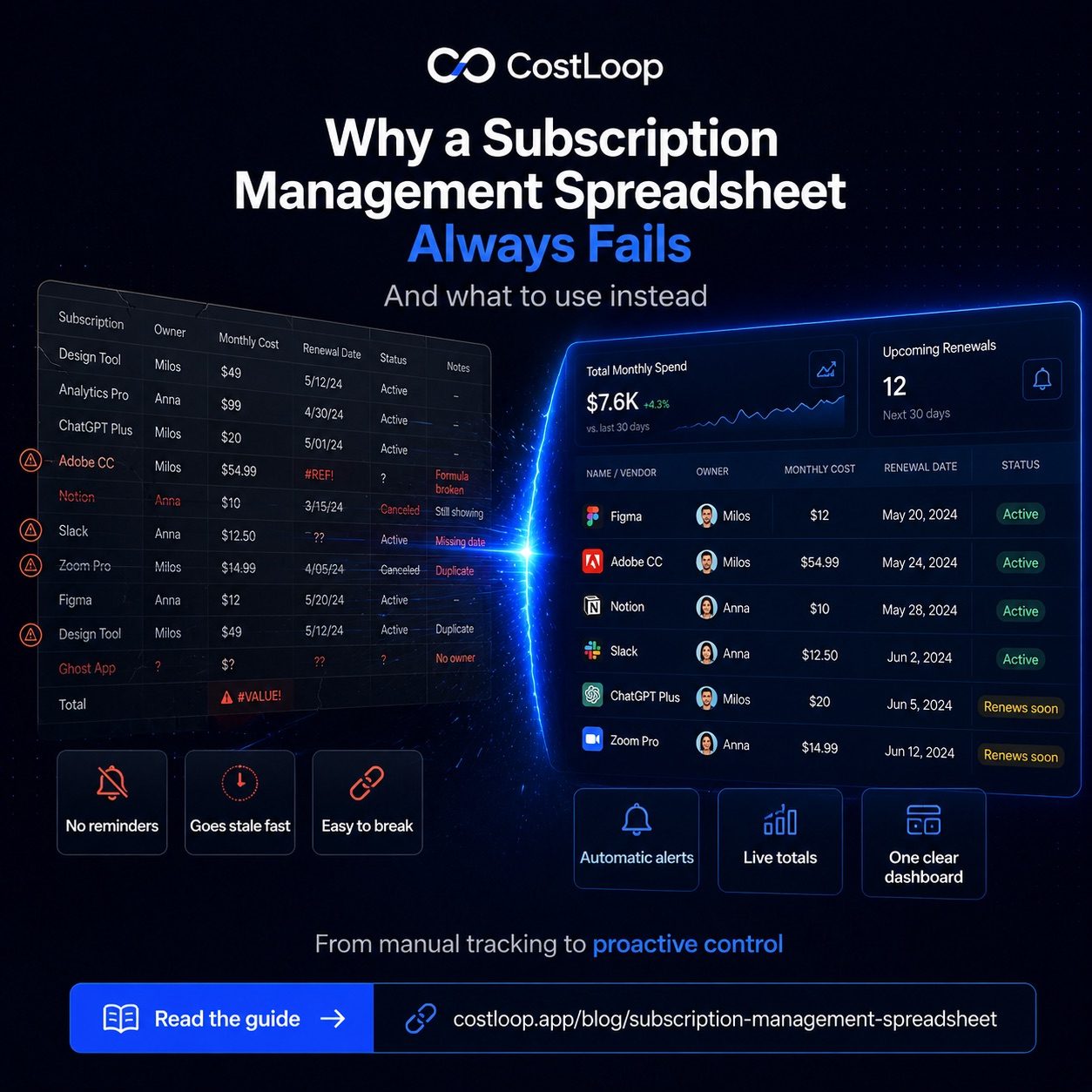
A subscription management spreadsheet is a sensible starting point. It's free, it works immediately, and for the first few months it does the job well. Many people run one successfully - they know their tools, they keep the list reasonably current, and they get value from having everything in one place. There's nothing wrong with starting here. The problem is that spreadsheets were designed for data analysis, not for acting as subscription management software that tracks a living, changing list of subscriptions with proactive reminders. And over time, that design mismatch shows up in specific, predictable ways.
Failure mode 1: someone forgets to update it after cancelling
This is the most common failure, and it happens to almost everyone who uses a spreadsheet for subscriptions. You cancel a tool - maybe Asana, because your team has migrated to Notion - but the act of cancelling is separate from the act of updating the spreadsheet. One requires logging into the billing portal; the other requires remembering to go update a different document. These two things don't happen at the same time. They should, but they don't.
A month later, the spreadsheet says you're paying $50/month for Asana. You're not. Your actual monthly total is $50 lower than what the spreadsheet shows. Now you've lost confidence in the data. You start treating the spreadsheet as "roughly right" rather than authoritative, which is the moment it stops functioning as a management tool and becomes an old list you glance at occasionally. From here it degrades further until you stop looking at it at all.
Failure mode 2: no reminders when renewals are coming
A spreadsheet contains data. It does not act on that data. There's no mechanism built into a spreadsheet that watches your renewal dates and sends you an alert seven, fourteen, or thirty days in advance. You'd need to manually check it weekly, cross-reference today's date against every renewal date, and then act on whatever you find. Essentially nobody does this reliably. It feels like it should be easy, but it requires consistent, proactive effort that competes with everything else demanding your attention.
Annual subscriptions are where this hurts most. You paid $299 for a year of something and moved on. Eleven months later, the charge appears and you have no idea it was coming. Had you known two weeks in advance, you could have decided whether to renew or cancel. Instead, the decision was made for you - by inertia and the absence of a reminder system. This is why forgotten subscription charges accumulate so predictably for businesses using spreadsheets.
Failure mode 3: shared sheets get edited incorrectly
Solo operators have a simpler version of this problem - the only person editing the spreadsheet is them, so at least you can't blame anyone else for errors. But even solo, it's easy to accidentally overwrite a formula, paste data into the wrong column, or delete a row you meant to edit. Google Sheets and Excel both lack the guardrails that a purpose-built tool would have.
For small teams, the problem compounds. Two people maintain the sheet. One edits it in a way that breaks the SUM formula. Someone else adds a tool in the wrong format. A row gets duplicated. Nobody notices until the total looks wrong, and by then untangling what happened is more work than starting over. Version history helps, but it doesn't prevent errors from happening, and most people don't check it proactively. These collaboration issues - multiple editors with no guardrails - are one of the core spreadsheet limitations that purpose-built subscription management software eliminates by design.
Failure mode 4: annual subscriptions get lost in the noise
Annual billing is common for tools you commit to - cloud storage, project management, email marketing. Paying annually can be cheaper than monthly billing. But annual subscriptions create a specific tracking problem: they appear once on your statement and then disappear for twelve months. In a spreadsheet, they look the same as any other row. There's nothing visually distinguishing a $299 annual charge from a $25 monthly charge until you look at the cycle column, which most people don't do regularly.
The result is that annual renewals tend to be the ones that catch you off guard. The spreadsheet says "Jun 3" in a renewal date column, but June 3 is in three weeks and there's nothing reminding you of that fact. You'll see it if you look. But you probably won't look. The SaaS renewal tracking problem is genuinely harder with annual subscriptions, and spreadsheets make it harder still because they offer no proactive alerting.
Failure mode 5: no clear total or useful search
Even a well-maintained spreadsheet makes it harder than it should be to answer basic questions: "What are we spending on communication tools?" "How much do we spend annually on tools nobody on the design team uses?" "Which subscriptions renew in the next 30 days?" These queries require filtering, formulas, or pivot tables. They're doable, but they're friction - and the manual tracking required to keep subscription data current adds more friction on top. Most people skip these checks because the effort isn't worth it for a quick review.
The result is that you have a list of subscriptions but no real visibility into your spending patterns. You know individual numbers but not the aggregate picture. A well-designed subscription tracker presents this information as the default view, not as a custom query you have to build.
What a dedicated tool does differently
A purpose-built subscription tracker isn't a fancier spreadsheet. It's a fundamentally different design. The core difference is that subscription management software acts on data instead of just storing it. When a renewal date is approaching, it fires an alert - you don't have to check. When you add or remove a subscription, the total updates automatically. When you want to see what you're spending by category, it's one click, not a formula.
This isn't about features for their own sake. It's about eliminating the maintenance overhead that makes spreadsheets fail. The reason spreadsheets go stale is that keeping them accurate requires effort every time something changes. A subscription tracker designed around this workflow reduces that effort to the minimum: add when you subscribe, remove when you cancel. Everything else is automatic.
CostLoop is a subscription tracker that is free to start - add your subscriptions, set renewal alerts, and get a live total on your dashboard. No formula-building required.
Start free - no credit card neededSpreadsheet vs CostLoop: side by side
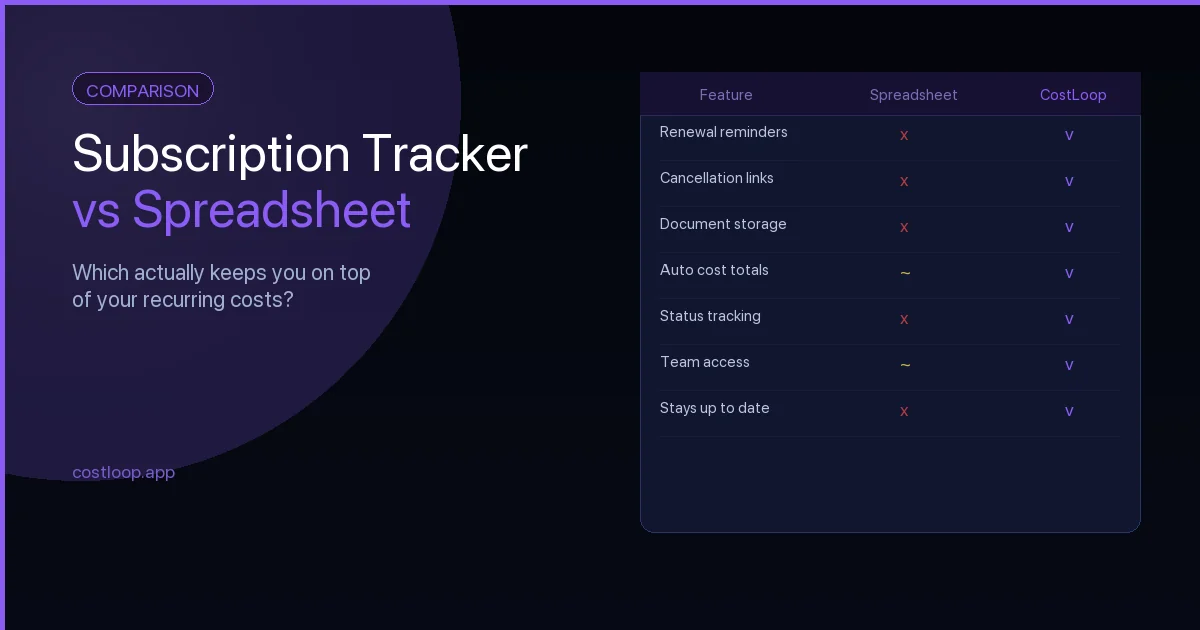
Here's a direct comparison across the criteria that determine whether a subscription management system actually holds up over time:
| Criteria | Spreadsheet | CostLoop |
|---|---|---|
| Renewal alerts | None (manual) | Automatic, configurable |
| Auto-totals | Formula required | Always calculated |
| Team access | Error-prone sharing | Controlled access |
| Search across subscriptions | Basic Ctrl+F | Full search + filters |
| Mobile access | Awkward | Designed for it |
| Setup time | 20–30 min | 10–20 min |
| Ongoing maintenance | High (easy to drift) | Low (add / remove only) |
| Historical tracking | Manual versions | Built in |
The honest case for still using a spreadsheet
There are scenarios where a spreadsheet genuinely makes sense. If you have only 3–5 subscriptions and they barely change, the overhead of a dedicated tool may not be worth it. If you have a strong existing habit of reviewing your spreadsheet weekly - and you actually stick to it - it can work well. And if your subscriptions are spread across a complex business with many cost centers that require custom categorization, a spreadsheet's flexibility might be more useful than a purpose-built tool's constraints.
For most small and medium businesses and freelancers, though, the failure modes described here aren't hypothetical. They're what consistently happens. The spreadsheet that started clean becomes the spreadsheet that's noticeably out of date, sends no alerts, and eventually gets abandoned in favor of "checking the credit card statement." That's not a system - that's wishful thinking.
CostLoop is free to start, which removes the financial barrier to trying it. If you've been running subscriptions on a spreadsheet and you've felt it slipping, the subscription tracker vs spreadsheet comparison might help you decide whether a switch makes sense. And the SaaS audit guide is a good place to start if you want to clean up your list before migrating it anywhere.
Tracking subscriptions doesn't need to be a burden. It just needs to be a system that works without constant manual attention - and that's exactly what a spreadsheet was never designed to be. Try CostLoop free and see what subscription visibility actually feels like when you're not maintaining it manually.
When a subscription management spreadsheet isn't enough anymore
A spreadsheet works until it stops working. The signals it is time to switch are specific: you have missed a renewal that the spreadsheet had recorded but nobody checked, you are spending more time updating the sheet than the sheet saves you, multiple people add tools and nobody updates the record consistently, or you have 20+ subscriptions and cannot see at a glance what is coming up in the next 30 days.
The alternative is not complex enterprise software. It is an online subscription management app that tracks renewals automatically and sends reminders without requiring anyone to check. The job it does is narrow but important: watch the dates, alert you before charges hit, and keep the list accurate without ongoing maintenance overhead. See the full comparison in the best subscription tracker guide for small and medium businesses.
Online subscription management software: what it does that a spreadsheet can't
Four things spreadsheets fundamentally cannot do: send automatic renewal reminders (the most important function, and the one that prevents missed charges), show you real-time total spend as you add or remove tools, allow multiple team members to update simultaneously without version conflicts, and store cancellation links per tool so you can act immediately when a renewal approaches. For a structured side-by-side, the subscription tracker vs spreadsheet comparison covers the feature gaps in detail.
An online subscription manager does all four automatically from the moment you add your first subscription. You do not build formulas, you do not set up calendar reminders manually, and you do not chase team members to update a shared file. The system works passively - which is exactly the behavior a spreadsheet cannot replicate. For a detailed breakdown of the specific differences, the subscription tracker vs spreadsheet comparison covers each point in depth.