Last pricing verification: September 3, 2026
Quick answer
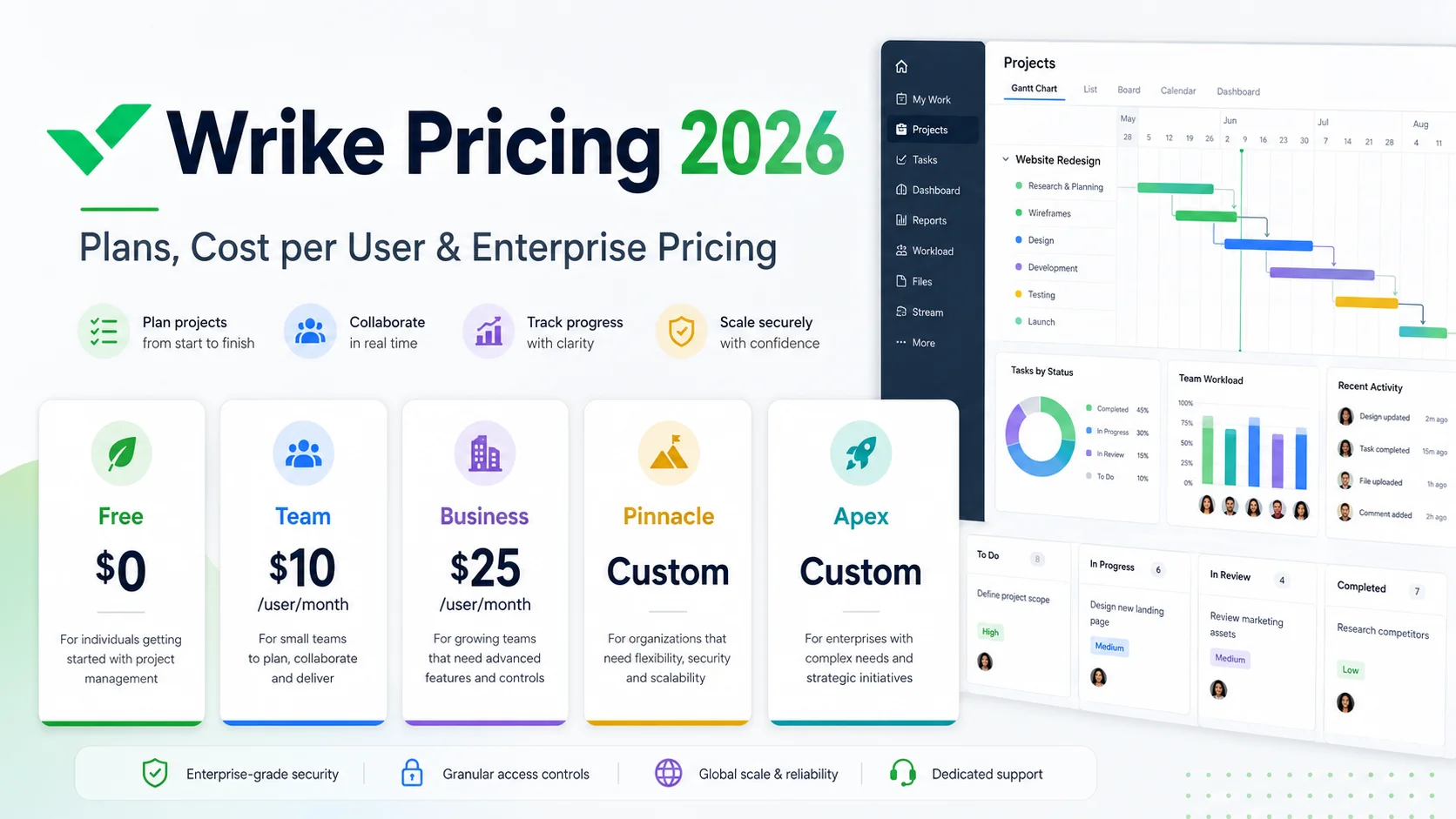
If you are searching wrike cost, the current 2026 U.S. pricing is straightforward at the lower tiers: Wrike Team is $10 per user per month and Wrike Business is $25 per user per month. Those amounts are monthly equivalents billed on an annual per-user basis. Wrike also has a Free plan at $0.
The enterprise side is less transparent. Wrike no longer shows one current plan simply called "Enterprise" in its main 2026 pricing table. The current quote-led tiers are Pinnacle and Apex, and both require contacting Wrike for pricing. Older articles that still present Professional, Business, Enterprise or older packaging as the current plan lineup can therefore mislead buyers.
The biggest pricing detail most summaries miss is that Wrike license cost is not always just "listed price x exact headcount." Wrike's current Team-plan help material says Team licenses can be purchased individually from 2 to 15 users, while Wrike's pricing FAQ separately says subscriptions are sold in user groups for larger account sizes. Business plans and above are annual-only, and Wrike says reducing seat count may require working with a Renewals or Account Manager.
Real Wrike cost = base plan + billable full-user seats + paid limited licenses + add-ons + implementation/services + taxes + any unused seat capacity
This guide breaks down Wrike cost per user, Wrike enterprise pricing, Wrike license cost, add-ons, license types, seat-count rules, practical team examples, and the buying questions that matter before you sign or renew.
Wrike pricing at a glance
| Plan | Current Public Price | User Range | Best Fit |
|---|---|---|---|
| Free | $0/user/month | Unlimited users | Basic task and board work with lower limits |
| Team | $10/user/month, billed annually | 2-15 users | Small teams needing Gantt, dashboards and stronger project management |
| Business | $25/user/month, billed annually | 5-200 users | Teams needing customizable workflows, forms, automation and time tracking |
| Pinnacle | Custom quote | 5 to unlimited | Advanced resource planning, budgeting, BI and complex operational control |
| Apex | Custom quote | 5 to unlimited | Enterprise-scale workflows with larger AI capacity, Whiteboards and advanced integrations |
Pricing note: Wrike states that this packaging and pricing applies to new purchases on or after January 21, 2026. The public $10 and $25 amounts are displayed as per-user monthly rates but billed annually. Taxes are not included in Wrike's listed U.S. prices.
Key takeaways
- Wrike Team costs $10/user/month on the current 2026 pricing page and supports 2-15 users.
- Wrike Business costs $25/user/month and supports 5-200 users.
- The published Team and Business rates are monthly equivalents billed annually; Business and higher plans are annual-only.
- Wrike Pinnacle and Apex use custom pricing. There is no responsible current public Wrike enterprise price to invent.
- Apex is the newest top-tier plan and now sits above Pinnacle in Wrike's current plan hierarchy.
- Wrike has multiple license types: full users, paid Contributors, free Viewers, and limited Collaborators under specific allowances.
- Wrike Whiteboard is currently listed at $15/user/month as an add-on; Integrate, Two-Way Sync, Datahub, Wrike Lock and extra AI Elite capacity are custom-priced.
- Wrike's own current documentation contains an important seat-purchasing nuance: Team help says individual licenses can be bought from 2-15 users, while the main pricing FAQ describes user-group purchasing for account sizes. Verify the billable quantity in checkout or your quote.
- The real Wrike project management pricing decision should be based on billable seats, plan features actually used, add-ons, implementation effort and renewal terms, not just the $10 or $25 headline.
In this guide
- Current Wrike plans and pricing in 2026
- Wrike cost per user and annual cost
- The seat-packaging rule that can change your invoice
- Free vs Team vs Business vs Pinnacle vs Apex
- Wrike enterprise pricing and the new Apex tier
- Wrike license cost: full users, Contributors, Viewers and Collaborators
- Wrike add-on pricing
- 14-day trial and purchasing rules
- Practical cost examples for small and larger teams
- How to calculate total Wrike cost
- When each Wrike plan makes sense
- How to control seats and renewals after purchase
Methodology and disclosure
This article is based primarily on Wrike's current official pricing page, current plan-comparison table, purchasing and subscription documentation, plan documentation, and license-type documentation, reviewed on September 3, 2026.
Where Wrike publishes a concrete number, this guide uses it. Where Wrike requires a sales quote, this guide says so. We do not copy old Enterprise prices, reseller estimates, legacy Professional-plan pricing or third-party "average enterprise cost" figures and present them as current official rates.
CostLoop publishes this guide and operates in software subscription, renewal, license and recurring-cost tracking. CostLoop does not replace Wrike. Wrike is project and work management software. CostLoop is the commercial-control layer for tracking what software your company pays for, who owns it, how many seats you carry, when it renews and what documents support the decision.
For related cost-control workflows, see CostLoop's Project Management Subscription Tracker, Software Budget Template, Renewal Tracker, and License Tracking Software.
Related CostLoop guides
- Project Management Subscription Tracker
- Asana Pricing 2026
- Smartsheet Pricing 2026
- Jira Pricing 2026
- Microsoft Project Pricing 2026
- Software Budget Template
- Renewal Tracker for Software Subscriptions
- Unused Software Licenses
- CostLoop Features
- CostLoop Pricing
Wrike cost in 2026: the current plan structure
Wrike's current 2026 plan structure is Free, Team, Business, Pinnacle and Apex. That matters because many indexed pricing pages still use older Wrike packaging or refer generically to "Wrike Enterprise."
For a buyer today, the current hierarchy is: Free for basic work management, Team for small teams, Business for configurable workflows and broader operational use, Pinnacle for advanced planning, budgeting and reporting, and Apex for the highest-scale human-and-AI workflow package.
A note on older Wrike Enterprise pricing articles
If you search wrike enterprise pricing, you will still find older references to an Enterprise plan. Wrike's current official 2026 pricing page does not list a standalone Enterprise tier. Instead, Pinnacle and Apex are the current sales-led enterprise options.
That does not mean every existing Enterprise customer was automatically moved or repriced. Wrike explicitly says the current packaging is for new purchases from January 21, 2026 onward and does not apply retroactively to prior purchases. Existing customers should treat their signed order form and renewal quote as the commercial source of truth.
Wrike Free plan: $0
Wrike Free costs $0 and can support unlimited users, but it is intentionally limited compared with paid plans. Wrike's current plan comparison lists 2 GB of storage per account and a limit of 200 active tasks per account on Free.
Free makes sense when you need basic task management, board/table views and simple collaboration without committing budget. It is not the right benchmark for a team that needs structured intake, advanced reporting, resource planning or deeper workflow automation.
Wrike Team pricing: $10 per user per month
Wrike Team is the current entry paid tier at $10 per user per month, billed annually. The plan supports 2 to 15 users.
Team includes the Free foundation and adds capabilities such as AI Essentials, shareable dashboards and interactive Gantt charts. Wrike's comparison table also shows 50 automation actions per seat per month and 2 GB of storage per user on Team.
Wrike Team cost examples
| Team Users | Monthly Equivalent | Annual Subscription |
|---|---|---|
| 2 | $20 | $240 |
| 5 | $50 | $600 |
| 10 | $100 | $1,200 |
| 15 | $150 | $1,800 |
These examples use the current $10/user/month rate and assume the exact Team seat count is billable. That assumption is supported by Wrike's current Team-plan comparison help page, which says Team licenses can be added individually starting with two users and up to 15.
When Team is the right plan
your team has 2-15 people who need full project-management access, Gantt charts and dashboards are useful but you do not need deep workflow customization, you want a low per-user cost with annual billing, and your process does not depend on advanced request forms, custom item types, capacity planning or portfolio-level finance.
When Team becomes too limited
you need more than 15 full users, structured request forms and custom workflows are central to operations, time tracking, advanced approvals or broader automation matter, several departments need separate operational structures, or you need resource capacity planning or project budgeting.
Wrike Business pricing: $25 per user per month
Wrike Business is currently $25 per user per month, billed annually. It supports 5 to 200 users and is positioned as the customizable work-management tier.
Business adds the controls that make Wrike more than a basic team project tracker: request forms, custom fields, custom item types, stronger automation, more administration, time tracking and broader workflow configuration. The current comparison table lists 200 automation actions per seat per month and 5 GB of storage per user.
Wrike Business cost examples
| Business Users | Headline Monthly Equivalent | Headline Annual Cost |
|---|---|---|
| 5 | $125 | $1,500 |
| 10 | $250 | $3,000 |
| 20 | $500 | $6,000 |
| 50 | $1,250 | $15,000 |
| 100 | $2,500 | $30,000 |
These are headline mathematical examples from the public $25 per-user rate. Your invoice can differ if Wrike's seat-group purchasing rules, add-ons, professional services, taxes or negotiated terms change the billable quantity or commercial structure.
The seat-purchasing rule most Wrike pricing articles miss
This is where wrike cost per user gets more complicated than the pricing card suggests. Wrike's pricing FAQ says subscriptions are sold in groups of users: for accounts up to 30 seats, groups of 5; for accounts from 30 to 100 seats, groups of 10; for accounts above 100 seats, groups of 25.
At the same time, Wrike's current Team-plan comparison help page explicitly says Team customers can buy individual licenses from 2 through 15 users. Those two official statements are not perfectly aligned if read as one universal rule.
The practical buying rule is therefore simple: do not assume your billable seat count from a blog post. For Team, confirm what checkout shows. For Business, Pinnacle or Apex, ask Wrike to state the exact billable seat quantity in the quote and order form.
Why seat blocks can materially change Wrike license cost
If a plan is billed in seat groups, the number of people who need Wrike and the number of licenses you pay for can differ.
Example: suppose a 23-person Business deployment is priced under a five-seat block rule. The nearest billable quantity would be 25 seats: 25 billable seats x $25 = $625/month equivalent = $7,500/year.
The three unfilled seats would represent $75/month, or $900/year, of paid capacity until the team grows into them. That does not mean the purchase is automatically bad; it means buyers should track purchased seats separately from assigned and active users.
CostLoop's Unused Software Licenses guide explains how to separate paid seats from genuinely needed seats before renewal.
Business and higher plans are annual-only
Wrike's current pricing FAQ says Business plans and above are available only as annual subscriptions. That means the $25 Business price is not a flexible month-to-month rate even though it is displayed as "per user/month."
Budget it as an annual commitment: Annual Business cost = billable full-user seats x $25 x 12.
For Pinnacle and Apex, use the annual quote directly rather than inventing a per-user number from an old article.
Wrike Pinnacle pricing: custom quote
Wrike Pinnacle is quote-based. The current pricing page does not publish a universal per-user or annual list price.
Pinnacle is built for complex workflows and adds capabilities such as advanced resource and capacity planning, project/portfolio/client budgeting, stronger role and user controls, time-tracking depth, and advanced reporting and BI. Wrike's current comparison table shows 15 GB of storage per user and 1,500 automation actions per seat per month on Pinnacle.
When Pinnacle is likely justified
resource capacity is a real planning problem, the company needs job roles, utilization and booking controls, project or client budgets need to be managed inside Wrike, leadership needs advanced reporting and BI beyond normal dashboards, and governance, permissions and operational complexity have outgrown Business.
Wrike Apex pricing: custom quote
Apex is Wrike's current top-tier plan and also uses custom pricing. It is the most important 2026 packaging change to understand if you are researching wrike enterprise pricing.
Apex includes Pinnacle capabilities and pushes further into enterprise workflow orchestration. Wrike currently highlights 10x more AI Elite actions than the base Business allocation, unlimited Whiteboards, Wrike Integrate automation/integration capability and bi-directional integrations through Wrike Sync. The plan comparison lists 50 GB of storage per user and 3,000 automation actions per seat per month.
Pinnacle vs Apex: how to think about enterprise cost
Do not compare Pinnacle and Apex only by asking which quote is cheaper. Compare the incremental enterprise capabilities against what your organization would otherwise buy separately.
Apex can make more economic sense when its included Whiteboards, integration/orchestration capacity and higher AI allocation replace separate tools or add-ons. If those features are irrelevant, Apex can become an expensive way to buy capacity you do not use.
Enterprise value test = Apex uplift - cost of tools/add-ons it realistically replaces
Wrike enterprise pricing: what is actually public?
The current answer to wrike enterprise pricing is: the price is not public. Pinnacle and Apex require a quote.
| Cost Component | Current Visibility | How to Budget |
|---|---|---|
| Pinnacle or Apex subscription | Custom | Use written Wrike quote |
| Full-user seats | Quote-driven | Confirm exact billable quantity |
| Contributors | Paid, reduced-rate license | Ask for per-Contributor rate |
| Viewers | Free under current model | Confirm account policy |
| Collaborators | Free allowance, extras may cost | Confirm allowance and extra-seat rate |
| Whiteboard | $15/user/month add-on | Model seats using the add-on |
| Integrate / Sync / Datahub | Custom | Request separate line items |
| Wrike Lock | Custom | Request separate line item |
| AI Elite action pack | Custom | Request usage and expansion pricing |
| Professional Services | Custom / package-based | Include implementation quote |
Wrike license cost: full users vs limited users
Wrike license cost is easier to control when you understand that not every person needs the same license type. Wrike currently separates Full User licenses from Limited User licenses.
Full users
Account Owners, Admins, Regular Users and External Users are Full Users under Wrike's current license documentation. Full Users require a paid full-user seat.
This is the expensive license category to review closely before renewal because it drives the headline per-user subscription cost.
Contributors
Contributors are paid Limited Users available on current Business, Pinnacle and Apex accounts for newer customers. They can interact with work shared directly with them, including viewing, changing status or dates, commenting, approving and tracking time for their own items, but they have fewer permissions than a full user.
Wrike does not publish one universal Contributor dollar amount on the main pricing page. Its documentation describes Contributors as paid at a reduced rate versus a Full User license. Treat the exact Contributor rate as quote-dependent.
Viewers
Wrike currently allows Viewers to be provisioned for free. Viewers can view and comment but have limited rights. Wrike reserves the right to limit Viewer counts to maintain service operation.
This is one of the easiest places to avoid over-licensing: someone who only needs visibility may not require a $25 Business full-user seat.
Collaborators
Collaborators are another limited user type. Wrike's current license documentation states that the included free Collaborator allowance is the greater of 20 collaborators or 15% of the number of Full User licenses on the paid subscription, with additional Collaborator licenses available for a fee.
For external clients, contractors or stakeholders, compare what they actually need to do before assigning a full paid seat automatically.
A simple Wrike license-rightsizing workflow
- List every person currently provisioned in Wrike.
- Mark each person as Full User, Contributor, Viewer or Collaborator.
- Separate purchased seats from assigned seats.
- Check last activity or workflow need before renewal.
- Move read-only or low-permission users to a limited license where appropriate.
- Remove departed employees immediately.
- Ask Wrike whether unused purchased capacity can be reduced at renewal.
- Store the final seat count and quote with the renewal record.
Wrike add-on pricing in 2026
The plan price is only one part of total Wrike project management pricing. Wrike currently lists several premium add-ons, and most are sales-led.
| Add-on | Current Public Pricing | What It Does |
|---|---|---|
| Wrike Whiteboard | $15/user/month | Visual collaboration and brainstorming canvas |
| Wrike Integrate | Custom pricing | No-code integrations and workflow automations |
| Wrike Two-Way Sync | Custom pricing | Bi-directional sync with supported third-party systems |
| Wrike Datahub | Custom pricing | Connect data for reporting and workflow context |
| Wrike Lock | Custom pricing | Customer-managed encryption keys / data access control |
| AI Elite action pack | Custom pricing | Additional AI Elite action capacity |
Wrike says these premium features are included with Apex except Wrike Lock and the AI Elite actions pack, or can be purchased as paid add-ons to other plans. Confirm exact packaging in your quote because enterprise bundles can change.
Whiteboard cost example
If 20 Business users all require the currently listed $15/user/month Whiteboard add-on: 20 x $15 = $300/month = $3,600/year for Whiteboard alone.
That would sit on top of the 20-user Business headline subscription cost of $6,000/year, producing a $9,600/year headline total before any other add-ons, services or taxes.
This is why add-ons need to be modeled at the same seat count as the core plan rather than treated as a tiny optional line item.
Professional Services and implementation cost
Wrike offers Professional Services deployment packages. The pricing page does not publish one universal implementation fee, so do not guess it. Wrike recommends consultancy for new teams and says teams of 20 or more should use a guided deployment.
For a larger rollout, implementation cost should include both the vendor fee and your internal effort: workspace and workflow design, data migration or import, template and custom-field setup, permissions and governance, integration setup, training and change management, internal admin time, and post-launch cleanup and adoption work.
Year-one Wrike TCO = annual subscription + add-ons + professional services + internal implementation cost + taxes
Wrike 14-day free trial
Wrike currently advertises a 14-day free trial with no credit card required. After the trial, the account does not silently become a paid plan just because the trial ended; Wrike's FAQ says the account is blocked until you choose a plan, downgrade to Free or speak with a representative.
Use the trial to test the exact workflows that justify the plan you are considering. A generic tour is weak evidence for a recurring annual purchase.
What to test during the Wrike trial
- Can your team create and maintain real projects without constant admin help?
- Do dashboards answer the questions managers actually ask?
- Do Gantt dependencies and timelines reflect how your work really runs?
- If evaluating Business, do request forms and workflow automation remove manual intake work?
- Can external stakeholders use Viewer/Collaborator access instead of paid full seats?
- Can the team identify which features would force a move to Pinnacle or Apex?
- What integration or data migration work is required before the platform becomes useful?
Wrike cost per user: practical scenarios
The safest scenarios separate public price from billable-seat packaging. Team is the cleanest because current Wrike help explicitly supports individual licenses from 2 to 15 users. Business is more sensitive to the account-level seat-group rules and quote details.
Scenario 1: 3-person project team
Plan: Team. Users: 3. Rate: $10/user/month billed annually. Monthly equivalent: $30. Annual headline cost: $360.
For a three-person team, the current Team help page supports individual license purchasing, so this is a realistic headline model.
Scenario 2: 12-person marketing or operations team
Plan: Team. Users: 12. Monthly equivalent: $120. Annual headline cost: $1,440.
This is near the upper end of Team. If the team needs request forms, custom workflow objects, more automation or time tracking, the plan decision may matter more than the $10 rate.
Scenario 3: 10-person Business team
Plan: Business. Headline users: 10. Public rate: $25/user/month. Headline monthly equivalent: $250. Headline annual cost: $3,000.
Confirm whether the billable seat quantity in checkout or quote matches the 10 people you intend to assign.
Scenario 4: 23 people need Business
Headline math at exact headcount would be: 23 x $25 = $575/month equivalent = $6,900/year.
If the purchase is billed under a five-seat grouping, 25 seats would be the practical billable quantity instead: 25 x $25 = $625/month equivalent = $7,500/year.
The difference is $600/year. That is why wrike cost per user should be modeled on billable seats, not only active headcount.
Scenario 5: 35-person Business deployment
If Wrike applies its published group-of-10 rule for an account in the 30-100-seat range, a 35-person deployment may need 40 billable seats. Confirm this in the written quote.
40 x $25 = $1,000/month equivalent = $12,000/year.
The five seats of unused capacity would have a headline annual value of $1,500 until they are filled or the seat count changes at renewal.
Scenario 6: enterprise rollout
Plan: Pinnacle or Apex. Public list price: not published. Full-user count: quote-dependent. Limited-license mix: quote-dependent. Add-ons: may be bundled or separate. Professional Services: may apply. Action: require a line-item annual proposal.
How to calculate total Wrike cost properly
Do not stop at the public plan price. Use a total-cost model that separates recurring license spend from optional and one-time components.
Annual Wrike TCO = core subscription + limited-user licenses + add-ons + professional services + integration costs + internal implementation + taxes
For public Team or Business pricing, start with: Core annual cost = billable full-user seats x monthly per-user rate x 12. Then add any separately priced users and capabilities.
Cost per active user
A useful internal metric is effective cost per active user: Effective cost per active user = annual Wrike TCO / 12 / active users.
Suppose a company pays for 25 Business seats but only 20 people use Wrike consistently. Even before add-ons, the effective core subscription cost per active user is: $7,500 / 12 / 20 = $31.25 per active user/month.
The listed price is $25. The effective price is higher because five paid seats are not producing active use.
Wrike project management pricing vs cheaper tools
Wrike does not need to be the cheapest project-management tool to be the right choice. It needs to create enough operational value to justify the annual recurring cost.
A cheaper tool can be more expensive if it forces the company to keep separate products for intake, reporting, resource planning, proofing, workflow automation or portfolio coordination. The opposite is also true: Wrike can become bloated if your use case is just task lists and status updates.
The right comparison is stack-level cost: Wrike TCO vs cost of the tools + manual processes Wrike genuinely replaces.
If you are comparing project-management platforms, CostLoop also has current pricing guides for Asana, Smartsheet, Jira and Microsoft Project.
Which Wrike plan should you choose?
Choose Free when you need basic task and board collaboration, the 200-active-task account cap is acceptable, you are evaluating Wrike before paying, and advanced workflow and reporting are unnecessary.
Choose Team when 2-15 people need paid access, Gantt, dashboards and AI Essentials are enough, you want the lowest paid Wrike cost per user, and you do not need Business-level request forms or workflow customization.
Choose Business when custom workflows and structured intake matter, the team needs request forms, custom fields or custom item types, time tracking and stronger automation are useful, your deployment is 5-200 users, and an annual commitment is acceptable.
Choose Pinnacle when advanced resource and capacity planning is a real requirement, budgeting and bill/cost rates need to live in the platform, leadership needs advanced BI and portfolio reporting, and enterprise governance is needed but Apex integrations/AI scale are not.
Choose Apex when enterprise workflows depend on deeper integration and orchestration, unlimited Whiteboards have real replacement value, Wrike Integrate and Sync are central to the operating model, the higher AI Elite action capacity will actually be consumed, and Apex can consolidate separate add-ons or tools enough to justify the quote.
What can make Wrike more expensive than the headline price?
1. Billable seat quantity: If commercial seat blocks exceed the number of people currently assigned, unused capacity becomes real recurring cost.
2. Wrong license type: Giving every viewer, contractor or stakeholder a full paid seat is lazy license management. Use the least expensive license that still supports the person's actual work.
3. Add-ons: Whiteboards, Integrate, Sync, Datahub, Lock and extra AI capacity can materially change the annual total.
4. Professional Services: Larger rollouts may include vendor deployment packages plus internal implementation time.
5. Plan upgrades: Moving from Team at $10 to Business at $25 is a 2.5x increase in the public per-user rate before add-ons.
6. Duplicate project-management tools: Wrike becomes harder to justify if teams continue paying for overlapping Asana, Monday.com, Smartsheet, Jira, ClickUp or Notion workflows without a clear reason.
7. Renewal inertia: Annual software gets expensive when nobody reviews users, plan fit or add-ons before the cancellation/renewal window.
15 questions to ask Wrike before buying
- What exact plan and packaging applies to our account under the January 21, 2026 structure?
- How many full-user seats will we actually be billed for?
- Does our account use individual seats or seat groups, and at what thresholds?
- What is the exact annual contract value before taxes?
- Which users can be Contributors, Viewers or Collaborators instead of Full Users?
- What is the current per-Contributor price in our quote?
- What free Collaborator allowance applies to our account?
- Which add-ons are included and which are separate line items?
- What is the price of Whiteboard for our exact seat quantity?
- What do Integrate, Two-Way Sync, Datahub, Lock and extra AI Elite capacity cost?
- Are Professional Services required or recommended for our rollout?
- What happens if we need to reduce seats during the contract?
- What changes can take effect only at renewal?
- What is the renewal notice or non-renewal process in our contract?
- Can Wrike provide a three-year cost view including expected expansion and renewal pricing?
Get the answers in writing. A sales call is not a contract record.
How to control Wrike cost after purchase
Once Wrike becomes part of your stack, treat it like a recurring commercial asset, not just a login page. Track at least: plan name, annual contract value, monthly equivalent, full-user seats purchased, full-user seats assigned, Contributor count, Viewer/Collaborator context, add-ons, contract start date, renewal date, notice or cancellation deadline, internal owner, billing owner, invoice/order form, Professional Services scope, and next seat-review date.
CostLoop's Subscription Manager is designed for that commercial layer: cost, owner, renewal date, documents, seat context and reminder workflows across all recurring software.
A simple Wrike renewal review
Run this review 60-90 days before renewal, not the week after the invoice lands.
- Confirm the current plan, annual price and renewal date.
- Export the current full-user list.
- Compare purchased full seats with assigned and active users.
- Move appropriate people to Contributor, Viewer or Collaborator access.
- Remove departed employees and duplicate accounts.
- List every paid Wrike add-on.
- Check whether Whiteboard, Integrate, Sync, Datahub, Lock or AI packs are still needed.
- Review whether Business, Pinnacle or Apex is still the correct tier.
- Measure which workflows are actually running in Wrike.
- Calculate software and manual processes Wrike replaced.
- Ask for the next-term quote before the decision deadline.
- Make an explicit renew / renegotiate / right-size / cancel decision.
- Store the new quote and next renewal date immediately after signing.
How CostLoop fits with Wrike
CostLoop does not replace Wrike as project-management or work-management software. Wrike manages the work. CostLoop helps you manage the recurring software cost around the work.
A business could use CostLoop to track Wrike alongside Asana, Jira, Microsoft 365, Adobe, Figma, Slack, Zoom and every other subscription in the stack.
For each recurring tool, CostLoop can keep the commercial record visible: current cost, billing cycle, renewal date, owner, seat/license context, documents and invoices, cancellation or vendor-management link, and review status.
See CostLoop features and CostLoop pricing for the product itself.
Frequently asked questions
How much does Wrike cost in 2026?
Wrike Free is $0. Team is $10 per user per month and Business is $25 per user per month, with the displayed rates billed annually. Pinnacle and Apex require a custom quote.
What is Wrike cost per user?
The current public full-user rates are $10/user/month for Team and $25/user/month for Business, billed annually. Pinnacle and Apex do not publish a universal current per-user price.
How much is Wrike for 5 users?
At the current public rates, 5 Team users equal $50/month equivalent or $600/year. Five Business users equal $125/month equivalent or $1,500/year before add-ons, services and taxes.
What is Wrike enterprise pricing?
Wrike's current quote-led enterprise tiers are Pinnacle and Apex. Pricing is not publicly listed, so a current written quote is required. Older references to a standalone Enterprise tier do not match the current 2026 public plan table.
What is Wrike license cost for Contributors?
Contributors are paid Limited User licenses available on Business, Pinnacle and Apex for eligible newer accounts. Wrike describes them as lower-cost than Full User licenses but does not publish one universal Contributor price on its main pricing page.
Are Wrike Viewers free?
Yes. Wrike's current license documentation says Viewers may be provisioned for free, subject to Wrike's right to limit counts for service operation.
How many free Collaborators does Wrike include?
Wrike's current license documentation says the free Collaborator allowance is the greater of 20 Collaborators or 15% of the number of Full User licenses on the paid subscription. Additional Collaborator licenses can be purchased.
Does Wrike bill monthly?
The current pricing page displays monthly per-user equivalents, but says the amounts are billed annually. Wrike's FAQ specifically states that Business plans and above are annual-only.
Does Wrike have a free trial?
Yes. Wrike currently offers a 14-day free trial with no credit card required.
How much is Wrike Whiteboard?
Wrike currently lists Whiteboard at $15 per user per month as an add-on. Wrike says Whiteboards are included with Apex, while other plans can purchase the capability separately.
Can Wrike seats be reduced?
Wrike's current subscription documentation says reducing the number of seats generally requires contacting a Renewals Manager or Account Manager, and some self-service changes take effect at renewal. Confirm the rules in your specific contract.
Is Wrike expensive for a small team?
For 2-15 users, Team is relatively straightforward at $10/user/month billed annually. Wrike becomes more expensive when a team needs Business at $25/user/month, paid limited licenses, add-ons, implementation services or unused billable capacity.
Final verdict
The clean 2026 answer to wrike cost is: Team is $10/user/month, Business is $25/user/month, and Pinnacle/Apex are quote-based. But that is only the start of the buying decision.
The strongest part of Wrike's current pricing model is that it gives buyers a clear lower-tier price while supporting multiple license types and free viewer access. The weak point is commercial complexity once you move into larger accounts, enterprise tiers and add-ons.
Before you buy, verify four things in writing: the exact plan, the exact billable seat quantity, the license mix, and the complete annual price including add-ons and services.
Then review those same four things before renewal. That is how you stop a $10 or $25 per-user product from quietly turning into a bloated annual software contract.

About the author
Milosh Mladenovski is a CostLoop founder and works on subscription discovery, license inventory and recurring software cost workflows. Author profile · LinkedIn