Last verified: July 25, 2026
Quick answer
If you are searching microsoft project cost, the first thing to know is that Microsoft has changed the packaging around Project.
The old cloud plan names have largely moved under Microsoft Planner:
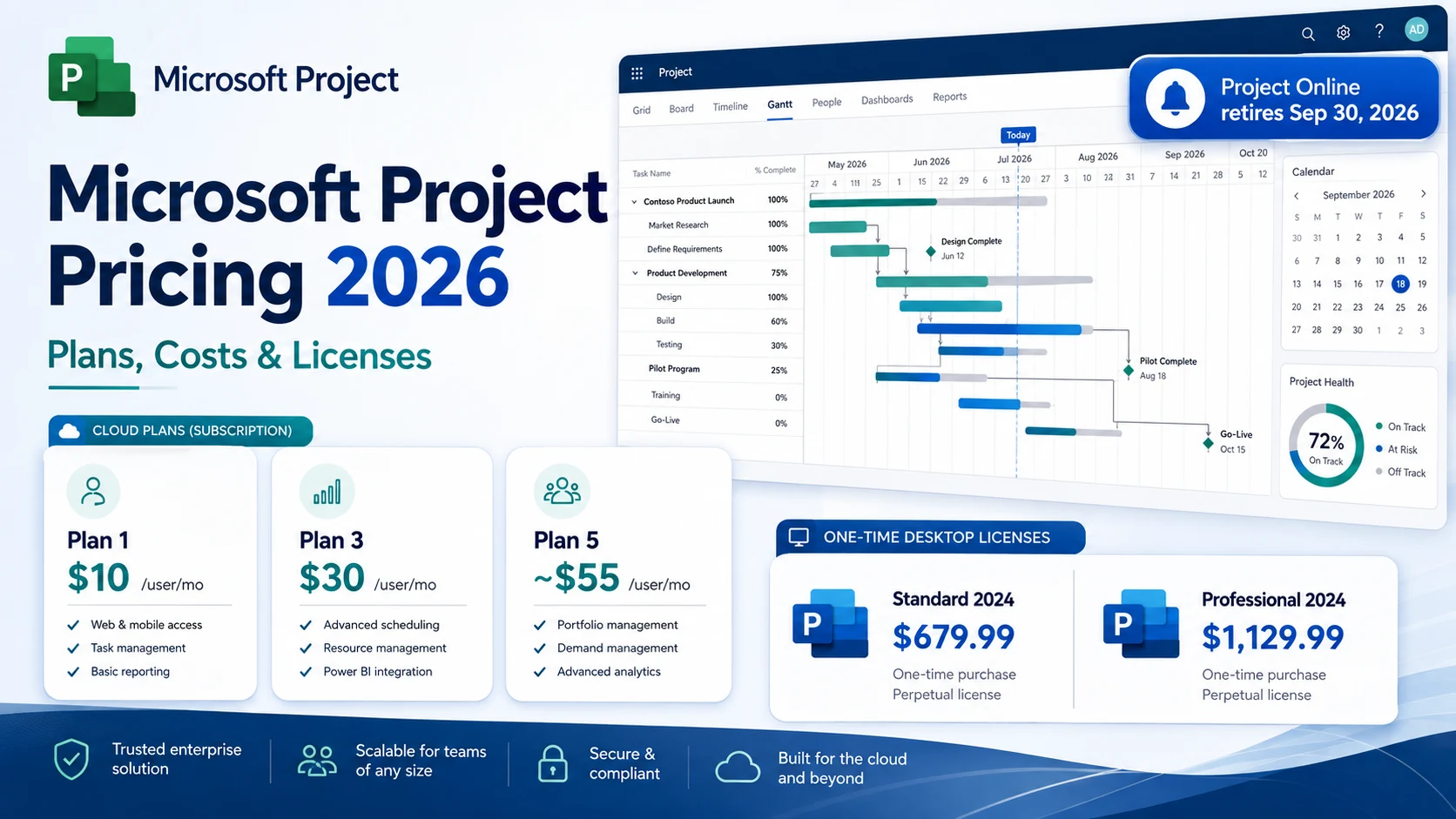
- Planner Plan 1, formerly Project Plan 1: $10 per user/month, paid yearly
- Planner and Project Plan 3: $30 per user/month, paid yearly
- Planner and Project Plan 5: about $55 per user/month, paid yearly for advanced portfolio and enterprise resource management capabilities
- Project Standard 2024: $679.99 one-time purchase for one user on one PC
- Project Professional 2024: $1,129.99 one-time purchase for one user on one PC
There is also one major 2026 caveat: Project Online retires on September 30, 2026. Microsoft’s current Planner and Project Plan 3 page still references Project Online and the Project desktop client, but Project Online itself is at the end of its lifecycle. The Project desktop application is not being retired.
That means a good 2026 pricing decision is no longer just “which Project Plan should we buy?” You need to decide whether you actually need Planner premium features, the Project desktop client, portfolio/resource management, or a one-time on-premises desktop license.
In this guide
- Current microsoft project cost in 2026
- What happened to Project Plan 1, Project Plan 3, and Project Plan 5
- microsoft project plan 3 cost and microsoft project plan 3 price
- How microsoft project plan pricing works now
- microsoft project software cost for subscription vs one-time purchase
- ms project prices for Standard 2024 and Professional 2024
- What a microsoft project plan license actually includes
- How to choose the right plan without overbuying
- How the September 2026 Project Online retirement changes the decision
Methodology and disclosure
This guide is based primarily on Microsoft’s current Planner, Project, Microsoft Store, and lifecycle documentation reviewed on August 31, 2026. Where Microsoft publishes a price, this article uses the published U.S. list price. Where a plan is sales-led or region-dependent, this guide says so instead of inventing a number.
For source checking, review Microsoft’s Planner and Project plan comparison, Planner and Project Plan 3 page, Microsoft Store pages for Project 2024, and Microsoft’s Project Online retirement guidance.
CostLoop publishes this article and competes broadly in software cost visibility, renewal tracking, and license management, but it is not a project-management replacement for Microsoft Project or Planner. CostLoop helps teams track recurring software costs, seat counts, owners, documents, and renewal dates across the stack.
For that broader workflow, see CostLoop’s guides to software license management, license tracking software, software license lifecycle management, and unused software seats.
Related CostLoop guides
- Project Management Subscription Tracker
- Best Subscription Tracker for Small and Medium Business
- Software License Inventory
- Best License Management Software
- Smartsheet Pricing 2026
- Jira Pricing 2026
- Asana Pricing 2026
- CostLoop Features
- CostLoop Pricing
Microsoft Project plans and pricing in 2026
The cleanest way to understand microsoft project plans and pricing today is to separate three buying models:
- Planner premium subscriptions for web and Teams-based project planning
- Planner and Project subscriptions that also include the classic Project desktop client
- One-time Project 2024 desktop licenses for customers that want an on-premises perpetual purchase
| Option | Current public price | Billing model | Best for |
|---|---|---|---|
| Planner Plan 1 | $10/user/month | Annual subscription | Structured project planning in web/Teams |
| Planner and Project Plan 3 | $30/user/month | Annual subscription | Advanced project management plus Project desktop |
| Planner and Project Plan 5 | About $55/user/month | Annual subscription | Enterprise portfolio/resource management |
| Project Standard 2024 | $679.99 | One-time purchase | One-user, one-PC desktop project management |
| Project Professional 2024 | $1,129.99 | One-time purchase | Advanced desktop project management and Project Server connectivity |
Regional prices, taxes, and enterprise agreements can change the final amount, so treat these as U.S. list prices rather than a universal global quote.
Planner Plan 1: the old Project Plan 1
Microsoft renamed Project Plan 1 to Planner Plan 1 in 2024. The current U.S. list price is $10 per user/month, paid yearly.
This is the lower-cost premium project-planning tier. It includes capabilities such as task dependencies, premium plan templates, reports, Timeline/Gantt view, backlogs and sprints, project goals, milestones, and custom task fields.
If you are searching old terms like microsoft project price plan or microsoft project plan pricing, this rename is important. A lot of older articles still call it Project Plan 1, but Microsoft now markets it under Planner.
Who should buy Planner Plan 1?
Planner Plan 1 is a good fit if you want richer project planning than the basic Planner included in Microsoft 365, need Gantt/timeline views and dependencies, and do not need the classic Project desktop application or advanced portfolio/resource features.
It is a bad fit if your only requirement is basic task boards already included in your Microsoft 365 plan.
Microsoft Project Plan 3 cost and price
This is the most important paid tier for traditional Microsoft Project buyers.
The current microsoft project plan 3 cost is $30 per user/month, paid yearly. The current microsoft project plan 3 price therefore equals $360 per licensed user per year before tax.
Microsoft now calls the product Planner and Project Plan 3. It includes everything in Planner Plan 1 plus more advanced project-management capabilities such as advanced dependencies with lead and lag, critical path and baselines, task history, resource request capabilities, program and demand management, scheduling and costing, and Project desktop.
Each subscription license allows up to five concurrent installations of the Project desktop client for that licensed user.
What is the microsoft project plan license cost for Plan 3?
- For one user: $30/month equivalent, $360/year
- For five users: $150/month equivalent, $1,800/year
- For ten users: $300/month equivalent, $3,600/year
This makes the microsoft project plan license cost easy to model when your team size is known.
Planner and Project Plan 5
Planner and Project Plan 5 is the highest subscription tier associated with the traditional Project family. Microsoft’s current public comparison page foregrounds Plan 1 and Plan 3, while Microsoft support guidance still references Plan 5 at about $55 per user/month, paid yearly. Treat that figure as a planning reference and verify it in your tenant or Microsoft quote before purchase.
Plan 5 is aimed at organizations that need capabilities beyond normal project scheduling, especially advanced portfolio management, enterprise resource management, allocation, and portfolio-level control.
A 10-user deployment at $55 per user/month is roughly $550/month or $6,600/year before tax. That is why you should not put every project manager on Plan 5 just because it is the top plan.
Microsoft Project software cost: subscription vs one-time purchase
The phrase microsoft project software cost can refer to two completely different things.
Subscription route
- Planner Plan 1: $10/user/month
- Planner and Project Plan 3: $30/user/month
- Planner and Project Plan 5: about $55/user/month
This is usually better if you need cloud collaboration, Planner integration, or the Project desktop client as part of an ongoing Microsoft 365 licensing model.
One-time purchase route
Microsoft still sells standalone desktop versions: Project Standard 2024 at $679.99 one-time and Project Professional 2024 at $1,129.99 one-time. Both are licensed for one user on one PC.
The one-time route can make sense for a user who wants the classic desktop experience and does not need the broader subscription model.
MS Project prices: Standard 2024 vs Professional 2024
If your search is ms project prices, the current standalone prices are straightforward.
Project Standard 2024
$679.99 one-time purchase. Best for single-user desktop project planning, scheduling and timelines, and organizations that do not need advanced collaboration or Project Server connectivity.
Project Professional 2024
$1,129.99 one-time purchase. Professional includes everything in Standard plus capabilities such as more comprehensive resource management, timesheets, and Project Server Subscription Edition connectivity.
Microsoft project management software cost by team size
| Scenario | Monthly equivalent | Annual cost |
|---|---|---|
| 3 users on Planner Plan 1 | $30/month | $360/year |
| 5 users on Planner and Project Plan 3 | $150/month | $1,800/year |
| 10 users on Planner and Project Plan 3 | $300/month | $3,600/year |
| 10 users on Planner and Project Plan 5 | $550/month | $6,600/year |
Mixed-license example
Suppose you have 2 senior PMs on Plan 5, 3 project managers on Plan 3, and 10 team leads on Planner Plan 1. The estimated annual cost is $1,320 plus $1,080 plus $1,200, for a total of $3,600/year.
Putting all 15 users on Plan 5 would cost $9,900/year. The role-based approach saves about $6,300/year in this example.
That is the basic principle behind good license management: match the license to the job instead of buying the highest tier for everyone.
Microsoft project management software price: what actually drives the total
- License mix. Planner Plan 1, Plan 3, and Plan 5 are not interchangeable. The right mix matters more than choosing one plan for the whole company.
- Microsoft 365 already in place. Basic Planner capabilities are included in many Microsoft 365 enterprise plans. If users only need basic task management, you may already be paying for enough capability.
- Need for Project desktop. If someone specifically needs the classic .mpp desktop application, Plan 3 or Plan 5 is the relevant subscription route, or you can consider a one-time Project 2024 desktop license.
- Portfolio/resource management. Plan 5 is where cost rises for enterprise portfolio requirements.
- Project Online migration work. If your organization still depends on Project Online, migration planning, data export, process redesign, and replacement tooling can all become part of the real total cost.
Project Online retires September 30, 2026
This is the most important timing issue in the entire article.
Microsoft’s official lifecycle documentation lists September 30, 2026 as the retirement date for Project Online. Microsoft has also stated that Project Online-only SKUs stopped being sold to new customers on October 1, 2025, creation of new Project Web App sites was blocked starting April 1, 2026, existing Project Online environments continue until September 30, 2026, Project desktop is not being retired, and Planner is one recommended transition direction.
Why this matters for microsoft project plan pricing
Microsoft’s current Plan 3 page still references Project Online as included functionality, but Project Online itself is days away from retirement at the time this article was verified.
Do not buy Plan 3 in 2026 because you think you are starting a new long-term Project Online deployment. Buy it for the capabilities that remain relevant: premium Planner, advanced project management, and Project desktop.
If you currently use Project Online
Do not wait until renewal day. You should already be planning where your Project Online data and workflows will go. Microsoft points customers toward options including Planner premium capabilities, Project Server Subscription Edition, Dynamics 365 Project Operations, and Project desktop for appropriate standalone workflows.
Microsoft Project plan license: who actually needs one?
A microsoft project plan license should be assigned based on what a person actually does.
- Basic contributors: If a user mainly views or updates tasks and your organization already has Microsoft 365, check whether included Planner capabilities are enough.
- Structured project planners: Planner Plan 1 makes sense when the user needs premium planning features like dependencies, timelines, milestones, and richer planning views.
- Project managers using desktop Project: Planner and Project Plan 3 is the obvious subscription route when the user needs the classic Project desktop client and advanced scheduling/costing.
- Portfolio/resource managers: Plan 5 is for people who genuinely need enterprise-level portfolio and resource-management capabilities.
Microsoft project plan pricing vs standalone desktop pricing
If you are deciding between a subscription and one-time purchase, compare the simple break-even period.
Project Standard 2024 vs Planner Plan 1: Standard 2024 is $679.99 once, while Planner Plan 1 is $120/year. After roughly 5.7 years, cumulative Plan 1 subscription fees would exceed the one-time Standard 2024 purchase price, ignoring upgrades, inflation, and differences in functionality.
Project Professional 2024 vs Plan 3: Professional 2024 is $1,129.99 once, while Plan 3 is $360/year. The simple price break-even is a little over 3 years.
These are not apples-to-apples feature comparisons. Planner subscriptions are cloud-oriented and collaborative. Project 2024 is a desktop product.
Common Microsoft Project pricing mistakes
- Buying Plan 3 because the old name says “Project” when Planner Plan 1 may be enough.
- Buying Plan 5 for every PM when enterprise portfolio capability is not required by every project manager.
- Ignoring Microsoft 365 entitlements that may already cover basic task management.
- Forgetting one-time desktop options for isolated desktop-only users.
- Treating Project Online as a future platform even though it retires September 30, 2026.
How to control Microsoft Project license costs
If you want to reduce microsoft project cost, do this before renewal:
- Export the list of paid Project/Planner licenses.
- Classify each user by real job need.
- Separate desktop Project users from web-only users.
- Identify people on Plan 3 or 5 who could move down.
- Remove former employees and inactive users.
- Check whether Microsoft 365 already covers basic Planner needs.
- Review one-time Project 2024 licenses where cloud collaboration is unnecessary.
- Document the renewal date and owner for the contract.
CostLoop’s license tracking software guide and software license inventory guide show how to structure that review across the rest of your software stack too.
How CostLoop fits
CostLoop does not replace Microsoft Project, Planner, or Project desktop.
What it does help with is the commercial control layer around them:
- store the plan and license type
- record the per-user or annual cost
- track paid seat counts
- assign an owner
- store contract/invoice links
- track renewal dates
- review unused or oversized licenses before the next charge
That is especially useful if Microsoft Project is only one part of a project-management stack that also includes tools such as Jira, Asana, Monday.com, Smartsheet, Notion, or ClickUp.
See CostLoop’s Project Management Subscription Tracker, or review CostLoop features and pricing for the product itself.
Frequently asked questions
What is Microsoft Project cost in 2026?
The current microsoft project cost depends on the product. Planner Plan 1 is $10/user/month, Planner and Project Plan 3 is $30, Plan 5 is about $55, Project Standard 2024 is $679.99 once, and Project Professional 2024 is $1,129.99 once.
What is Microsoft Project software cost for one user?
The microsoft project software cost ranges from $10/month for Planner Plan 1 to $30/month for Plan 3 or about $55/month for Plan 5. One-time desktop options are $679.99 for Standard 2024 and $1,129.99 for Professional 2024.
What is MS Project cost?
If you search ms project cost, the modern answer depends on whether you want Planner premium, Project desktop through Plan 3/5, or a one-time Project 2024 desktop license.
What are current MS Project prices?
Current ms project prices include $10/user/month for Planner Plan 1, $30/user/month for Planner and Project Plan 3, about $55/user/month for Plan 5, $679.99 for Project Standard 2024, and $1,129.99 for Project Professional 2024.
What is MS Project software cost for a perpetual license?
The current ms project software cost for one-time desktop licensing is $679.99 for Project Standard 2024 or $1,129.99 for Project Professional 2024.
What is Microsoft Project management price for Plan 3?
The current microsoft project management price for Planner and Project Plan 3 is $30 per user/month, paid yearly.
What is Microsoft Project Plan 3 cost?
The microsoft project plan 3 cost is $30/user/month, paid yearly, or $360 per licensed user each year.
What is Microsoft Project Plan 3 price for five users?
The microsoft project plan 3 price for five users is about $150/month equivalent or $1,800/year before tax.
What is a Microsoft Project Plan license?
A microsoft project plan license is a per-user subscription entitlement. Planner Plan 1 covers premium Planner planning features, while Plan 3 and Plan 5 add more advanced Project capabilities.
What is Microsoft Project Plan license cost?
The microsoft project plan license cost starts at $10/user/month for Planner Plan 1, $30/user/month for Plan 3, and about $55/user/month for Plan 5.
Is Microsoft Project Online still available?
Only temporarily for existing customers. Project Online officially retires on September 30, 2026. Project desktop, Planner, and Project Server Subscription Edition are not part of that retirement.
Final verdict
The Microsoft Project pricing landscape in 2026 is confusing mainly because the product names changed while old search terms stayed alive.
The practical buying map is simple: use Planner in Microsoft 365 if basic included task management is enough, use Planner Plan 1 at $10/user/month for premium web-based project planning, use Planner and Project Plan 3 at $30/user/month when you need advanced scheduling and Project desktop, use Plan 5 only when enterprise portfolio/resource-management capability is genuinely required, and consider Project Standard 2024 or Professional 2024 if a one-time desktop license fits better.
Do not build a new strategy around Project Online. It retires September 30, 2026.
The cheapest plan is not automatically the best value. The right answer is the lowest-cost license that actually matches each user’s job.