Last verified: July 24, 2026
Quick answer
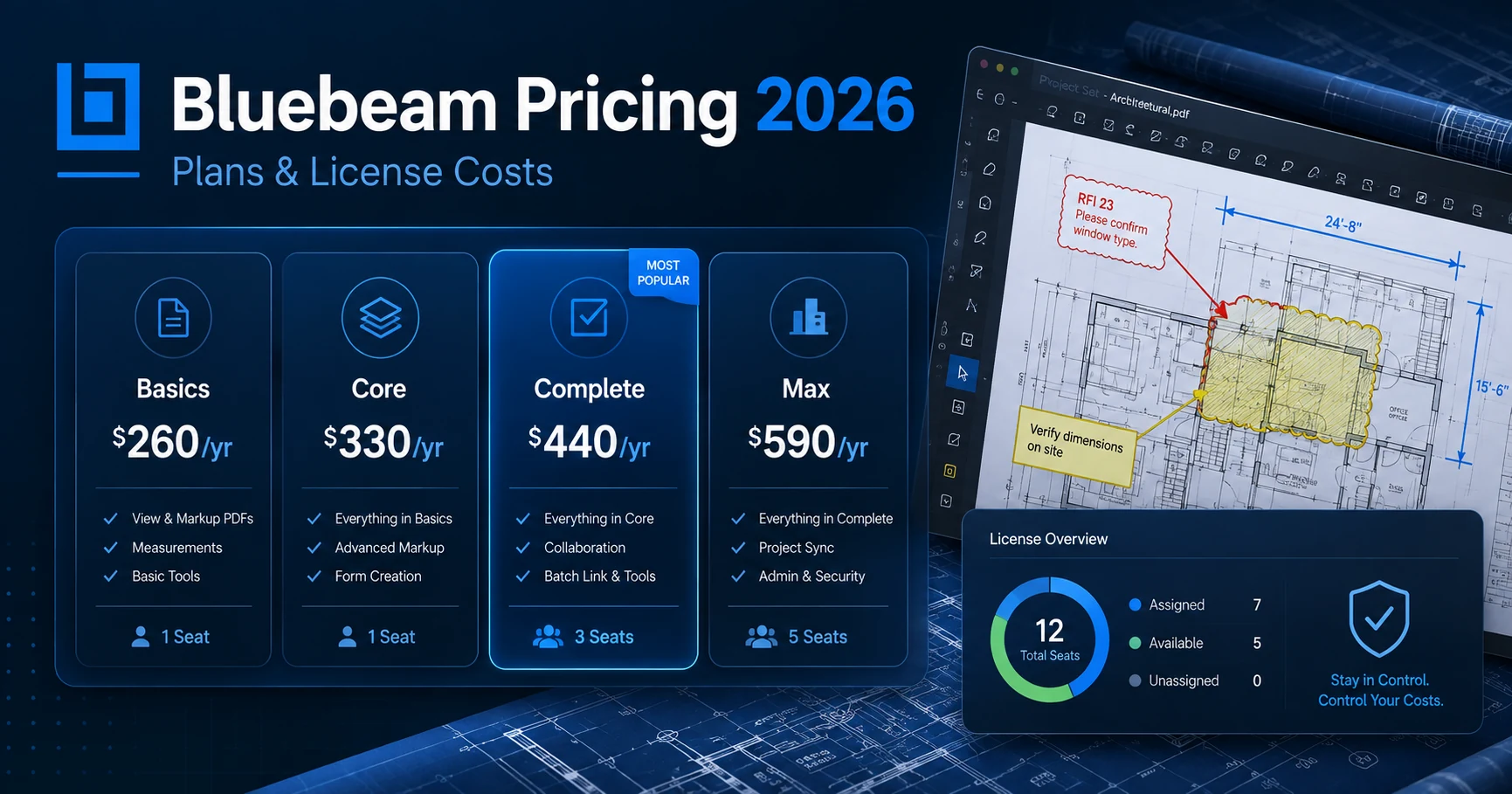
If you are researching bluebeam cost, the current US list prices are straightforward:
| Bluebeam plan | Price per user | Monthly equivalent | Best fit |
|---|---|---|---|
| Basics | $260/year | $21.67/month | Simple PDF markups and document management |
| Core | $330/year | $27.50/month | Professional markups, measurements and Studio collaboration |
| Complete | $440/year | $36.67/month | Advanced takeoffs, reporting and workflow automation |
| Max | $590/year introductory price | $49.17/month | AI-assisted drawing review and advanced AEC workflows |
All four plans are billed annually. Bluebeam says every plan includes Revu for Windows plus Bluebeam on web and mobile, technical support, Bluebeam University training, and unlimited secure centralized storage. Organizations can also mix and match plans for different users instead of buying the same tier for everyone.
That last point is the biggest practical lever for lowering Bluebeam cost. A project manager who needs Core does not automatically need Complete or Max, and a stakeholder who only needs basic markup capability should not be carrying an expensive top-tier seat.
Key takeaways
- Bluebeam Basics costs $260 per user/year.
- Bluebeam Core costs $330 per user/year.
- Bluebeam Complete costs $440 per user/year.
- Bluebeam Max currently costs $590 per user/year at an introductory price.
- Bluebeam says Max buyers who purchase at the introductory price lock that price through their renewal in 2027; later renewals will use a future standard list price.
- Bluebeam allows organizations to mix and match subscription plans by user.
- All organizations with more than two Bluebeam licenses can use Org Admin to allocate seats, change packages and manage users.
- The easiest way to reduce Bluebeam spend is to match each user’s actual workflow to Basics, Core, Complete or Max before renewal.
How this guide was researched
This guide was checked against Bluebeam’s current US pricing page and current Bluebeam Technical Support documentation in August 2026. Pricing can vary by country, currency, tax treatment, negotiated agreement, reseller terms or future product changes, so verify the final quote before purchasing.
CostLoop publishes this guide. CostLoop is not a replacement for Bluebeam. Bluebeam is construction and AEC software for PDF markup, takeoffs, collaboration and drawing workflows. CostLoop helps businesses track the commercial side of software subscriptions: costs, seats, owners, documents and renewal dates.
For broader license-control guidance, see CostLoop’s software license management guide, license tracking software guide, software license inventory guide, and software license lifecycle management guide.
Related CostLoop resources
- Aconex Pricing 2026
- Document Management Software Pricing 2026
- Unused Software Licenses: Find and Reclaim Wasted Seats
- SaaS License Management: How to Track Licenses and Stop Overpaying
- Cloud-Based Software License Management
- 12 Best License Management Software Tools in 2026
- CostLoop Features
- CostLoop Pricing
Bluebeam pricing plans in 2026
Bluebeam currently sells four subscription tiers: Basics, Core, Complete and Max. The plans are annual subscriptions priced per user.
Bluebeam Basics: $260 per user/year
Basics is Bluebeam’s entry-level paid plan. It is aimed at users who need straightforward PDF markup and document management without the more advanced measurement and collaboration capabilities in the higher tiers.
Current list price:
- $260 per user/year
- equivalent to about $21.67 per user/month when spread across 12 months
Bluebeam lists these core capabilities for Basics:
- PDF creation, viewing, editing and markups
- length and area measurements
- participation in Studio collaborations
Bluebeam also makes the limitations clear. Basics does not include perimeter or more advanced measurement tools, and Basics users cannot host or manage Studio collaboration in the same way higher-tier users can.
Bluebeam Core: $330 per user/year
Core is the plan many professional AEC users will find more practical because it adds richer measurement, collaboration and CAD-oriented workflows.
Current list price:
- $330 per user/year
- equivalent to $27.50 per user/month
Core includes everything in Basics, plus capabilities such as:
- specialty markup tools for 2D and 3D PDFs
- perimeter, count, angle and volume measurements
- drawing overlay and comparison
- the ability to host and manage Studio collaborations
- CAD plug-ins and workflows
The price difference between Basics and Core is $70 per user/year. For someone who regularly performs takeoffs, measurements or Studio coordination, that upgrade can be easy to justify. For someone who only marks up PDFs occasionally, it may be unnecessary.
Bluebeam Complete: $440 per user/year
Complete is the advanced productivity tier for users who need automation, faster quantity workflows and richer reporting.
Current list price:
- $440 per user/year
- equivalent to about $36.67 per user/month
Complete includes Core plus features such as:
- Dynamic Fill measurements and markups
- Quantity Link with Microsoft Excel
- advanced markup reporting
- Batch Link automation
- Batch Slip Sheet automation
- batch signatures and seals
- scripting commands for custom automation
The jump from Core to Complete is $110 per user/year. That is not huge for a high-usage estimator or document-control specialist, but it becomes real money when applied blindly to dozens of users.
Bluebeam Max: $590 per user/year introductory price
Max is Bluebeam’s highest current plan and focuses heavily on AI-assisted and advanced AEC workflows.
Current introductory price:
- $590 per user/year
- equivalent to about $49.17 per user/month
Bluebeam currently lists capabilities including:
- AI integration via MCP
- AI drawing reviews
- AI drawing comparisons
- AI multi-view Stitching
- Magic Markups features such as Duplicate as, Convert to and Offset
- connected Studio Sessions with Revit
This price needs an important warning label. Bluebeam calls $590 an introductory price, not a permanent standard list price. According to Bluebeam, customers who buy Max at the introductory price keep that price through their 2027 renewal. Later renewals will use a future standard list price that Bluebeam has not yet published.
If you are creating a multi-year Bluebeam cost forecast, do not assume $590 stays fixed indefinitely.
Bluebeam cost comparison at a glance
| Plan | Annual cost/user | Difference vs previous tier | Monthly equivalent |
|---|---|---|---|
| Basics | $260 | - | $21.67 |
| Core | $330 | +$70/year | $27.50 |
| Complete | $440 | +$110/year | $36.67 |
| Max | $590 introductory | +$150/year | $49.17 |
The differences look small when viewed per person. They become meaningful across a team.
For example, upgrading 50 users from Core to Complete adds:
50 x $110 = $5,500 per year
Upgrading the same 50 users from Complete to Max at the current introductory price adds:
50 x $150 = $7,500 per year
That is why license assignment matters more than simply asking which plan has the most features.
Real Bluebeam cost examples
Example 1: three-person team on Core
- 3 Core seats x $330
- Annual cost: $990
- monthly equivalent: $82.50
Example 2: ten-person team on Complete
- 10 Complete seats x $440
- Annual cost: $4,400
- monthly equivalent: $366.67
Example 3: 25-person team on Core
- 25 Core seats x $330
- Annual cost: $8,250
- monthly equivalent: $687.50
Example 4: 25-person team on Max
- 25 Max seats x $590 introductory price
- Annual cost: $14,750
- monthly equivalent: $1,229.17
Compared with Core, that Max deployment adds $6,500 per year.
Example 5: mixed-license team
This is the more realistic model because Bluebeam explicitly allows organizations to mix and match plans.
Assume a 20-person company has:
- 6 Basics users
- 8 Core users
- 4 Complete users
- 2 Max users
Annual cost:
- 6 x $260 = $1,560
- 8 x $330 = $2,640
- 4 x $440 = $1,760
- 2 x $590 = $1,180
Total annual Bluebeam cost = $7,140
If the company lazily bought Complete for all 20 users, the annual cost would be:
20 x $440 = $8,800
The role-based mix saves $1,660 per year without removing Bluebeam from anyone who needs it.
That is the kind of optimization worth doing before renewal.
Which Bluebeam plan should each role get?
There is no perfect mapping because every company works differently, but the decision should be based on actual workflow rather than job title alone.
| User need | Likely starting plan | Why |
|---|---|---|
| Simple PDF review and markups | Basics | Avoids paying for advanced measurement and automation |
| Regular measurements and Studio collaboration | Core | Adds professional measurement and collaboration tools |
| Estimating, advanced reporting and batch workflows | Complete | Adds automation and quantity-focused capabilities |
| AI-assisted drawing review and advanced connected workflows | Max | Highest-tier AI and AEC functionality |
Use this as a starting point, not as a rigid rule.
A senior manager who only reviews PDFs may need less licensing than a junior estimator who works in Bluebeam all day. License by workflow, not hierarchy.
How to manage Bluebeam licenses
The second keyword in this article, manage Bluebeam licenses, is where the practical savings happen.
Bluebeam’s current subscription model uses account-based access rather than the old serial-number-and-product-key process. Bluebeam’s Org Admin documentation says admins can allocate subscription seats, add or deactivate users, change plans, and manage administration centrally.
Use Bluebeam Org Admin
Organizations with more than two Bluebeam licenses get access to Org Admin, according to Bluebeam’s current user-management documentation.
Org Admin can be used to:
- allocate Bluebeam subscription seats
- change subscription packages
- add or deactivate users
- manage other administrators
- manage eligible SSO and SCIM configuration
- filter and export user lists
- reallocate subscriptions
That is the right place to manage Bluebeam licenses operationally.
Reallocate seats instead of automatically buying more
Bluebeam’s documentation explicitly allows admins to change a user’s plan and free an assigned seat. If all seats in a subscription are already assigned, an admin can change an existing user’s access to an unpaid collaborator role to free a seat for somebody else.
Before purchasing another license, ask:
- Is there an inactive user who can be removed?
- Does an existing user need a lower plan?
- Can a seat be reallocated instead of increasing the contract?
This is basic license hygiene, but many teams skip it.
Mix plans instead of standardizing everyone on Complete or Max
Standardizing everyone on one Bluebeam tier is operationally simple, but financially lazy if their workflows are different.
Bluebeam explicitly says organizations can mix and match plans for users with different needs. Use that flexibility.
A practical quarterly review might look like:
- markups only -> Basics
- measurement / Studio owner -> Core
- advanced estimator / batch workflow user -> Complete
- heavy AI / advanced AEC workflow -> Max
- inactive or departed user -> remove or reallocate
Bluebeam Org Admin Pro
Bluebeam also offers Org Admin Pro, which is separate from a normal Revu subscription.
According to Bluebeam support documentation, Org Admin Pro adds organization-wide controls and reporting around access, Studio usage, Bluebeam on web and mobile, and Max AI features.
Bluebeam does not present a simple public Org Admin Pro price on the main Revu pricing page, so do not invent a number for it. If you need those capabilities, treat it as a separate sales or account-management conversation.
Is Bluebeam still a perpetual license?
For current buyers, think subscription, not one-time perpetual purchase.
Bluebeam’s subscription FAQ describes the current model as subscription-based access using a Bluebeam ID. One login can provide access to included Bluebeam solutions across supported devices.
This matters because old Bluebeam pricing articles may still reference historical perpetual Revu licensing. Those figures are stale for a new 2026 purchase decision.
For a current budget, use the Basics, Core, Complete and Max annual subscription prices shown above.
What every Bluebeam plan includes
Bluebeam’s pricing page says all four current plans include:
- Bluebeam Revu for Windows desktop
- Bluebeam on web and mobile
- phone and email technical support
- Bluebeam University training
- unlimited secure centralized storage
Bluebeam’s subscription FAQ also says a subscription can be accessed on up to five devices using a single login.
That does not mean one paid user seat should be shared among multiple employees. It means the licensed user can work across supported devices using their own Bluebeam ID.
Hidden Bluebeam costs to think about
The public plan price is only the first line in a real total-cost discussion.
1. Buying too high a plan for low-usage users
This is the easiest waste to fix.
A Basics user costs $260/year. A Complete user costs $440/year. That $180 difference becomes $9,000 per year across 50 users.
2. Keeping departed employees assigned
When someone leaves, reclaim the seat instead of waiting for the annual renewal. CostLoop’s guide to unused software seats explains the broader offboarding problem.
3. Treating the Max introductory price as permanent
Do not build a five-year forecast around $590 unless Bluebeam later confirms that price. Bluebeam has explicitly described it as introductory.
4. Buying new seats before checking available capacity
Use Org Admin to check seat allocation first. Reallocation can be cheaper than expansion.
5. Ignoring the renewal date
Annual billing makes renewal planning important. If nobody reviews the license mix before renewal, the company can lock in another year of avoidable spend.
CostLoop’s software license lifecycle management guide covers how to put that review into a repeatable process.
Bluebeam cost optimization checklist
Run this before every Bluebeam renewal:
- Export the current user list from Org Admin.
- Remove departed employees and unused accounts.
- Check which users are on Basics, Core, Complete and Max.
- Ask whether each user still needs their current tier.
- Downgrade people whose workflows no longer require advanced features.
- Reallocate unused seats before buying additional licenses.
- Separate temporary project needs from permanent seat requirements.
- Confirm whether Max’s current introductory pricing still applies.
- Record the renewal date, owner and annual commitment.
- Document the final seat decision so next year’s review starts from reliable data.
For a broader operating model, pair this with CostLoop’s software license inventory and license tracking software guides.
How CostLoop fits with Bluebeam
CostLoop does not replace Bluebeam or Bluebeam Org Admin.
Bluebeam Org Admin is where you manage Bluebeam-specific users, plans and seat access. CostLoop is where a small or growing business can track Bluebeam alongside the rest of its recurring software stack.
For Bluebeam, a CostLoop record can help you keep track of:
- total annual cost
- seat count
- plan mix
- internal owner
- next renewal date
- contract or invoice links
- related cancellation or account-management information
The distinction is simple:
Use Bluebeam Org Admin to administer Bluebeam. Use CostLoop to keep Bluebeam visible as part of your overall software spend and renewal calendar.
See CostLoop features or CostLoop pricing for the current product scope.
Frequently asked questions
What is Bluebeam cost in 2026?
Current US Bluebeam cost is $260/user/year for Basics, $330/user/year for Core, $440/user/year for Complete, and $590/user/year at the current introductory price for Max. Bluebeam bills these plans annually.
How much does Bluebeam cost per month?
Bluebeam is billed annually, but the monthly equivalents are approximately $21.67 for Basics, $27.50 for Core, $36.67 for Complete and $49.17 for Max at its current introductory price.
What is the cheapest Bluebeam plan?
Basics is the cheapest current paid Bluebeam subscription at $260 per user/year.
What is the difference between Bluebeam Core and Complete?
Core focuses on professional-grade markups, measurements, drawing comparison and Studio collaboration. Complete adds advanced tools such as Dynamic Fill, Quantity Link, advanced markup reporting and several batch automation capabilities.
What is Bluebeam Max?
Bluebeam Max is the highest current plan. It adds AI-assisted drawing-review and advanced AEC workflow capabilities on top of Complete. Its current $590/user/year price is introductory.
How do I manage Bluebeam licenses?
To manage Bluebeam licenses, use Bluebeam Org Admin. Admins can assign seats, change plan access, add or deactivate users, reallocate subscriptions and manage organization-level account access.
Can I mix Bluebeam plans across my team?
Yes. Bluebeam’s pricing page explicitly says organizations can mix and match plans for users with different needs. This is one of the best ways to control total Bluebeam spend.
Can I reassign a Bluebeam license?
Bluebeam Org Admin supports changing subscription access and reallocating seats. If a paid seat is tied to someone who no longer needs it, review whether it can be freed or reassigned before buying more capacity.
Is Bluebeam sold as a perpetual license in 2026?
Current Bluebeam buying is subscription-based. Old perpetual-license pricing found in older articles should not be used as the basis for a new 2026 purchase decision.
Is Bluebeam Max always $590 per year?
No guarantee has been published for long-term pricing. Bluebeam currently calls $590/user/year an introductory price and says buyers at that price keep it through their 2027 renewal. A later standard list price will be announced in the future.
Final verdict
If you want the simple answer, Bluebeam cost ranges from $260 to $590 per user/year across the four current plans.
But the smarter buying question is not “Which Bluebeam plan is best?”
It is:
Which users actually need which Bluebeam plan?
For a small team, the difference may be a few hundred dollars per year. For a 50- or 100-person AEC organization, poor tier assignment can waste thousands.
Buy the capability each person needs, use Org Admin to manage Bluebeam licenses actively, reclaim seats when roles change, and review the full plan mix before every annual renewal.
CostLoop helps teams track recurring software costs, owners, seats, renewal dates, and related documents with a software subscription tracker. See the CostLoop pricing plans.

About the author
Milosh Mladenovski is a CostLoop founder and works on subscription discovery, license inventory and recurring software cost workflows. Author profile · LinkedIn